
Teleprompter for Streamlabs — Voice-Tracked AI Across Both Streamlabs Desktop and Talk Studio
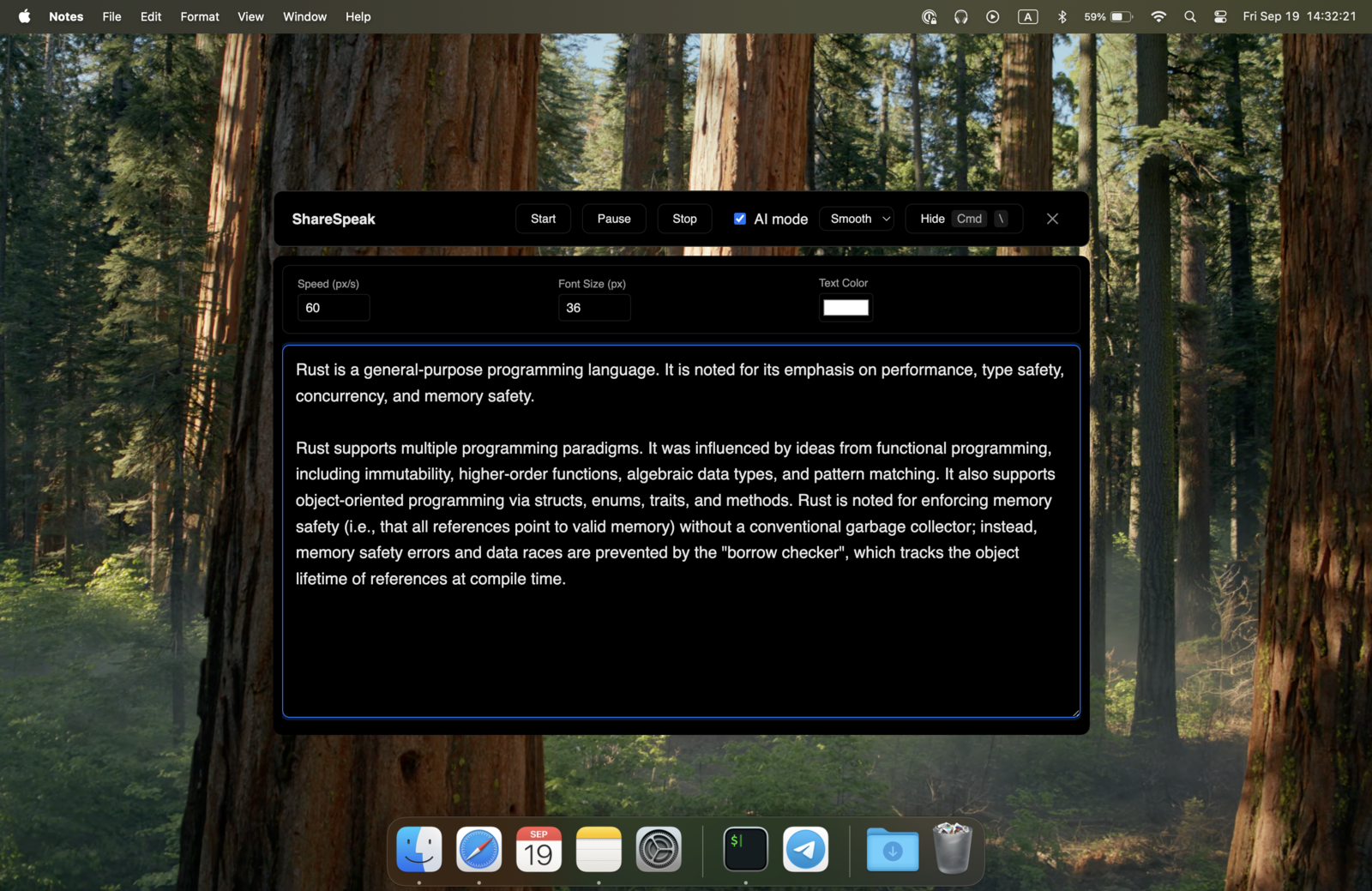
Streamlabs ships two streaming products: Streamlabs Desktop (the OBS fork with their UI and integrations) and Streamlabs Talk Studio (the browser-based streaming tool). Neither has a real voice-tracked AI teleprompter — Desktop relies on the same plugin workarounds OBS does; Talk Studio's prompter is a fixed-speed text panel inside the browser. ShareSpeak runs as a native desktop overlay invisible to both, voice-tracked at your pace. $14.99 once.
Why "Does Streamlabs Have a Teleprompter?" Is a Frustrating Question
Streamlabs is actually two different products built around streaming, with very different teleprompter situations:
Streamlabs Desktop — the OBS Studio fork with Streamlabs' UI, alerts, and Logitech integrations. Like OBS, it doesn't have a native teleprompter. The community workarounds are the same:
- Browser Source pointed at a web teleprompter — works but becomes part of your scene; hide it from output and you can't see it either.
- Text source with auto-scroll plugin — fixed-speed scroll, no voice tracking, breaks on updates.
- Third-party plugins (when they exist) — version-locked, configuration-heavy.
- Notes on a second monitor — visible eye-darts viewers notice.
Streamlabs Talk Studio — the browser-based streaming product (their answer to StreamYard and Restream Studio). Talk Studio ships a built-in teleprompter feature, which is a step forward. But it carries the limits of any browser-based panel: fixed-speed scrolling, character cap per session, lives inside the browser tab, no AI voice tracking, restricted to host-tier accounts.
ShareSpeak is a native desktop overlay that sits on top of both Streamlabs products. Voice-tracked AI follows your speech, the script lives outside any browser tab or OBS scene, OS-level invisibility keeps it out of every recording and stream output. Same overlay, both Streamlabs products, $14.99 once.
Built to Complement Both Streamlabs Products
Native Overlay, Not a Streamlabs Plugin or Source
ShareSpeak doesn't live inside Streamlabs Desktop or Streamlabs Talk Studio. It's not a scene source, not a Browser Source, not a plugin, not a panel inside the Talk Studio browser tab. It's a standalone desktop application that runs alongside whichever Streamlabs product you're using.
Why this matters:
- No plugin installation in Streamlabs Desktop — your Streamlabs install stays untouched
- No browser panel in Talk Studio — your script doesn't compete with video feeds for screen real estate
- No version compatibility risk — Streamlabs ships updates, ShareSpeak keeps working
- No scene cleanup or hide/show — overlay lives on you, not on Streamlabs scenes
- Same approach works in OBS, StreamYard, Restream, vMix — one tool across your whole streaming workflow
AI Voice Tracking — The Feature No Streamlabs Solution Has
Every Streamlabs teleprompter option — Talk Studio's built-in panel, Desktop's plugin workarounds, browser sources — uses fixed-speed scrolling. You set a speed before going live and have to match it for the duration. For a 4-hour Twitch stream or a 90-minute live podcast, that breaks down within 15 minutes.
ShareSpeak follows your voice with AI speech recognition. No remote, no scroll wheel, no producer needed:
- Reading chat between scripted segments? Pause — the prompter waits.
- Game commentary speeds up during action? Talk fast — the text keeps up.
- Sponsor read at brand-approved cadence? Read at your pace — the script matches.
- 4-hour subathon? Voice tracking holds the entire stream.
One Overlay Across Both Streamlabs Desktop and Talk Studio
Streamlabs Desktop and Talk Studio are different products with different teleprompter limitations. Switching between them — for example, using Desktop for solo gameplay streams and Talk Studio for guest interviews — usually means switching teleprompter approaches too.
ShareSpeak runs identically in both. The script lives on your desktop screen — invisible to Streamlabs Desktop's display capture, invisible to Talk Studio's browser-based capture. Switch between Streamlabs products mid-week and your teleprompter workflow stays exactly the same.
Unlimited Script Size for Long-Form Streams
Browser-based teleprompters typically cap your script. Talk Studio's panel has the same kind of limit; Desktop's text-source workarounds have practical limits. For real long-form streaming sessions:
- 3-hour Twitch session prep: 20,000–40,000 characters
- 90-minute interview show: 15,000–30,000 characters
- Multi-segment live podcast with sponsor reads: 10,000–25,000 characters
- Educational livestream covering a full topic: 15,000–35,000 characters
ShareSpeak has no character limit. Paste 50,000 characters of session prep if you need it. Voice tracking advances naturally — no scene-switching gymnastics, no character splitting across panels.
Works Across All Your Streamlabs Scenes
Streamlabs streamers build complex layouts: starting soon, intro, just chatting, gameplay, BRB, ending soon, sponsor break. Whatever Streamlabs scene is currently active, your script stays visible to you and invisible to your stream output. No per-scene teleprompter configuration. Scene transitions, hotkey-driven switching, advanced scene switcher automation — all keep working normally without disrupting your script.
Same applies in Talk Studio: switching between virtual studio scenes, guest layouts, screen sharing modes — your overlay stays put.
Works Beyond Streamlabs — Across Your Entire Streaming Stack
Most streamers don't stay in one tool. Tuesday Streamlabs Desktop for the main Twitch stream. Wednesday Talk Studio for a guest podcast. Thursday OBS for a backup setup. Friday StreamYard or Restream for a multi-destination promotional stream.
ShareSpeak runs across all of them with the same OS-level invisibility:
- Streamlabs Desktop & Talk Studio — primary use case
- OBS Studio — same OS-level invisibility
- Twitch Studio — works the same way
- StreamYard, Restream — browser-based competitors
- Ecamm Live (Mac) — invisible to all Ecamm captures
- vMix (Windows pro broadcasting) — same overlay behavior
- Zoom, Teams, Meet — for non-stream calls
- Loom — for async recordings
One $14.99 license. Every streaming and meeting tool you use across your career.
For Every Type of Streamlabs Streamer
Twitch Streamers on Streamlabs Desktop
Variety streamers, Just Chatting, IRL content. Talking points stay on screen across 4-hour sessions without plugin debugging.
Talk Studio Podcasters & Interviewers
Browser-based live interviews where Talk Studio's built-in teleprompter feels limited. Unlimited script, voice tracking, works for guests too.
VTubers Using Streamlabs Desktop
Live2D or VRoid avatar streams via Streamlabs Desktop. Avatar on stream; script on your screen — invisible to capture.
Educational Live Streamers
Live coding streams, lectures, tutorial broadcasts via Streamlabs. Lesson plans, code examples, learning objectives on screen for every session.
Multi-Guest Talk Studio Shows
Panel discussions, interview podcasts, roundtables on Talk Studio. Every speaker prepared with their own script — host + guests run their own ShareSpeak licenses.
Multi-Tool Streamers
Creators using Streamlabs Desktop for gaming + Talk Studio for interviews + OBS as backup. One teleprompter overlay across all of them.
The Honest Math
Streamlabs Desktop is free. Streamlabs Talk Studio's basic teleprompter is included in paid plans. Why pay $14.99 for a separate tool?
Streamlabs built-in solutions win when:
You're a casual streamer doing short single-scene broadcasts under 1,500 words. Solo, no guests. Only stream through Streamlabs.
ShareSpeak wins when:
You stream 4-hour Twitch sessions, host multi-guest podcasts on Talk Studio, debug Streamlabs Desktop plugin compatibility on every update, run sponsor reads with brand-specified cadence, or use Streamlabs alongside OBS/StreamYard/Restream.
For comparison: StreamYard Core at $44.99/month includes their teleprompter. VODIUM at $15/month. ShareSpeak's $14.99 lifetime is the cheapest voice-tracked teleprompter option that works specifically with Streamlabs products.
Native on Mac and Windows — Wherever Streamlabs Runs
Streamlabs Desktop supports Mac and Windows. Talk Studio runs in any modern browser. ShareSpeak runs native on Mac and Windows — covering both Streamlabs platforms. Streaming from a PC? See how each teleprompter app for Windows compares.
$14.99 per streamer. Same license works across both Streamlabs products plus every other streaming tool you'll touch.
One Teleprompter Across All of Streamlabs (And Everything Else)
Download ShareSpeak before your next stream. Voice-tracked AI, unlimited script size, works in Streamlabs Desktop AND Talk Studio AND every other tool. $14.99 once — cheaper than a single month of any streaming subscription.
Use code FIRST100 for 25% off — $11.24 instead of $14.99
Frequently Asked Questions from Streamlabs Streamers
Does Streamlabs have a built-in teleprompter?
Streamlabs Talk Studio (the browser-based product) ships a built-in teleprompter feature. Streamlabs Desktop (the OBS fork) does not — it relies on the same plugin and Browser Source workarounds that OBS uses. ShareSpeak works as a native overlay on top of both, voice-tracked and OS-level invisible.
Will ShareSpeak appear in my Streamlabs stream output?
No. ShareSpeak is invisible at the OS level. Streamlabs Desktop's display capture, window capture, and game capture all skip it. Streamlabs Talk Studio's browser-based capture also skips it. Your stream output to Twitch, YouTube, Kick, or any RTMP destination contains only what was legitimately captured.
Is this a Streamlabs plugin?
No. ShareSpeak is a completely separate desktop application — no plugin install, no Streamlabs configuration changes, no scene sources to add or hide. It runs alongside Streamlabs Desktop or Talk Studio. When Streamlabs ships updates (which they do frequently with Logitech behind them), ShareSpeak keeps working because it isn't tied to Streamlabs at all.
Does it conflict with Streamlabs alerts, widgets, or chatbot?
No. Streamlabs alerts, chatbot, widgets, donation notifications, follower alerts — all process stream events or display browser-source content within Streamlabs. ShareSpeak is on your screen, not in your stream output, and doesn't touch any Streamlabs services. They coexist fine.
Does it work with Streamlabs game audio capture?
Yes — they don't interact. ShareSpeak listens only to your microphone for voice tracking. Streamlabs captures game audio separately for streaming. Your game audio, alerts, and music never trigger ShareSpeak; only your spoken voice does.
Compatible with VTuber setups (Live2D, VRoid) inside Streamlabs?
Yes. VTubers using Streamlabs Desktop with a Live2D, VRoid Studio, VTube Studio, or Veadotube avatar — ShareSpeak runs separately on your screen. The avatar shows in your stream output; the teleprompter is on your monitor for you only. Voice tracking still works through your microphone independent of the avatar's voice mapping.
Can my Talk Studio guests use ShareSpeak too?
Yes. Each person buys their own license — $14.99 each — and runs ShareSpeak on their own laptop during the Talk Studio call. Each guest's script overlay is invisible to the stream and to other participants. A panel discussion can have every speaker prepared with their own talking points.
Does it work with Streamlabs Ultra subscription features?
ShareSpeak works regardless of your Streamlabs plan. Free Streamlabs Desktop, Streamlabs Ultra, Talk Studio Free, or Talk Studio paid tiers — ShareSpeak runs alongside any of them. Your Streamlabs subscription state has zero impact on whether ShareSpeak works.
Real Voice-Tracked Teleprompter for Streamlabs — Desktop and Talk Studio
Voice-tracked AI. Native overlay. Invisible to capture. Works across both Streamlabs products and every other streaming tool. $14.99. Forever.
Get ShareSpeak — $14.99