
Teleprompter for Loom — Voice-Tracked, Per-Prospect Scripts, Works Beyond Loom Recordings
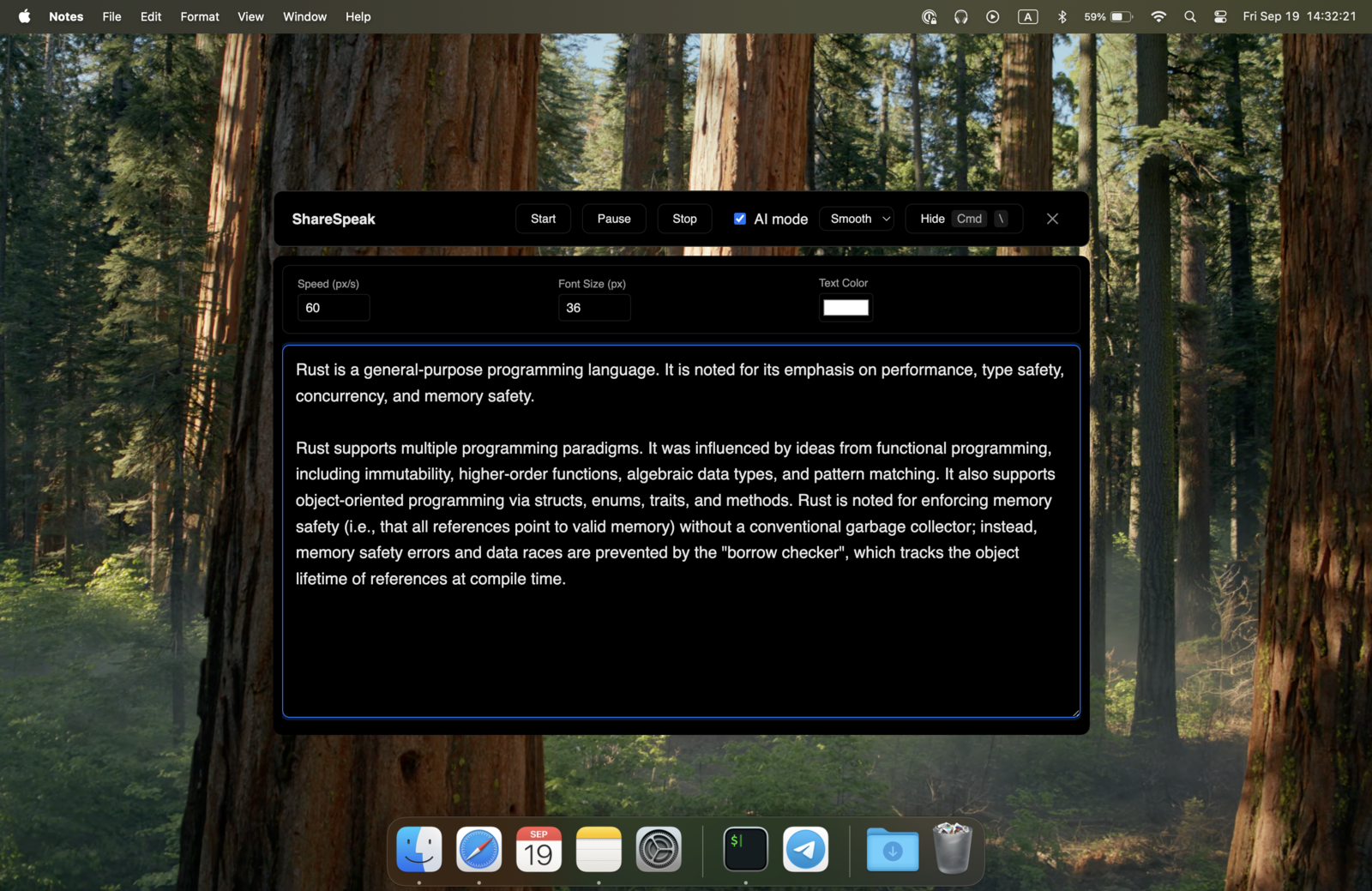
Loom doesn't have a teleprompter — that's still an open feature request. What it has is Speaker Notes: a free pop-up that keeps your script visible to you while recording and hidden from viewers. But it's static — no auto-scroll, no voice-following — and it only works inside Loom's desktop recorder. ShareSpeak adds AI voice tracking that follows your natural speech, per-account script libraries, and works during Loom recording AND across Zoom, Teams, Meet, and any other tool you use. $14.99 once.
Updated: July 2026 · Loom Speaker Notes verified on support.loom.com
Does Loom Have a Teleprompter? What Speaker Notes Actually Is
No — Loom doesn't have a dedicated teleprompter; it's one of the most-requested features Loom hasn't shipped. What Loom does have is Speaker Notes, in the desktop app (macOS 13+ and Windows 10+): a resizable pop-up where you write your script or bullet points — up to 10,000 characters — that stays visible to you while recording and never appears to viewers. It's available on every Loom plan, including Free. The catch is what it isn't:
- Static, not a scroller — the notes sit in a window and you keep your own place. There's no auto-scroll and no voice-following, so on a full-length script you're hunting for your line while also driving the demo.
- Loom's desktop recorder only — it helps while you record in Loom, period. The moment you're in a live Zoom demo, a Teams call, or an OBS stream, it's not there.
- A single notes window — one text area per recording. No script library, no per-account prep, no quick switching between scripts.
- Notes, not delivery — it shows your text; it doesn't help you pace it. Reading a static block still lands as read rather than spoken.
ShareSpeak fills the gap. AI voice tracking that scrolls at your pace. Works in Loom AND every other tool you use. Per-account scripts. $14.99 once.
The Upgrades Loom's Speaker Notes Doesn't Have
AI Voice Tracking — What Static Speaker Notes Can't Do
Loom's Speaker Notes doesn't scroll at all — it's a static window of text you keep your own place in. On a few bullet points that's fine; on a full script you're constantly finding your line while also running the demo.
ShareSpeak follows your voice. The script moves at exactly your pace, with the natural pauses and accelerations of real conversation:
- Demonstrating a slow workflow step? Slow down — the script slows with you.
- Speeding through familiar setup? Pick up the pace — the script keeps up.
- Pausing for emphasis on a key value prop? Pause — the script waits.
- Off-scripting to address something specific? Improvise — pick back up when you return.
Works in Loom — and Every Other Tool You Use
Loom's Speaker Notes only works inside Loom's desktop recorder. The moment you need a script in a live Zoom demo, a Teams customer call, or a Google Meet partner meeting, you're back to printed notes or sticky-note hell.
ShareSpeak is invisible across every platform:
- Loom async recording — your overlay invisible to Loom's screen capture
- Zoom live demos — same script library, invisible to participants
- Microsoft Teams enterprise calls — invisible during screen share and in Teams recordings
- Google Meet prospect calls — invisible during demos and presentations
- Slack huddles, Discord, FaceTime, Webex — same OS-level invisibility
- Browser-based tools (StreamYard, Riverside, etc.) — works the same way
One $14.99 license. Every meeting and recording platform you'll ever use.
Per-Account Scripts — A Library, Not a Single Text Box
Loom's Speaker Notes is a single notes window you paste into per recording. No library. No quick switching. If you record 5 personalized Looms for 5 prospects in one afternoon, you're copy-pasting from Notion 5 times.
ShareSpeak treats scripts like a library:
- Per-prospect scripts — account-specific value props, their stack, the pain points from discovery
- Per-stage scripts — different scripts for first-touch outreach, demo, follow-up, closing
- Reusable templates — base scripts for common use cases that you personalize per recording
- Quick switching — load different script per Loom without reopening the app
- Objection responses ready — the responses you've refined over hundreds of demos, always one glance away
Recording 10 personalized Looms in an afternoon stops being a slog when each one has its script loaded and ready.
Works With Any Loom Plan — No Upgrade, No Subscription
Loom's Speaker Notes is free on every plan, so this isn't about paying Loom for a teleprompter — it's about what Speaker Notes can't do. ShareSpeak adds the voice-following and cross-tool layer for a one-time $14.99, and it doesn't care which Loom tier you're on.
ShareSpeak works regardless of your Loom plan tier:
- Free Loom? ShareSpeak works.
- Starter Loom? ShareSpeak works.
- Business or Enterprise Loom? Same — ShareSpeak doesn't care, it just runs alongside.
$14.99 once, forever. No subscription creep. Your Loom plan stays unchanged.
Async-First and Live-First — One Tool, Both Modes
Most workflows mix async and live. Sales reps record async product demos in Loom, then run live discovery calls in Zoom, then follow up async in Loom replies. Customer success records async product walkthroughs, then jumps on live escalation calls. Switching tools per recording mode is friction.
ShareSpeak doesn't care about async vs live. Same overlay, same voice tracking, same script library — across Loom recording, Zoom live calls, async video replies, and live demos. The tool moves with your workflow.
No Loom Integration, No Atlassian Account, No IT Approval
ShareSpeak doesn't connect to Loom. Doesn't read or write your Loom workspace. Doesn't touch your Atlassian SSO. Doesn't appear in any Loom or Atlassian admin console. It's a standalone desktop app that runs alongside Loom and stays invisible to its capture.
For enterprise sales orgs running Loom on managed laptops, this matters. No security review needed. No procurement cycle. No Atlassian admin involvement. Download, install, use on your next Loom recording.
For Every Way You Actually Use Loom
Async Sales Demos
Personalized Looms per prospect — their stack, their pain, their stakeholder concerns. Per-account scripts ready, voice tracking keeps delivery natural.
Customer Success Touchpoints
Personalized account check-ins, expansion conversations, feature announcements. Account history and usage data scripted into the Loom.
Async Product Walkthroughs
Product feature explainers, onboarding videos, customer education Looms. Polished delivery, key points hit every time.
Async Investor Updates
Founders sending monthly Loom updates to investors. Metrics, narrative, asks — scripted, voice-paced, no fumbles in front of the board.
Internal Team Communication
Manager updates, async standups, decision context for remote teams. Same polish that Loom's culture promises, finally deliverable consistently.
Founder Personal Touchpoint Videos
Async investor warm-intros, personal welcomes for new customers, recruiting videos for senior hires. Founder voice scripted, never fumbled.
Speaker Notes Is Free — So This Is About Capability, Not Cost
Let's be straight: Loom's Speaker Notes is free, so ShareSpeak isn't about saving on a Loom subscription. It's a one-time $14.99 upgrade that does what a static notes window can't:
Loom Speaker Notes: free, but a static window — you keep your own place, Loom recorder only
ShareSpeak: $14.99 once — voice-following scroll, a per-account script library, and it works in Zoom, Teams, Meet and OBS too
Keep whatever Loom plan you already have. ShareSpeak layers the teleprompter Loom never built on top of it — once, for $14.99.
Loom is still excellent for async recording, transcription, AI summaries, and viewer insights. Keep it. ShareSpeak just adds the voice-following prompter — and unlike Speaker Notes, it follows you into every other tool you record or present in.
Runs Native on Mac and Windows
Loom users run the spectrum: SaaS sales teams on MacBooks, enterprise reps on Windows laptops. ShareSpeak runs natively on both — same feature set, same invisibility on every platform. Recording on a PC? See how each teleprompter app for Windows compares.
$14.99 once per user. One license covers both platforms.
The Teleprompter Loom Should Have Built
Download ShareSpeak before your next Loom recording. Per-account script ready, voice tracking your pace, works for your Zoom and Teams calls too. $14.99 once — no Loom subscription required, keep whatever plan you already have.
Use code FIRST100 for 25% off — $11.24 instead of $14.99
Frequently Asked Questions from Loom Users
Will ShareSpeak appear in my Loom recording?
No. ShareSpeak is invisible at the OS level — Loom's screen capture doesn't see it. Your finished Loom video, embedded shares, viewer insights — none of them include the overlay. Same invisibility for Loom's mobile recording, desktop app, and Chrome extension recording modes.
Does it replace Loom's Speaker Notes?
You can use either or both. Loom's Speaker Notes is a static notes window — visible to you, hidden from viewers, but you keep your own place. ShareSpeak is a voice-following teleprompter that scrolls at your pace and also works outside Loom. Most people just use ShareSpeak, but the two don't interfere if you want to keep Speaker Notes for quick bullet lists.
Do I still need Loom Business to use this?
No. ShareSpeak works with any Loom plan, including Free — it just runs alongside whatever you use. And since Loom's Speaker Notes is already free on every plan, you're not paying Loom extra for a prompter either way. ShareSpeak simply adds the voice-following and cross-tool support that Speaker Notes doesn't have, for a one-time $14.99.
Does it interfere with Loom AI features (transcription, summaries, filler word removal)?
No. Loom's AI features process your microphone audio and the captured video — neither of which ShareSpeak touches. Loom transcription captures only what you spoke aloud. AI summaries work the same. Filler word removal works on your speech audio. ShareSpeak is silent (it's just text on your screen) and invisible (it's not in the capture).
Will viewers see the teleprompter in my Loom recording's reactions or comments?
No. The Loom video itself doesn't contain the overlay, so viewers see only what was actually captured. They can react, comment, and watch normally — they have no way of knowing you used a teleprompter. Same applies to Loom AI features like auto-generated chapters and CTAs.
Works with multiple Loom accounts (work + personal)?
Yes. ShareSpeak doesn't connect to Loom at all — it doesn't know how many Loom accounts you have. Switch between accounts in Loom however you normally do; ShareSpeak just sits on top of whatever Loom window is active.
Is using a teleprompter for async Loom messages deceptive?
No more than having presenter notes in PowerPoint or a script in your hand for a YouTube video. The viewer expects you to have prepared — async videos that look polished signal care, not deception. The content is still your real expertise, your real product, your real value props. The teleprompter just helps you deliver them cleanly.
Can my whole sales/CS team use it?
Each person buys their own license — $14.99 once per user. A 10-person sales team = $149.90 total, forever, with no renewal. It works with whatever Loom plan each person already has, Free included. Most teams expense it once and never think about it again.
Record Looms Like the Top 1% — Without the Subscription
Voice-tracked script. Per-account library. Works in Loom AND every other tool — the voice-following prompter Loom's Speaker Notes isn't. $14.99 once. Forever.
Get ShareSpeak — $14.99