
Teleprompter for Podcasters — Interview Questions, Sponsor Reads, and Show Structure on Screen, Invisible on Camera
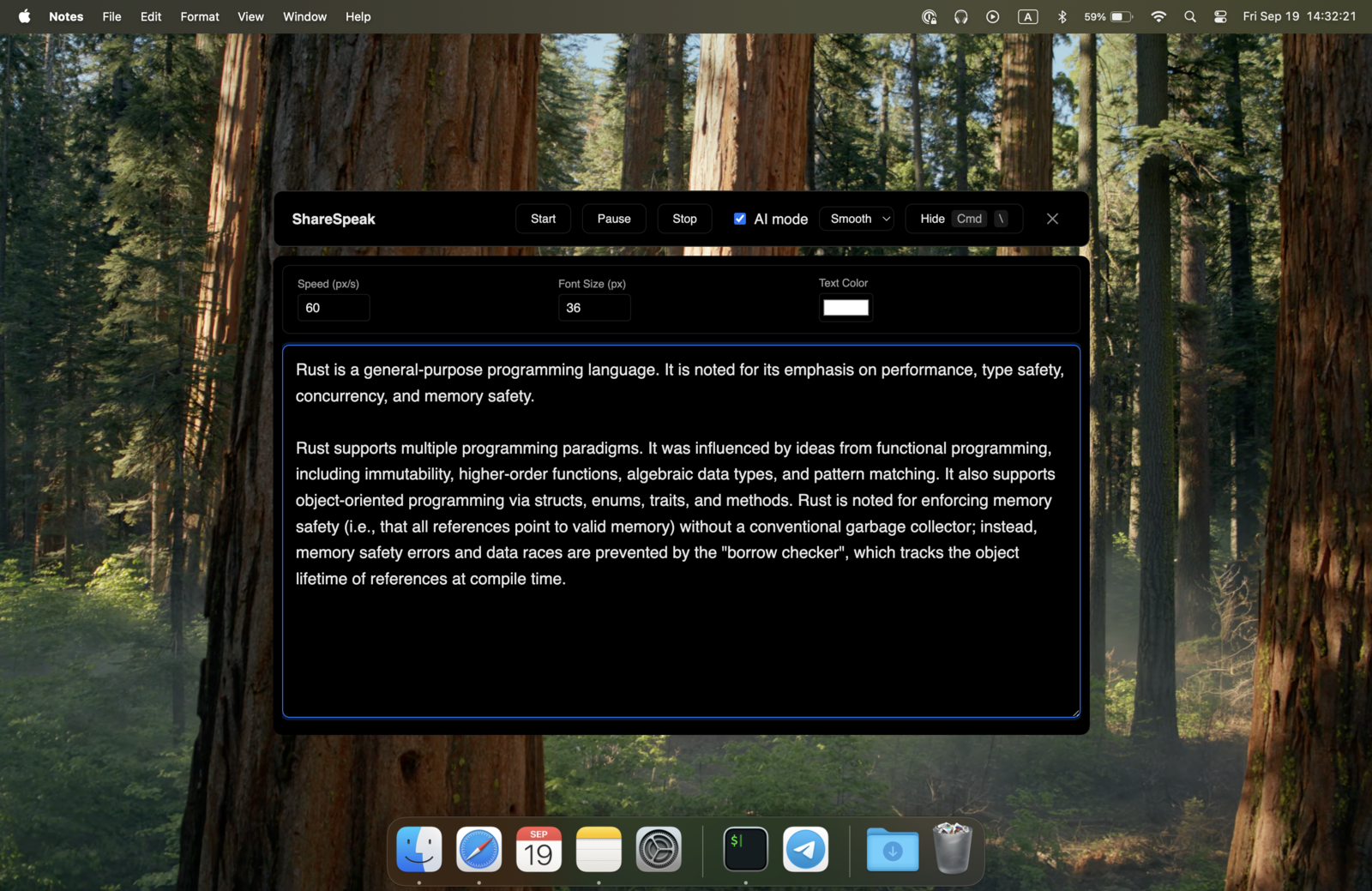
Video podcasting is bigger than ever — Spotify, YouTube, Apple all built around video-first audio. But video reveals every glance at a notebook, every "uh, what was my next question?" pause. ShareSpeak puts your interview prep, sponsor copy, and segment notes on screen — invisible to your camera, invisible to your audience. Voice tracking keeps it natural. $14.99 once.
The Video Podcast Recording Reality
Audio-only podcasting forgave a lot. You could glance at notes, flip through pages, even read the sponsor copy off your screen — listeners didn't see any of it. Video podcasting forgives nothing. Every eye movement is captured. Every notebook glance breaks immersion. Every "let me check my notes" pause kills the conversation.
The cope without ShareSpeak:
- Printed question list — paper rustling on the mic, eyes constantly down, looks unprepared on camera.
- Notes on a second monitor — the side-eye glance is obvious on every cutaway, and every modern podcast cuts to closeups.
- Memorize everything — works for monologues, falls apart in 2-hour interviews where you forget the next question.
- Notes app on your phone — looking down breaks framing, kills eye contact with guest, ruins the camera shot.
- Wing the sponsor read — sponsor compliance teams flag this in post, you re-record, deadline slips.
ShareSpeak fixes this. Your full episode prep — interview questions, sponsor copy, segment transitions, guest bio facts — floats on top of your recording setup, invisible to the camera and to your guest.
Built for the Realities of Long-Form Video Podcasting
Invisible in Riverside, Squadcast, Zencastr, OBS — Every Recording Platform
Whatever you record on, ShareSpeak is invisible to the capture at the OS level. Riverside captures local high-quality video tracks — your script doesn't appear in any of them. Squadcast (Descript), Zencastr, Spotify for Podcasters all record the same way — same result. ShareSpeak isn't in your master tracks.
Also invisible to OBS for live-streamed podcasts, Ecamm Live for Mac-based studios, and StreamYard for browser-based recording. Same story for screen recording during product-related podcast segments — your overlay never makes it into the file.
AI Voice Tracking — For 90-Minute Interviews That Go Anywhere
Podcast interviews don't follow your question list in order. Your guest mentions something fascinating on question 2 that opens up a tangent you both want to follow. You spend 15 minutes there. Now where were you on the prep doc?
ShareSpeak follows your voice. The script keeps up with your natural conversation pace — no remote, no clicking, no breaking flow:
- Guest goes on a tangent? Let them — the prompter waits.
- Want to drill deeper on what they just said? Improvise — pick up your next planned question whenever you're ready.
- Pre-prepared follow-ups for a controversial topic? They're cued up exactly when the topic comes up.
- Recording for 90 minutes? Voice tracking works the whole session — no scroll fatigue, no manual control needed.
Per-Guest Prep — 50 Questions Without Memorizing 50 Questions
Great podcast hosts research their guests deeply. They know the books, the past interviews, the controversial Twitter thread, the personal anecdote from episode 47 of someone else's show. Then they walk into the recording with 50 questions ready but only time for 12 — and they have to pick the right 12 in real-time based on conversation flow.
ShareSpeak makes deep prep usable in the moment:
- Guest bio facts — names of family, hometown, alma mater, current pets, last book they recommended — for natural humanizing references
- Their work, in their words — quotes from their book, their thesis, their recent essay — for "as you wrote in chapter 3..." moments
- Connection threads — links between what they're saying now and what they said in a previous interview
- Topic-specific question banks — 5 angles to drill into each major topic, ready when the conversation enters it
- Hot-button follow-ups — the question their PR team prepped them for that you can ask anyway
The result: interviews that sound effortless and informed, not scripted. Listeners assume you have a photographic memory. Actually you just have ShareSpeak.
Sponsor Reads — Hit the Brand-Approved Copy Word-for-Word
Sponsor reads are where podcaster freedom ends. The brand sent you 120 words of approved copy with specific URL pronunciation, specific offer wording, specific disclaimers. Their compliance team reviews the episode. If you ad-libbed away from the approved copy, they ask for a re-record. If you forget the promo code, the read is invalid and doesn't count toward CPM.
ShareSpeak displays the sponsor copy when you need it:
- Pre-roll sponsor copy at the start of recording
- Mid-roll sponsor copy at the natural break
- Post-roll sponsor copy at the end
- Multiple sponsor reads per episode? Each one ready in sequence
- URL with the affiliate code, promo code, disclaimer — all there exactly as the brand wrote them
You sound like you're talking to a friend about a product you love. The brand sees their exact approved copy delivered cleanly. The promo code is right. The URL is right. The CPM check arrives.
Show Structure on Screen — Never Drop a Segment
Most successful podcasts have structure: cold open, intro, sponsor 1, segment 1, ad break, segment 2, sponsor 2, listener questions, outro. New podcasters skip segments in long recordings. Veteran podcasters built habits but still miss the rare segment in a 3-hour episode.
ShareSpeak holds your show structure:
- Cold open + intro — the recurring hook that sets up the episode
- Sponsor placements — exact spots where to read which sponsor
- Segment transitions — the lines you use to move between topics smoothly
- Recurring bits — the listener-favorite segment you always do but sometimes forget under deadline pressure
- Outro — the call-to-action you want to deliver consistently (subscribe, leave a review, follow on socials)
Your show sounds polished and consistent. Your editor has less cleanup. Your listeners stop noticing the cracks.
Works with Every Remote Recording Stack
Most podcast guests aren't in your studio. ShareSpeak works whatever stack you use to record them:
- Riverside.fm — local high-quality tracks; ShareSpeak invisible in your track and your guest's track
- Squadcast (now Descript) — same setup, same invisibility
- Zencastr — works identically
- Zoom + local recording — common low-budget setup, ShareSpeak invisible to both
- In-studio recording — your laptop open with ShareSpeak running, cameras don't see the screen content
Your guest never sees your script — they see you, asking thoughtful, prepared, conversational questions. They leave the interview impressed with how researched you were.
For Every Podcast Format You Run
Solo Monologue Podcasts
Lex Fridman-style solo essays. Hardcore History-style deep dives. Your full script on screen, voice-paced, invisible. No fumbles, no "where was I?" pauses in a 2-hour monologue.
Interview Shows
Diary of a CEO-style guest interviews. 50 questions prepped per guest, voice-paced delivery, natural follow-ups. Sound like you researched them for a week.
Sponsor Reads & Ad Insertions
Brand-approved copy, word-perfect promo codes, URL pronunciation. Sponsor compliance approves on first review. CPM doesn't get clawed back.
Co-Hosted Shows
All-In Podcast-style roundtables, Pivot-style co-hosts. Your part of the script ready, talking points cued, no awkward "you take the next one" moments.
Live-Streamed Podcasts
Twitch/YouTube live podcasts, Spaces, Discord stages. Your script invisible to viewers. Take audience questions while keeping your structure on screen.
Roundtable & Panel Episodes
Multiple guests, you moderating. Topic queue on screen, follow-ups per guest, time management cues. The chaos of 4-person video calls becomes a coherent episode.
The Math of Why Podcasters Pay $14.99
Podcast economics in 2026 are obvious if you're growing the show:
Mid-tier sponsor CPM: $25–$50 per thousand downloads
Episode at 30K downloads: $750–$1,500 per sponsor read
One sponsor compliance flag (wrong promo code, missed disclaimer): re-record or lose the read = $750+ gone
One bad interview that goes viral for the wrong reason: incalculable
ShareSpeak: $14.99, one-time, forever
If ShareSpeak helps you not blow one sponsor read or one prestige-guest interview — paid for itself 60x over.
Compare to alternatives podcasters consider: hardware teleprompter rig ($300–$2,000+), Elgato Prompter at $299 hardware, or Riverside's basic in-app teleprompter (no voice tracking, manual scroll). ShareSpeak is $14.99 once, voice-tracked, invisible to recording.
Runs Native on Mac and Windows
Most pro podcast setups are Mac. Mid-tier setups are Windows. ShareSpeak runs natively on both — same feature set, same invisibility behavior. Podcasting from a PC? See how each teleprompter app for Windows compares.
$14.99 per host, one-time. Co-hosting? Each host buys their own — $29.98 total for a two-host show, forever.
Your Next Episode, Recorded Like the Top Shows Record
Download ShareSpeak before your next recording. Paste your interview questions, your sponsor reads, your segment structure. Record the episode with the prep of a 10-year veteran. $14.99 — cheaper than one sponsor compliance re-take.
Use code FIRST100 for 25% off — $11.24 instead of $14.99
Frequently Asked Questions from Podcasters
Will my guest see the teleprompter on their end?
No. ShareSpeak is invisible at the OS level — your guest sees your camera feed of you, that's it. They have no awareness that you're using a teleprompter. The interview feels organic to them.
Does it appear in Riverside, Squadcast, or Zencastr recordings?
No. These platforms record local high-quality video tracks from your camera. ShareSpeak isn't on your camera — it's on your screen. Your camera never captures it, so it's not in any output track. Same story for Zoom-based recording or any other remote podcast tool.
Won't I sound robotic if I'm reading from a script?
Only if you sound robotic to begin with. Voice tracking means the text moves at your natural pace — no forced read-along rhythm. Most podcasters use their script for prompts and reference, not word-for-word reading: a question, a fact, a transition cue. The viewer hears thoughtful preparation, not robotic recital.
Can I do flowy improvised interviews while still using a script?
Yes — this is exactly how most podcast hosts use ShareSpeak. Your script lives as a question bank and reference, not a linear teleprompter. Voice tracking means you can riff for 10 minutes on a tangent and pick up your next planned question seamlessly when the time is right. The script is a safety net, not a railroad.
Works for solo monologue podcasts (Lex Fridman, Hardcore History style)?
Yes — and this is where ShareSpeak shines hardest. Long-form solo recording means staying on script for 60-120 minutes without losing thread. Voice tracking handles your natural pacing for the entire session. Hardcore History levels of research become deliverable.
For sponsor reads — does it help me sound authentic, not scripted?
Yes. The brand wants the copy delivered as written; you want the read to sound natural. ShareSpeak puts the copy on screen so you can deliver it naturally instead of straining to remember exact phrasing. Best sponsor reads sound conversational while being word-perfect — that's the gap ShareSpeak closes.
Works with multi-camera podcast setups (Ecamm Live, OBS)?
Yes. ShareSpeak is invisible to all screen capture and to all cameras (since cameras don't see your screen at all). Multi-camera setups, NDI, virtual cameras, OBS scenes — none of them pick up your overlay. Pro studio setups treat ShareSpeak the same as a basic laptop setup.
My cohost wants to use it too — do we need a team license?
Each host buys their own — $14.99 per person, one-time. Two hosts = $29.98 total, forever. No team plans, no per-show fees, no podcast network discounts needed. Most podcast duos expense it as a production cost on episode one.
Record Like the Top 1% of Video Podcasters
Your interview prep on screen. Voice tracking your pace. Listeners hearing a polished, conversational, deeply-researched episode. $14.99. Forever.
Get ShareSpeak — $14.99