SpeakFlow Pricing 2026 — Is It Free? Plans, Limits, and the True Cost

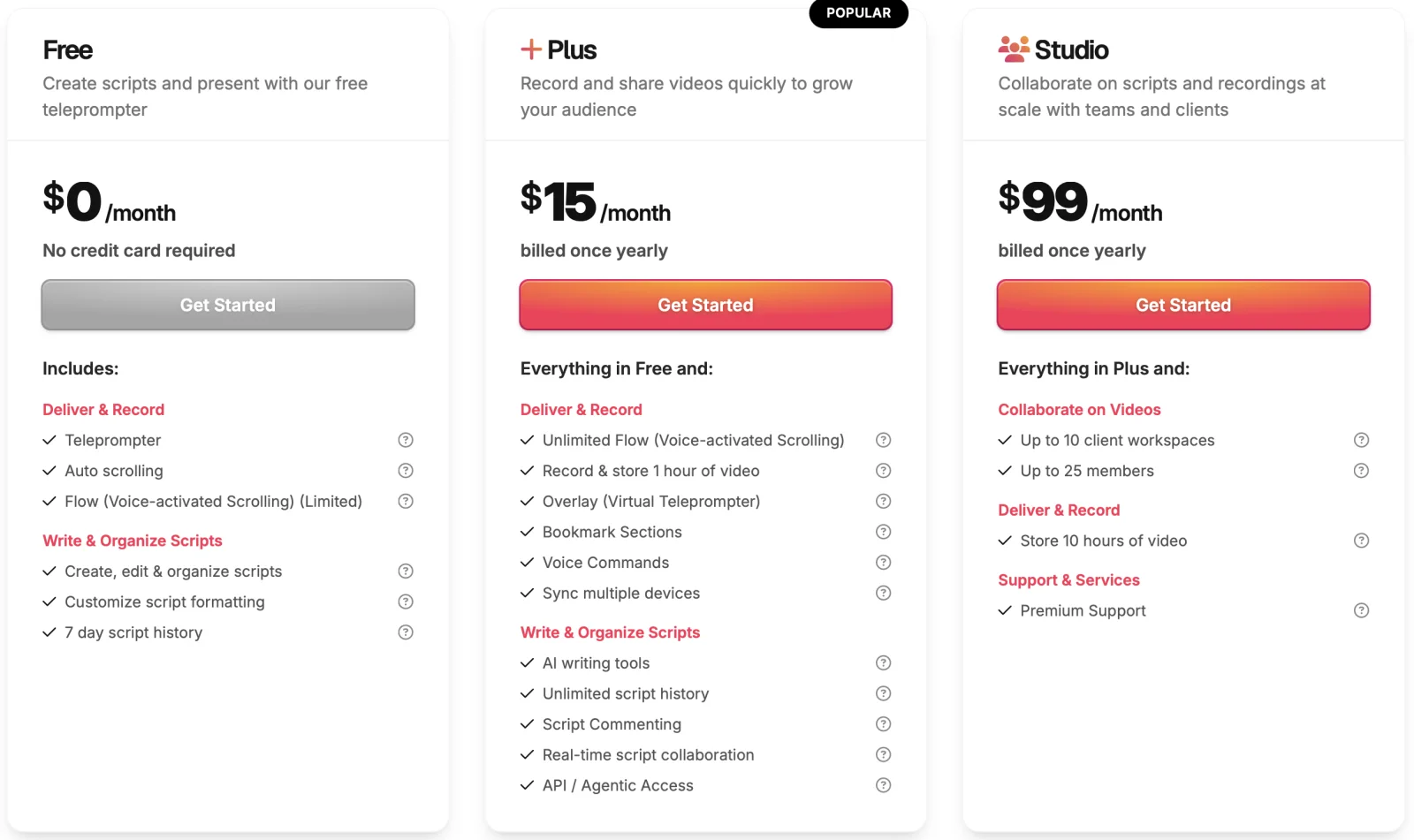
SpeakFlow has a free plan with voice-activated scrolling — but with hard limits: "limited Flow," watermarked recordings, 25-minute video storage cap, and no cloud backup. The Plus plan ($19/month) removes watermarks and unlocks unlimited Flow. Studio ($40/month) adds the top-tier features. Here's the full pricing breakdown — and what a one-time $12.50 alternative looks like for desktop workflows.

Is SpeakFlow Free? Quick Answer

Yes — with significant limitations. SpeakFlow's free plan includes voice-activated scrolling ("Limited Flow"), unlimited script creation, 25 minutes of video storage, and 7-day script history. The catches: watermarked recordings, shorter session times, and no cloud backup. To remove watermarks and unlock unlimited Flow, you upgrade to Plus at $19/month ($15.20/mo effective on annual billing) — that's $182.40-$228 per year. The top-tier Studio plan is $40/month. Annual billing saves 20% on any paid plan.

SpeakFlow Plans in 2026 — Side by Side

TierFreePlusStudio
Monthly Billing$0$19/mo$40/mo
Annual Billing (20% off)$0$15.20/mo$32/mo
Annual Cost$0$182.40$384
Flow Voice ScrollingLimitedUnlimitedUnlimited
Watermark on Recordings✗ Yes✓ Removed✓ Removed
Video Storage25 min1 hourMaximum
Cloud Backup
Script History7 daysUnlimitedUnlimited
Overlay (Virtual Teleprompter)
AI Writing Tools
Voice Commands
Multi-Device Sync
Team CollaborationLimited

Prices reflect SpeakFlow's public pricing as of 2026. Annual billing offers 20% savings on Plus and Studio plans. SpeakFlow is browser-based and works across devices without requiring native app installation.

"Is SpeakFlow Free?" — The Honest Answer Beyond Yes/No

SpeakFlow's free plan exists and includes voice-activated scrolling, which sets it apart from many freemium teleprompters where voice tracking is gated behind paywalls entirely. That said, "free" comes with conditions worth understanding before you commit your workflow to it:

  • "Limited Flow" — voice scrolling works but with restricted usage (session length or monthly minute caps). For occasional short videos, fine. For consistent professional workflow, you hit the limit fast.
  • Watermarks on recordings — every video you record through SpeakFlow's recording feature shows a watermark on the free tier. Same dynamic as VEED's free plan: unusable for client-facing or professional output.
  • Shorter session times — the free tier caps how long individual recording sessions can run.
  • 25 minutes of video storage — total storage cap, not per-video. Active creators fill this fast.
  • 7-day script history — older scripts roll off after a week. Risk of losing prep work.
  • No cloud backup — your work isn't backed up; if your browser session clears, scripts go with it.
  • No AI writing tools — gated to paid plans.
  • No overlay mode — virtual teleprompter overlay feature is Plus-and-up only.
  • No multi-device sync — script created on laptop doesn't sync to phone for recording.

Verdict: SpeakFlow Free is a working teleprompter for occasional non-professional use. For anyone producing actual deliverable video (sales demos, course content, social media), Plus at $19/month (or $15.20 annual) is the practical minimum to get watermark-free output and unlimited Flow. That's $182.40-$228 per year.

Tier-by-Tier Reality Check

SpeakFlow Free ($0) — Useful Demo, Limited Real-World Use

The free plan exists to let you try Flow voice scrolling before paying. What you get:

  • Voice-activated scrolling (limited usage)
  • Unlimited script creation and organization
  • Customizable script formatting
  • 25 min video storage total
  • 7-day script history rolling window
  • Browser-based, no install required

The watermark on recordings is the main reason most users upgrade quickly. Free tier reasonable for: testing the platform, occasional personal scripts. Not reasonable for: consistent professional output.

Plus ($19/mo monthly, $15.20/mo annual) — The "Watermark Removed" Tier

The practical minimum paid tier. Upgrades from Free:

  • Unlimited Flow voice scrolling — no session or monthly caps
  • Watermark removed from recordings
  • 1 hour video storage total (up from 25 min)
  • Unlimited script history — nothing rolls off after 7 days
  • Overlay (virtual teleprompter) — script overlay on other apps in the browser
  • Bookmark sections within scripts
  • Voice commands for hands-free control
  • Multi-device sync — laptop scripts available on phone
  • AI writing tools for script generation/refinement

Annual billing saves 20% — effectively $15.20/month or $182.40/year. Monthly billing is $19/month or $228/year. This is the tier most consistent users settle into.

Honest framing: if you use SpeakFlow's full feature set (AI writing, overlay, multi-device sync), Plus is reasonable. If you mostly use Flow voice scrolling on desktop, you're paying $180+/year for one feature that has cheaper alternatives.

Studio ($40/mo monthly, $32/mo annual) — Power Users and Teams

Top tier with maximum limits across the board. What it adds over Plus:

  • Maximum video storage — no practical caps
  • Maximum AI writing credits
  • Full team collaboration features
  • Advanced integrations
  • Priority support
  • Higher overall account limits across all features

Annual billing is $384/year per user. Monthly billing is $480/year. Worth it for: production teams, agencies producing video at scale, power users hitting Plus limits. Overkill for: solo creators or small teams.

Note: SpeakFlow's pricing has updated over 2024-2026 — earlier sources show Studio at $99/month, current 2026 pricing is $40/month. Plus has updated from $15 to $19/month. Always check current pricing on speakflow.com directly before committing.

The Watermark Tax — Why Free Isn't Really Free for Most Users

SpeakFlow follows the same pricing pattern as VEED, BIGVU, and similar browser-based teleprompters: free tier exists but watermarks render output unusable for most actual use cases. Use cases where the watermark kills value:

  • Sales demos and async customer videos — watermark signals "free tier user," undermines authority
  • Course content on Udemy, Thinkific, Teachable — students see watermark every lesson, affects perceived quality
  • YouTube tutorial channels — competitive creators don't have watermarks
  • Investor pitches and corporate webinars — watermark equals amateur tier optics
  • Marketing videos and product content — brand consistency demands clean output
  • Job interview recordings (HireVue, Spark Hire) — recruiters notice watermarked submissions

The only watermark-free path within SpeakFlow is Plus tier or higher. Minimum $182.40/year (annual billing) or $228/year (monthly). For workflows where voice scrolling is the primary need but cloud sync, AI writing, and overlay aren't required — that's paying full subscription for one feature.

When SpeakFlow Subscription Is Worth It

Honest framing — SpeakFlow's pricing makes sense for specific user profiles:

  • Browser-first users — you want everything in a browser tab, no desktop app preference
  • Multi-device workflow — script on laptop, record on phone, voice-track on tablet — sync matters
  • AI writing usage — you genuinely use the AI tools for script generation and refinement
  • Team collaboration need — Studio tier handles shared script libraries and team workflows
  • Cloud backup priority — you want your scripts safely synced rather than local-only
  • No desktop app preference — browser-only feels lighter than installing software

SpeakFlow's pricing is less suitable for: solo desktop users with single-device workflows, budget-conscious creators wanting one-time payment, users who already have separate AI writing tools (ChatGPT, Claude, etc.) and don't need SpeakFlow's built-in.

The One-Time Payment Alternative — $12.50 Lifetime

For desktop AI teleprompter workflows specifically, there's a different pricing model worth considering. ShareSpeak is a native desktop AI teleprompter at $12.50 once, lifetime updates included.

What you get for $12.50:

  • AI voice tracking — same category as Flow, follows your speech naturally
  • Native Mac, Windows, and Linux apps — desktop-first design
  • OS-level invisibility — script doesn't appear in Zoom screen share, OBS recording, Camtasia capture, or Loom output
  • Unlimited script size — no character limits, no session caps
  • Per-user licensing — no team subscription tier creep
  • No subscription — pay $12.50 once, free updates forever
  • No watermarks — your recordings are clean regardless of which screen recorder you pair with

What you don't get: SpeakFlow's AI writing tools (you'd use ChatGPT/Claude separately), browser-based access (ShareSpeak is desktop-only), team collaboration features. For solo desktop creators these aren't deal-breakers; for browser-first or team workflows, SpeakFlow's subscription is the better fit.

See the full comparison: SpeakFlow Alternative — $12.50 Lifetime.

SpeakFlow vs ShareSpeak — 5-Year Total Cost

Subscription versus one-time. The math compounds over years:

SpeakFlow Plus (monthly billing, 5 years): $1,140 per user

SpeakFlow Plus (annual billing, 5 years): $912 per user

SpeakFlow Studio (monthly, 5 years): $2,400 per user

SpeakFlow Studio (annual, 5 years): $1,920 per user

5-person team on Plus annual over 5 years: $4,560

5-person team on Studio annual over 5 years: $9,600

ShareSpeak (one-time, lifetime): $12.50 per user

5-person team on ShareSpeak (one-time, lifetime): $62.50

For desktop teleprompter-centric workflows, that's $900-$1,900 saved per user over 5 years. For a 5-person team, $4,500-$9,500 in savings.

Compare with other 2026 teleprompter subscription pricing: PromptSmart at $9.99/mo, VODIUM at $15/mo, VEED Basic at $12/mo, Teleprompter.com at $20/mo. SpeakFlow Plus sits in the middle at $15.20-$19/mo.

Who Pays SpeakFlow Subscription, Who Doesn't Need To

Browser-First Multi-Device Creators

Workflow spans laptop, phone, tablet. SpeakFlow's cross-device sync delivers real value here — subscription is justified.

Desktop-Only Solo Creators

Working from one laptop, recording with QuickTime, OBS, or Camtasia. One-time payment alternatives fit better.

Course Creators Producing Watermark-Free Output

Recording course modules at scale. SpeakFlow Plus at $182/year vs ShareSpeak + free recording at $12.50.

Sales Reps Recording Async Demos

Async sales videos need clean watermark-free output. Per-rep SpeakFlow Plus at $228/year vs $12.50/rep one-time.

Podcasters & YouTubers

Podcast hosts and YouTubers recording from desktop. Subscription overhead unnecessary for the workflow.

Teams With Existing AI Writing Tools

Already use ChatGPT, Claude, or other AI for script drafts. SpeakFlow's bundled AI writing is redundant — paying for unused features.

Voice Tracking Without the Watermark Tax — $12.50 Once

Download ShareSpeak. Pair with QuickTime, OBS, Loom, or any free recording tool. Get watermark-free AI voice tracking on Mac, Windows, and Linux — for less than one month of SpeakFlow Plus.

Use code FIRST100 for $12.50 price

Frequently Asked Questions About SpeakFlow Pricing

Is SpeakFlow free?

Yes — SpeakFlow has a free plan, but with significant limitations. The free plan includes voice-activated scrolling (described as "limited Flow"), unlimited script creation, 25 minutes of video storage, and 7-day script history. It also imposes shorter session times, watermarks on recordings, and no cloud backups. For most professional use cases, the free plan is workable for short scripts but unusable for client-facing video output due to watermarks. To remove watermarks and unlock unlimited Flow voice scrolling, you upgrade to Plus at $19/month.

How much does SpeakFlow cost in 2026?

SpeakFlow has three pricing tiers in 2026: Free ($0, with watermarks and limited features), Plus ($19/month, the most popular paid tier), and Studio ($40/month, top-tier with maximum limits). Annual billing offers a 20% discount on all paid plans. Plus is the practical minimum tier for anyone needing watermark-free output and unlimited voice scrolling.

What's the difference between SpeakFlow free, Plus, and Studio plans?

Free includes limited Flow voice scrolling, 25 min video storage, watermarked recordings, and 7-day history. Plus ($19/mo) unlocks unlimited Flow, 1 hour video storage, no watermarks, overlay mode, AI writing tools, voice commands, multi-device sync, and unlimited script history. Studio ($40/mo) adds the maximum credits/limits and the most advanced features for power users and teams.

Does SpeakFlow watermark videos on the free plan?

Yes. SpeakFlow's free plan adds a watermark to any video recordings you make. For most professional use cases — sales demos, course content, client-facing videos — the watermark is a deal-breaker. Removing the watermark requires upgrading to the Plus plan at $19/month ($15.20/month if billed annually with the 20% discount). That's $182.40-228 per year minimum for watermark-free output.

What does "Limited Flow" mean on the SpeakFlow free plan?

Flow is SpeakFlow's voice-activated scrolling technology — the script advances at your speech pace automatically. On the free plan, Flow is described as "limited," meaning either restricted usage minutes per month or restricted session length. Plus and Studio plans unlock "unlimited Flow" so voice tracking works across full recording sessions without hitting caps. The free tier is essentially a demo of the voice scrolling feature.

Does SpeakFlow have an annual discount?

Yes. SpeakFlow offers 20% savings on yearly billing for any paid plan. Plus drops from $19/month effective to $15.20/month effective ($182.40/year instead of $228). Studio drops from $40/month to $32/month effective ($384/year instead of $480). Annual billing locks you in for 12 months and pays upfront.

What does SpeakFlow Plus cost over 5 years?

SpeakFlow Plus on annual billing is $182.40/year per user. Over 5 years that's $912 per user. On monthly billing ($19/month), it's $1,140 per user over 5 years. Studio plan on annual ($32/month effective) is $1,920 over 5 years. For a 5-person team on Plus annual over 5 years, total spend is $4,560.

Is there a one-time payment alternative to SpeakFlow's subscription?

Yes. ShareSpeak is a desktop AI teleprompter with voice tracking for $12.50 one-time, lifetime updates. For users whose main SpeakFlow use is the voice-activated scrolling on desktop, ShareSpeak delivers equivalent voice tracking at less than one month of SpeakFlow Plus. No watermarks, no session limits, no cloud-backup gating, no annual renewals. See the full SpeakFlow alternative breakdown.

Voice-Tracked Teleprompter Without the Subscription

$12.50 once vs $182-480/year. Watermark-free output. Mac, Windows, Linux. No session caps, no cloud-backup gating, no annual renewal.

Get ShareSpeak — $12.50