
Parrot Teleprompter Alternative — ShareSpeak: The Desktop Upgrade Your Phone Can't Give You
Parrot Teleprompter is a decent mobile app — but it's stuck on your phone. No real desktop version, no voice tracking, and scripts that vanish after updates. ShareSpeak is a native desktop teleprompter with AI voice control for $14.99 lifetime. The next step up from mobile.
| Feature | ShareSpeak | Parrot Teleprompter |
|---|---|---|
| Pricing | $14.99 Lifetime | Free app + $79+ hardware |
| AI Voice Tracking | ✓ | ✗ |
| Desktop Native App | ✓ | ✗ |
| Windows Support | ✓ | ✗ |
| Invisible During Recording | ✓ | ✗ |
| Hardware Required | ✗ | $79+ kit recommended |
| Script Safety | Local files, always safe | Scripts lost on updates |
Why Desktop Creators Need More Than a Phone App
A Real Desktop App — Not a Mobile Port
Parrot Teleprompter is built for phones and tablets. Their Mac "support" is an iOS app running on Apple Silicon — it requires an external monitor and behaves like a mobile app stretched to desktop. There's no Windows version at all (the only workaround is running an Android emulator).
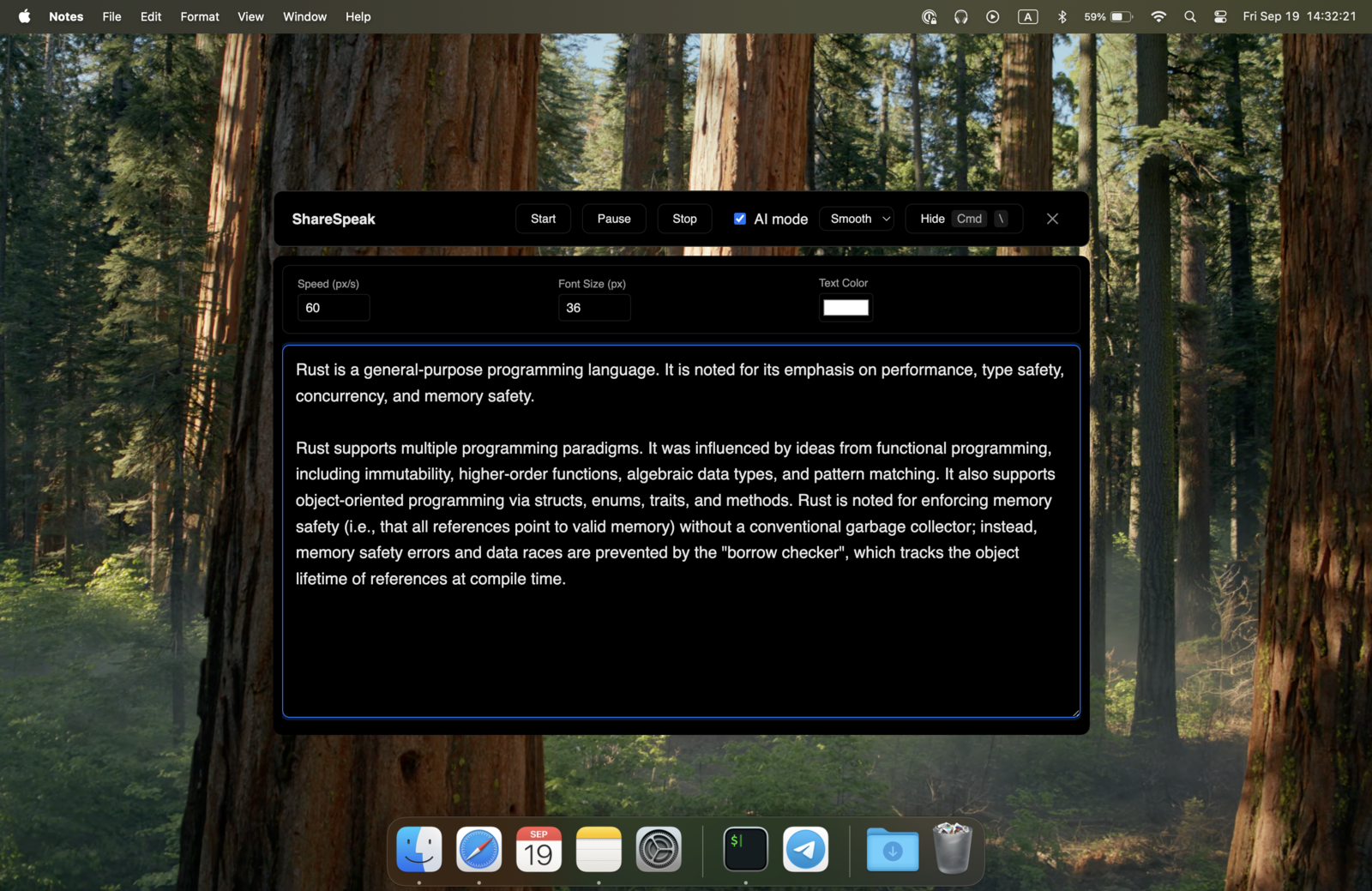
If you record screencasts, tutorials, or present on Zoom from your computer, a phone teleprompter means splitting your attention between two screens. ShareSpeak runs natively on your desktop as a true AI teleprompter for Mac — and a native Windows teleprompter too — with proper window management, keyboard shortcuts, and an overlay that sits right where you need it. Weighing a kit against an app? See software vs hardware teleprompter.
AI Voice Tracking — No Bluetooth Remote Needed
Parrot Teleprompter uses fixed-speed scrolling. To control it properly, you need their $50-100 Bluetooth remote. Without it, you're stuck setting a scroll speed and hoping you speak at exactly that pace. Pause to think? The text keeps moving. Speed up? You're left behind.
ShareSpeak follows your voice with AI speech recognition. No remote control, no Bluetooth pairing, no extra hardware. Just speak naturally and the text moves with you. Pause mid-sentence — it waits. Rush through a section — it keeps up. Your voice is the controller.
Invisible During Screen Recording — Not a Second Screen to Glance At
With Parrot on your phone, you're reading from a separate device while recording on your computer. Your eyes constantly dart between screens — and your audience notices. It's obvious you're reading something off-camera.
ShareSpeak overlays directly on your desktop, right where your eyes naturally look. It's an invisible teleprompter for screen sharing — hidden from screen capture software, whether you set it up as an OBS teleprompter or record through Zoom, Loom, anything. Your viewers see a clean screen; you see your script. No eye-darting, no second device.
Your Scripts Won't Disappear After an Update
Parrot Teleprompter has a critical bug: app updates delete all saved scripts. Google Play reviews from 2024 are almost entirely 1-star ratings about lost scripts. Users also report scripts vanishing when the phone goes to sleep, the app closes, or you navigate away. There's no manual save — your work just disappears.
ShareSpeak works with your own text files stored on your computer. Paste text in or load a file — your scripts live on your machine, managed by your OS, backed up by your existing backup system. No app database that can corrupt or wipe itself. Your scripts are always yours.
$14.99 Software vs $79+ Hardware Kit
Parrot's app is free, but to use it properly you need their hardware: a $79+ teleprompter kit with a beam splitter glass, plus a $50-100 Bluetooth remote for scroll control. That's $129-179 in hardware to read text at a fixed speed from your phone.
ShareSpeak is $14.99, runs on the computer you already own, and needs zero hardware accessories. AI voice tracking replaces the Bluetooth remote. The invisible overlay replaces the beam splitter glass. Same result — reading naturally while looking at camera — without the physical setup. The same reasoning applies to pricier rigs, which is why creators weighing one often read our Elgato Prompter alternative breakdown before buying glass.
Works Offline, No Account, No Cloud Dependency
Parrot stores scripts in-app with basic Dropbox integration — no Google Drive, no iCloud, no other cloud options. When those scripts disappear after an update, your only backup is whatever you manually exported to Dropbox.
ShareSpeak needs no account, no cloud sync, and no internet connection. It runs entirely offline. Your scripts are plain text files on your computer — back them up however you want, with whatever tools you already use.
Ready to Graduate from Your Phone?
Screencasters & YouTubers
Stop glancing at your phone while recording. ShareSpeak puts your script right on your desktop — invisible to your audience, right where your eyes naturally look.
Remote Presenters
Use it as a teleprompter for Zoom or Teams with your script overlaid on the call window. No phone propped up next to your monitor, no obvious eye movement.
Course Creators
Produce professional lessons from your desktop. No hardware kit setup, no Bluetooth pairing. Just open ShareSpeak, paste your script, and record.
Public Speakers
Practice speeches on your laptop with voice-paced scrolling. No phone to prop up, no remote to hold, no hardware to pack.
From Phone to Desktop in 2 Minutes
Download ShareSpeak, paste your script, and start recording. No hardware to set up, no Bluetooth to pair, no app database that deletes your work. Just a teleprompter that lives where you work — on your computer.
Compare to other options: our teleprompter alternatives hub, the teleprompter for YouTube creators, and the teleprompter for podcasters. ShareSpeak works the same across all of them — one $14.99 desktop app.
Use code FIRST100 for 25% off — $11.24 instead of $14.99
Frequently Asked Questions
Parrot is free. Why pay $14.99 for ShareSpeak?
Parrot's app is free, but it's a mobile app with no real desktop version, no voice tracking, and a critical script-loss bug. To use it properly, you'd spend $79+ on their hardware kit and $50-100 on a Bluetooth remote. ShareSpeak is $14.99 total — a native desktop app with AI voice control, no hardware needed.
Can I use Parrot on my phone alongside ShareSpeak on desktop?
Sure — if you have a use case for a phone teleprompter (like on-location shoots with a hardware rig), Parrot still works for that. ShareSpeak handles the desktop side — screencasts, Zoom calls, tutorials, and anything you record on your computer. Different tools for different setups.
Does ShareSpeak need a hardware teleprompter kit?
No. ShareSpeak is software-only. It overlays on your screen and becomes invisible to recording software. No beam splitter glass, no camera rig, no external monitor. Just your computer and your voice.
Will my scripts be safe with ShareSpeak?
Yes. ShareSpeak works with plain text you paste in or load from files on your computer. Your scripts are stored on your machine, not in an app database that can corrupt or wipe itself. Back them up however you normally back up your files.
Does ShareSpeak have mirror mode like Parrot?
ShareSpeak doesn't need mirror mode — that's a feature for hardware teleprompter rigs where text reflects off a beam splitter glass. Since ShareSpeak overlays directly on your screen, the text is always the right way around. You read it naturally, right where you're looking.
Does ShareSpeak have a Bluetooth remote?
You don't need one. ShareSpeak's AI voice tracking replaces the remote entirely — the teleprompter follows your voice in real time. But if you prefer manual control, you can use keyboard shortcuts to pause, resume, and adjust speed.
Your Desktop Deserves a Real Teleprompter
Stop propping your phone next to your monitor. Get a native desktop teleprompter with AI voice tracking — for less than Parrot's Bluetooth remote costs.
Buy ShareSpeak Now — $14.99