
Updated: October 2026
Moody Alternative (2026): $14.99 vs $39, and It Runs on Windows
Moody is a genuinely lovely MacBook-notch teleprompter — invisible during screen sharing, and a one-time $39 (no subscription). Two catches: it's Mac-only (macOS 15+), and it isn't the cheapest. ShareSpeak does the same job — notch mode, invisible overlay, voice-following — for a one-time $14.99, and it also runs on Windows.
Our verdict
Switch to ShareSpeak if you want to pay less than half ($14.99 vs $39), you use Windows or move between Mac and Windows, or you want a choice of speech engines. Stay with Moody if you're Mac-only, you love its notch-native design, and the extra ~$24 doesn't matter. Honest one-liner: these are close cousins — both one-time, both invisible notch teleprompters — so it comes down to price and whether you need Windows.
Moody teleprompter review: the honest version
Moody is one of the best-known MacBook-notch teleprompters, and it shows — the design is clean and the notch integration is the nicest we've seen. It follows your voice, hides from screen sharing and even screenshots, and it's a one-time purchase. It's a good app; here's the balanced view before you decide.
What Moody does well
- Beautiful, notch-native Mac design
- Hidden in screen sharing and screenshots
- Voice-synced scrolling
- One-time $39 — no subscription
Where it's limited
- Mac-only — needs macOS 15+, no Windows
- $39, versus $14.99 for a comparable app
- No trial link on its site (it promises help within 7 days if Moody doesn't work)
- Doesn't name its speech engine (ShareSpeak lets you pick Apple Speech, Whisper or Gemini)
Moody vs ShareSpeak, side by side
Here's the short version; the three scenarios and an honest look at where Moody wins follow below.
| Feature | ShareSpeak | Moody |
|---|---|---|
| Price | $14.99 one-time | $39 one-time |
| macOS (native Swift notch panel) | ✓ | ✓ |
| Windows | ✓ | Mac-only |
| Invisible to screen capture | ✓ | Yes (and screenshots) |
| Voice-following scroll | Apple Speech, Whisper or Gemini | Scrolls as you speak |
| Scripts Library (save & edit) | ✓ | ✓ |
Moody price and platform per moodyteleprompter.com (checked October 25, 2026; moody.mjarosz.com now redirects there): $39 one-time, macOS 15 or later on Intel and Apple Silicon (it was $29 and macOS 14.7+ in July 2026).
Moody teleprompter for Windows?
Short answer: there isn't one. Moody is built specifically for macOS and the MacBook notch, requires macOS 15 or later, and has no Windows version. If you searched for "Moody teleprompter for Windows," you're out of luck with Moody itself.
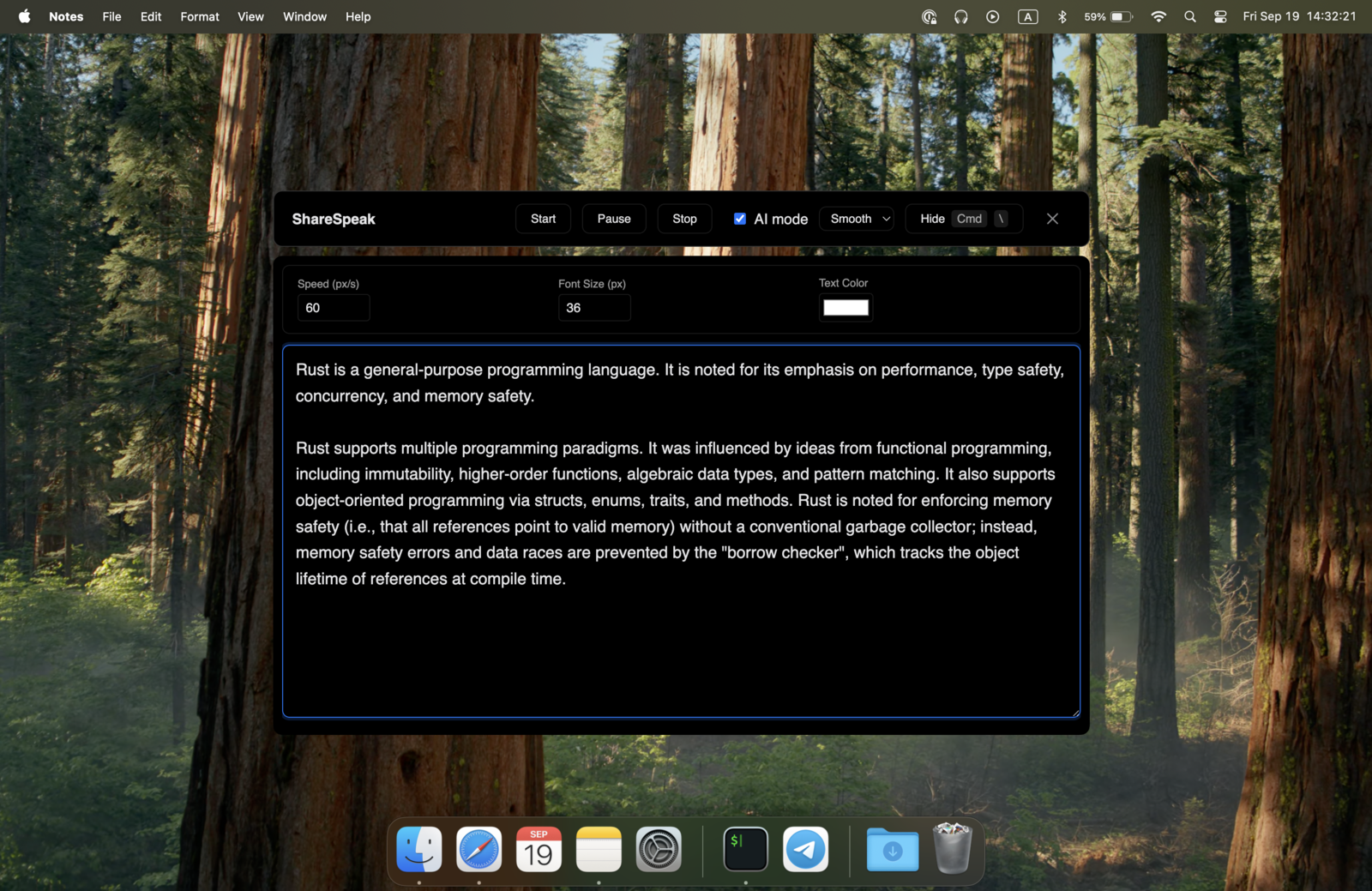
ShareSpeak is the closest thing to "Moody on Windows": an invisible teleprompter with voice-following, running on Windows as well as Mac. Windows PCs have no notch, so instead of notch mode you get a floating overlay you can place anywhere — right under your webcam, for example — and on Windows 10 (version 2004 or later) and Windows 11 it stays out of screen shares and recordings, the way Moody does on a Mac. Grab the Windows download — $14.99 once. It's the same overlay behind our invisible teleprompter for screen sharing. Want to weigh every Windows option, not just ours? See our ranking of the best teleprompter software for Windows.
$14.99 vs $39 — both one-time
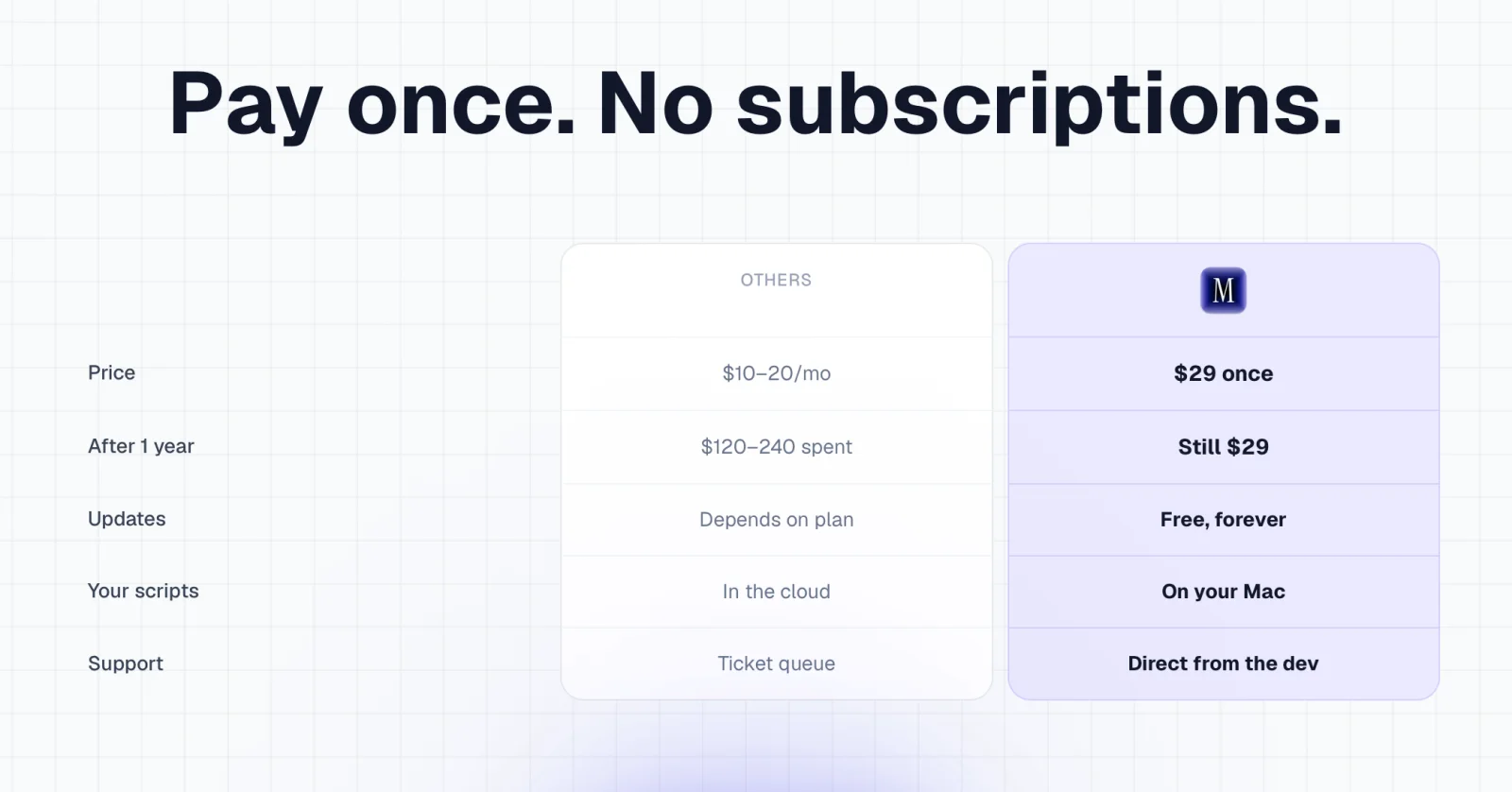
Neither app is a subscription, so this is a simple one-time comparison: Moody is $39, ShareSpeak is $14.99. You save $24.01 up front and add Windows support and a choice of speech engines. The Scripts Library — save and edit named scripts, with a live word count and speaking-time estimate — is included, no add-on, handy whether you're recording a tutorial or a teleprompter for YouTube.
- • Moody: $39 (Mac only)
- • ShareSpeak: $14.99 (Mac + Windows)
- • You save $24.01 and get Windows support
ShareSpeak vs Moody: which fits you
Choose ShareSpeak if…
you want to pay less than half ($14.99 vs $39), you use Windows or move between Mac and Windows, or you want a choice of speech engines and named saved scripts with word count and speaking time.
Choose Moody if…
you’re Mac-only on macOS 15 or later, want the most notch-native, polished design, and the extra ~$24 doesn’t matter to you.
Either works if…
you just need a one-time, invisible, voice-following teleprompter on a Mac. Both do the core job; it comes down to price, Windows support and design taste.
Where Moody genuinely beats ShareSpeak
We make ShareSpeak, so here’s the other side, from Moody’s own site (October 2026):
- Notch-first focus. Moody is built around the macOS notch, and the camera-positioned text and overall polish are its whole focus.
- Everything stays on your Mac. Its site says your scripts, notes and voice never leave your Mac, with no cloud uploads and no accounts. ShareSpeak needs no account either; its local Whisper engine keeps audio on the Mac (Apple Silicon, macOS 15 or later).
- An iPhone remote. Moody Remote lets you drive the prompter with gestures on your iPhone, alongside keyboard shortcuts and voice following.
- More built in. Moody Cue splits a script into sections you can jump between mid-talk, and a built-in screen recorder captures demos with your script running.
If those matter more to you than price and Windows support, Moody is a great choice.
When Moody is the right choice
Moody is worth it if:
- You're Mac-only and want the nicest notch integration. Moody is polished and notch-first — if design is what sways you, it's excellent.
- The price gap is immaterial. Both are one-time; if $39 vs $14.99 doesn't move you, pick the app you like the feel of.
Moving over from Moody in 3 steps
- Copy your scripts out of Moody (plain text is fine).
- Buy a license, then download ShareSpeak for Mac, or the Windows version, and paste the key on first launch. No account.
- Paste each script into ShareSpeak's Scripts Library, pick notch or overlay mode, and read — voice-following follows your pace.
Comparing other notch teleprompters?
Notchie
Another Mac notch teleprompter at $29.99 — see the Notchie alternative.
Tellie
Tellie Pro is $29 once and Apple Silicon only — see the Tellie alternative, or all notch apps in the best teleprompter for Mac list.
Cue
An iPhone teleprompter for selfie video — see the Cue teleprompter alternative.
AI teleprompter for Mac
The full rundown of ShareSpeak on macOS — see the AI teleprompter for Mac.
All alternatives
33 apps compared on the teleprompter alternatives hub.
Same notch teleprompter, less than half the price
A one-time $14.99 for an invisible notch teleprompter with voice-following — on Mac and Windows. No subscription, ever.
Use code FIRST100 for 25% off — $11.24 instead of $14.99
Moody alternative FAQ
How much does Moody cost?
As of October 2026, Moody is a one-time $39 (per moodyteleprompter.com; it was $29 in July 2026) — no subscription, and its homepage shows no trial link. ShareSpeak is also one-time, but $14.99 — less than half the price.
Is Moody available on Windows?
No. Moody is Mac-only and requires macOS 15 or later; its developers say it's "built specifically for macOS to take advantage of the macOS notch design," with no Windows version. ShareSpeak runs on both macOS and Windows for $14.99 once.
Is ShareSpeak cheaper than Moody?
Yes. Both are one-time purchases with no subscription, but ShareSpeak is $14.99 versus Moody's $39 — you save $24.01 and also get Windows support plus a choice of speech-recognition engines.
Does ShareSpeak have a notch mode like Moody?
Yes, on MacBooks with a notch (Apple Silicon, macOS 14 or later) ShareSpeak has a Notch Bar mode, a native Swift notch panel that scrolls your script right next to the camera, plus a floating overlay you can place anywhere — both invisible to screen capture. On Windows (where there's no notch) the overlay simply floats where you want it.
Can ShareSpeak be invisible during screen sharing, like Moody?
Yes. Moody says it stays hidden during screen sharing and even in screenshots; ShareSpeak is hidden from screen capture at the OS level too, so it stays out of Zoom, Google Meet, Microsoft Teams, OBS, Loom and other screen-sharing and recording apps, on Mac and on Windows.
Does ShareSpeak have a built-in script editor?
Yes — the Scripts Library. Save a script per call, per video, or per client, edit it in-app, and see a live word count and speaking-time estimate; hit Play to load it into the teleprompter. It's included in the one-time $14.99, no add-on.
Mac and Windows. $14.99 once.
An invisible teleprompter with voice-following — notch mode on Mac, a floating overlay on Windows — for less than half of Moody.
Buy ShareSpeak Now — $14.99