
Updated: September 2026 · Tellie pricing and requirements verified on tellieapp.com (version 1.6.2)
Tellie Alternative: ShareSpeak vs Tellie Pro Teleprompter for Mac
Tellie is a free Mac notch teleprompter, but its voice-following scroll lives in Tellie Pro, $29 once, and the app only runs on Apple Silicon Macs with macOS 14 or later (checked September 2026). ShareSpeak is the alternative if you want voice-follow for $14.99 once, or you work on an Intel Mac or Windows. Both stay invisible on Zoom, Meet and in screen recordings.
Choose ShareSpeak if…
you want the script to follow your voice and would rather pay $14.99 than $29, you have an Intel Mac or a Windows PC anywhere in your setup, or you want to pick the speech engine (Apple Speech, local Whisper, or Gemini).
Choose Tellie if…
a fixed-speed prompter is enough and you want it free, or you present from Keynote and want your speaker notes in the notch, or you want Stagehand to check off must-cover points and debrief each take.
Either works if…
you're on an M-series Mac and the job is reading a script near the camera while Zoom or OBS sees a clean screen. Both are one-time purchases, and neither has a subscription.
What the Tellie teleprompter actually is
Tellie is a Mac teleprompter that sits at the MacBook notch, next to the camera, and is excluded from screen capture. It's made by Steve Chazin, who answers support email himself. The free version is a working prompter rather than a demo: auto-scroll, mirror mode, opacity and font controls, and it opens Word, PDF, Pages and Markdown files with your headings turned into jump-to sections.
Tellie Pro is where the interesting parts are. Voice Follow tracks the words you say in 40+ languages, all on-device. Stagehand lets you mark must-cover sections that turn green as you cover them, warns you when a point is running out of time, and debriefs you afterwards. Presenter Magic puts Keynote speaker notes in the notch. No account, no cloud, no telemetry. It is a well-made app, and we'd rather say that than pretend otherwise.
The friction is in three places: what the free tier leaves out, which computers it runs on, and how it recognizes speech.
Where Tellie stops short
1. Voice Follow is the $29 part
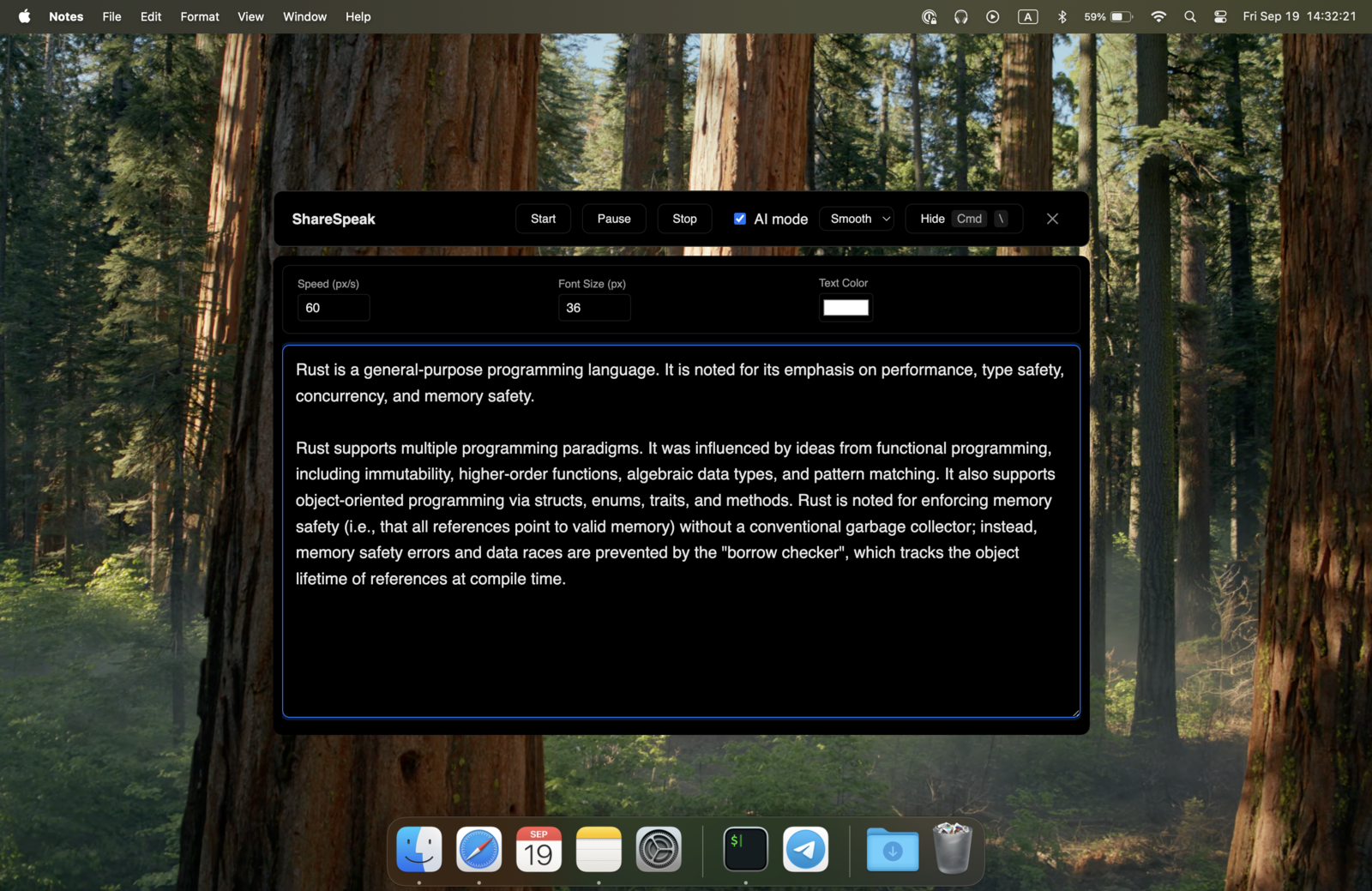
Tellie Free scrolls at a speed you set. The script following your voice, pausing when you pause and catching up when you ad-lib, is Pro. Every install gets Pro for 10 days; on day 11 Voice Follow, the resizable and detachable prompter, global hotkeys and playlists switch off unless you pay $29. ShareSpeak has one tier. $14.99 includes voice-follow, the floating resizable overlay, notch mode and the Scripts Library, and nothing turns off later.
2. Apple Silicon only: no Intel Macs, no Windows
Tellie's help page is direct about it: “Tellie requires an Apple Silicon Mac (M1 or later) running macOS 14 or later. It does not run on Intel Macs.” There is no Windows version. ShareSpeak ships a native build for Intel Macs and for Windows 10/11 (Windows download), and it's the same invisible teleprompter on each: hidden from Zoom, Meet, Teams, Loom and OBS. Need a Windows option? See how each teleprompter app for Windows compares.
3. One speech engine, tied to Apple's language list
Tellie's Voice Follow runs on Apple's on-device dictation models, so it covers the languages Apple ships a model for. Tellie says so itself and tells you to test your language during the trial before buying. ShareSpeak gives you three engines: Apple Speech Recognition (Apple Silicon), local Whisper models (offline), and Gemini (cloud, detects the language automatically, needs your API key and a connection).
The trade-off is real in the other direction too. With Gemini your audio goes to Google; Tellie never sends audio anywhere. If that matters, run ShareSpeak on Apple Speech or Whisper and it stays offline as well. More on the engines on our AI teleprompter for Mac page.
Tellie vs ShareSpeak: price and features side by side
Both are one-time purchases. Tellie figures verified on tellieapp.com, September 2026.
| Feature | ShareSpeak | Tellie |
|---|---|---|
| Price with voice-follow scrolling | $14.99 one-time | $29 one-time (Tellie Pro) |
| Subscription | No | No |
| Free tier | No (license key required) | Yes (fixed-speed prompter) |
| Trial | None | 10 days of Pro, no card |
| Mac, Apple Silicon | Yes | Yes (macOS 14+) |
| Mac, Intel | Yes | No |
| Windows 10/11 | Yes | No |
| Invisible on screen share and recordings | Yes | Yes (Free and Pro) |
| Voice-follow scrolling | Included | Pro only |
| Speech engines | Apple Speech, Whisper (local) or Gemini (cloud) | Apple on-device models, 40+ languages |
| Floating, resizable overlay | Included | Pro only |
| Scripts | Scripts Library (named, word count, speaking time); imports Word, Markdown and text files, headings become sections (0.4.2) | Opens Word, PDF, Pages, Markdown; playlists in Pro |
| Devices per license | 2, floating (Mac or Windows) | 3 Macs |
| Refund | Case-by-case, 21-day window | 14 days, no questions asked |
| Coaching and Keynote notes | No | Stagehand, Take Coach (beta), Presenter Magic (Pro) |
How the two teleprompter apps compare in real workflows
Recording talking-head video and screencasts
On an Apple Silicon Mac this is close to a tie: both apps sit by the camera, and both are excluded from screen capture, so OBS, Loom, QuickTime and Camtasia record a clean screen. The split is what you pay to have the script follow your voice while you record — $14.99 in ShareSpeak, $29 in Tellie, because Tellie Free scrolls at a fixed speed only.
Live calls on Zoom, Meet and Teams
Both stay hidden when you share your screen. Tellie Pro adds something we don't have: Stagehand ticks off must-cover points as you say them, which suits a sales call with a checklist. ShareSpeak's edge is the machine the call happens on. A lot of work laptops are Windows or older Intel MacBooks, and Tellie runs on neither.
More than one computer
A Tellie Pro license covers 3 Macs, all of which must be Apple Silicon. A ShareSpeak license covers 2 devices and floats between them, and ShareSpeak also runs on Intel Macs and Windows PCs. If every machine you own is an M-series Mac, Tellie's 3 seats are the better deal on count; mix in an Intel Mac or a PC and Tellie can't run there.
Setup guides for the common cases: teleprompter for Zoom, teleprompter for Camtasia recordings and teleprompter for sales demos.
When Tellie is the right choice
We make ShareSpeak, so read this section as the part we had least reason to write. Tellie wins here:
- You want free. Tellie Free is a complete fixed-speed prompter that stays invisible on calls, with no account and no expiry. ShareSpeak needs a $14.99 license to run at all. If you don't need voice-follow, Tellie costs $0 and we can't match that.
- You want to try before paying. 10 days of Pro with no card, then a 14-day no-questions refund. ShareSpeak has no trial, and our refund policy is case-by-case within 21 days.
- You present from Keynote. Presenter Magic shows each slide's speaker notes in the notch and can advance slides as you finish a point. ShareSpeak has no Keynote integration.
- You want coaching, not only scrolling. Stagehand's must-cover marks, time warnings and post-take debrief (Take Coach is in beta) have no equivalent in ShareSpeak.
- You work from PDF or Pages files. Tellie opens Word, PDF and Pages files directly and keeps their headings as sections. ShareSpeak 0.4.2 imports Word, Markdown and text files with headings as sections too, but for PDF and Pages you paste the text.
If none of those is your situation and what you want is a prompter that follows your voice, the math is $14.99 against $29, on more kinds of computer.
Switching from Tellie to ShareSpeak in 4 steps
- Your Tellie scripts are ordinary files on your Mac. Delete Stagehand marks (
## !and> key:lines); they're plain text and would appear in the prompter. - Download ShareSpeak for Mac (Apple Silicon or Intel) or for Windows, and enter your license key.
- Import the Word, Markdown and text files into the Scripts Library with the Import button (or drop them on it), and paste the text of PDF or Pages files into a new entry. Imported scripts are named after their files, and each one shows its word count and a speaking-time estimate. This is the same library described on our teleprompter with notes page.
- Pick a speech engine: Apple Speech on M1 or later, Whisper when you want to stay offline, Gemini if you switch languages. Choose notch mode or the floating overlay and press Play.
Voice-follow teleprompter for Mac and Windows, $14.99 once
One tier, one payment. Voice-follow, notch mode, the floating overlay and the Scripts Library are all in the $14.99, on Apple Silicon, Intel and Windows. If a free fixed-speed prompter on an M-series Mac is all you need, Tellie Free is a fair pick.
Use code FIRST100 for 25% off — $11.24 instead of $14.99
Tellie alternative FAQ
Is Tellie free?
Partly. As of September 2026, Tellie Free is a complete fixed-speed teleprompter: auto-scroll, mirror mode, opacity and font controls, and it stays invisible to Zoom and screen recorders. Voice Follow, the feature that scrolls the script as you speak, is part of Tellie Pro at $29 once. New installs get 10 days of Pro with no card, then drop to Free.
How much does Tellie Pro cost?
As of September 2026, Tellie Pro is $29 as a one-time payment, not a subscription. It covers up to 3 Macs, includes free updates for all of Tellie 1.x, and has a 14-day money-back guarantee. ShareSpeak is also a one-time purchase at $14.99, with voice-follow scrolling included, so it is the cheaper of the two for a prompter that follows your voice. Tellie Free costs nothing if fixed-speed scrolling is enough.
Does Tellie work on Windows?
No. Tellie is a Mac app. ShareSpeak runs on Windows 10 and 11 as well as macOS, and stays invisible during screen sharing on both.
Does Tellie work on Intel Macs?
No. Tellie's help page says it requires an Apple Silicon Mac (M1 or later) running macOS 14 or later, and that it does not run on Intel Macs. ShareSpeak ships an Intel build too; on Intel Macs voice-follow runs on Gemini with your own API key, because Apple Speech Recognition needs Apple Silicon.
Are Tellie and ShareSpeak invisible on Zoom?
Yes, both. Each app excludes its window from screen capture, so the script stays out of Zoom, Google Meet, Microsoft Teams, recordings and screenshots. Tellie does this on its free tier too. ShareSpeak does it on Windows as well as Mac.
Can I move my scripts from Tellie to ShareSpeak?
Yes. Tellie reads ordinary files stored on your Mac, so nothing is locked in. Since version 0.4.2, ShareSpeak imports Word (.docx), Markdown and text files straight into its Scripts Library, and Word headings (or # and ## lines in Markdown) become sections you can jump between; for PDF and Pages files, copy the text and paste it into a new entry. Delete any Stagehand marks first (lines starting with ## ! or > key:), because they would show up in the prompter.
More reading: the full teleprompter alternatives hub, other notch apps (Moody alternative, Notchie alternative), our best teleprompter for Mac list, or download ShareSpeak.