
Updated: July 2026
Riverside Teleprompter (2026): Plans, Guests + Alternative
Yes, Riverside has a built-in teleprompter — but it's not free, and it's host-only on Pro, Grow, and Webinar; only the custom Business plan gives guests one too. So if you're a guest, on the free plan, or just want a prompter without a subscription, ShareSpeak is a one-time $14.99 app any participant can run — invisible to the recording, on any plan.
Our verdict
Use Riverside's teleprompter if you're the host on Pro or higher and record everything inside Riverside — it's right there in the studio. Reach for ShareSpeak if you're a guest (host-only plans lock you out), you're on Riverside's free plan, or you'd rather pay once than €29+/month. One-line why: Riverside's prompter is a paid, host-first feature inside one studio; ShareSpeak is a one-time desktop prompter that works for anyone, invisible, on any platform.
Does Riverside have a teleprompter? The honest answer
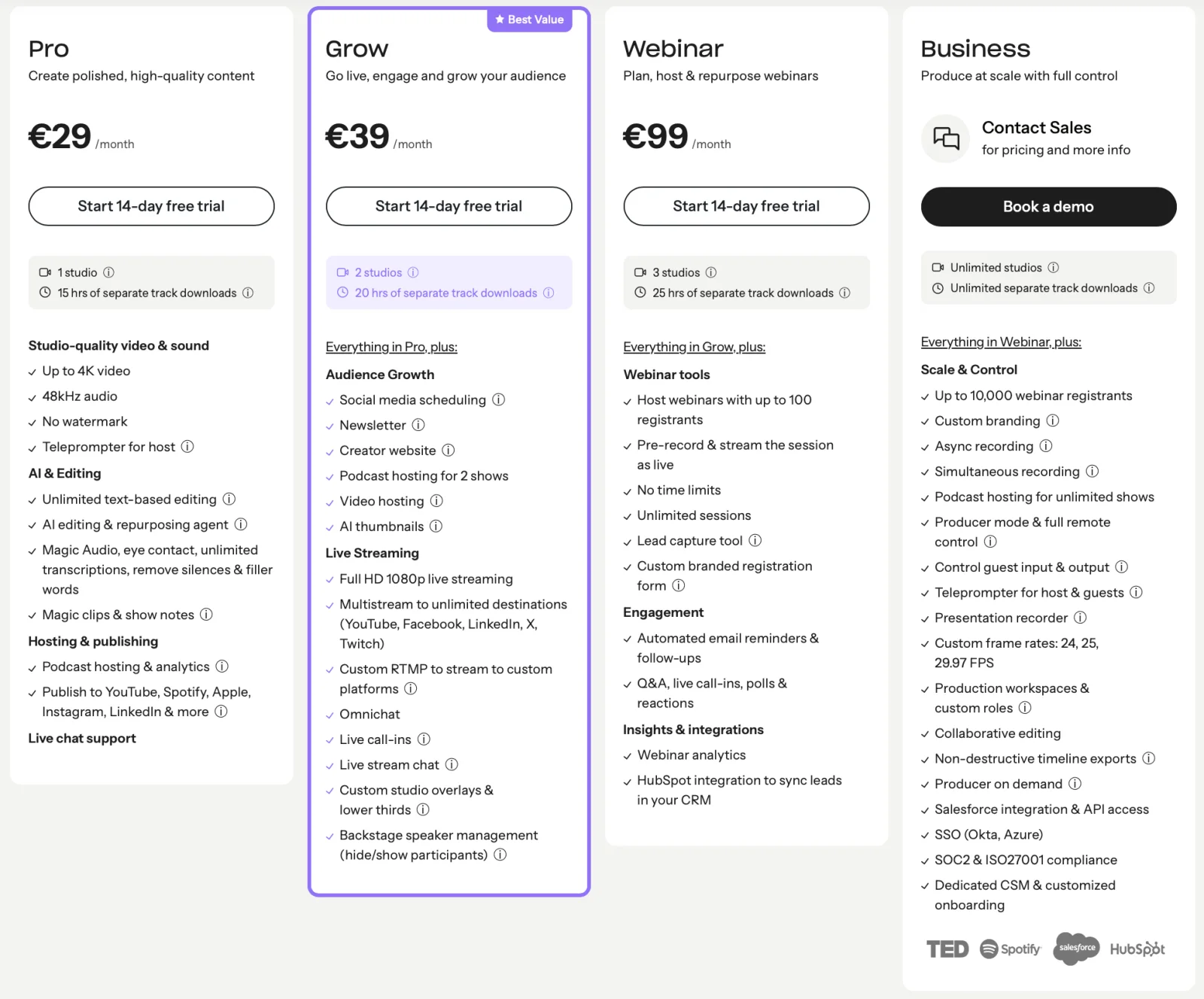
Riverside (riverside.com) is a browser-based recording studio for podcasts and video interviews, and it does include a teleprompter. The catch is where it's available. The free plan doesn't have it. It's included on Pro (€29/mo), Grow (€39/mo), and Webinar (€99/mo) — but on all three it's host-only. Guests only get a teleprompter on the custom Business plan.
For a solo host recording inside Riverside, that's fine. The friction shows up the moment a guest needs to read a script too, or when you're not on a paid plan.
The guest problem — and how ShareSpeak fixes it
Guests can't use it unless the host is on Business
On Pro, Grow, and Webinar, Riverside's teleprompter is host-only. If you're the guest on someone else's recording — an interviewee, a co-host, an expert dropping in — you simply don't get one, no matter how prepared you'd like to be. Upgrading to guest access means the host pays for the custom Business tier.
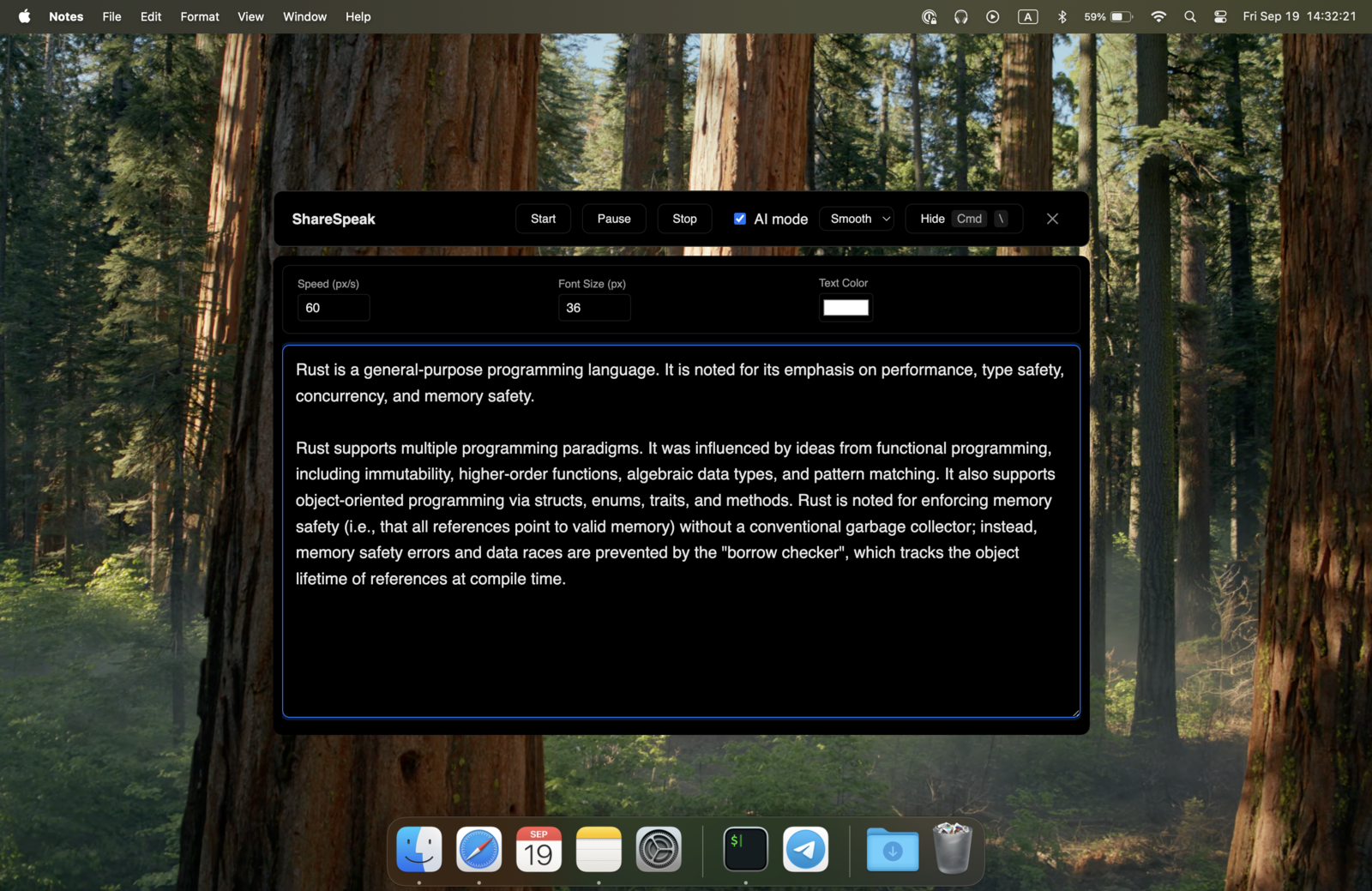
ShareSpeak fixes this from your side of the call: it's your own desktop app, and it's a native overlay hidden from capture at the OS level, so it stays out of the Riverside recording entirely — the same idea as our invisible teleprompter for screen sharing. You read your script; the host's plan doesn't matter. If you want the step-by-step, see how to set up a teleprompter for Riverside on any plan.
€29/month for Pro vs $14.99 once
Riverside's teleprompter starts at Pro: €29/month, with annual billing up to 20% cheaper. If the teleprompter is the main reason you'd upgrade, that's a steep subscription for one feature. ShareSpeak is $14.99 once — and it follows your voice as you speak, rather than scrolling at a fixed rate.
Cost over 2 years (per person):
- • Riverside Pro (monthly, €29/mo): €696 over 2 years (€29 × 24)
- • With annual billing: up to ~20% less
- • ShareSpeak: $14.99 once
See how the whole category compares in our teleprompter pricing comparison.
Riverside plans vs a one-time teleprompter
| Plan | Price (monthly · annual) | Teleprompter |
|---|---|---|
| Riverside Free | $0 | Not included |
| Riverside Pro | €29/mo | Host only |
| Riverside Grow | €39/mo | Host only |
| Riverside Business | Custom | Host & guests |
| ShareSpeak | $14.99 one-time | Anyone (host or guest) |
Riverside pricing per host in EUR as shown on riverside.com (July 2026); Webinar is €99/mo, Business is custom. Annual billing is up to 20% cheaper. Riverside bills in your local currency (e.g. $29 in USD regions).
It follows your voice, not a fixed speed
ShareSpeak's scroll tracks your speech: pause to think and it waits, speed up and it keeps up, all on-device. For an interview, a podcast, or a YouTube recording where the pace is unpredictable, that beats setting a scroll speed and hoping you match it.
Riverside vs Camtasia for teleprompter work
These solve different jobs. Riverside is a browser recording studio for interviews and podcasts; Camtasia is a desktop screen recorder and editor for tutorials. Neither is a dedicated teleprompter — Riverside's is host-only on paid plans, and Camtasia doesn't have one built in. ShareSpeak is the piece that works with either: a native overlay that stays invisible whether you're recording in Riverside or capturing a screencast with a teleprompter for Camtasia.
When Riverside's teleprompter is the right choice
Keep Riverside's built-in teleprompter if:
- You're the host and already pay for Pro or higher. It's built into the studio you're recording in — nothing extra to open.
- You want everything in one place. Record, prompt, and edit inside Riverside without a second app.
- Your guests are on your Business plan. If you've paid for guest teleprompters, they're built right into the room.
A teleprompter for any Riverside seat — $14.99 once
Host or guest, free plan or paid, ShareSpeak gives you a voice-following teleprompter that stays invisible to the recording. It's one of 25 tools on our teleprompter alternatives hub.
Use code FIRST100 for 25% off — $11.24 instead of $14.99
Frequently asked questions
Does Riverside have a teleprompter?
Yes — Riverside has a built-in teleprompter, but it isn't on the free plan. As of July 2026 it's included on Pro, Grow, and Webinar, and on those plans it's host-only ("Teleprompter for host"). Only the custom-priced Business plan gives both the host and guests a teleprompter. So whether Riverside's teleprompter works for you depends heavily on your plan and whether you're the host.
Is Riverside's teleprompter free?
No. The free plan doesn't include the teleprompter. The cheapest tier that does is Pro — €29/month, with annual billing up to 20% cheaper. Grow is €39/month and Webinar is €99/month. ShareSpeak, by contrast, is a one-time $14.99 with the teleprompter included, no tier.
Can guests use Riverside's teleprompter?
Only on the Business plan. On Pro, Grow, and Webinar, Riverside's teleprompter is host-only — a guest joining your recording can't read from it. ShareSpeak solves this from the guest's side: it's the guest's own desktop app, invisible to the recording, so a guest can read their script no matter what plan the host is on. Here's how to set up a teleprompter for a Riverside recording as a guest.
How much does Riverside cost in 2026?
Riverside has a Free plan, then Pro at €29/month, Grow at €39/month, Webinar at €99/month, and a custom Business plan. Annual billing is up to 20% cheaper (prices shown in EUR; Riverside bills in your local currency). The teleprompter starts at Pro and only reaches guests on Business.
Can ShareSpeak be invisible during a Riverside recording?
Yes. ShareSpeak is a native overlay hidden from screen capture at the OS level, so it stays out of your Riverside recording and any screen you share. Your script is on your screen; the recording and the other participants never see it.
Can I move my script into ShareSpeak?
Yes, by copy-paste. ShareSpeak accepts plain text, so paste your script into a new entry in ShareSpeak's Scripts Library (save one per episode or guest, with a live word count and speaking-time estimate). No import tool or account needed.
Works for the guest, not just the host
A voice-following teleprompter, invisible to your Riverside recording, on any plan — $14.99 once, no subscription.
Buy ShareSpeak Now — $14.99