
Cue Teleprompter Alternative — $14.99 Lifetime, Cross-Platform Desktop, No Paywall
Cue is a freemium iPhone-first teleprompter for short-form selfie videos — TikTok, Reels, Shorts. Their AI Voice Sync is genuinely good, but the workflow is mobile camera overlay locked behind a one-time paywall. ShareSpeak is a transparent $14.99 lifetime desktop AI teleprompter for laptop-based workflows — Zoom calls, Loom recordings, OBS streams, Camtasia tutorials. macOS and Windows. Pay once, every feature included. On a shared screen it works as an invisible teleprompter — hidden from Zoom, Meet, Teams, Loom and OBS at the OS level.
| Feature | ShareSpeak | Cue |
|---|---|---|
| Pricing Model | $14.99 once, all features | Free + paywall for Pro |
| Primary Use Case | Desktop screen workflows | iPhone selfie videos |
| AI Voice Tracking | ✓ | ✓ |
| Works on Zoom/Teams/Meet | ✓ | ✗ |
| Invisible to Screen Recording | ✓ | Records its own video |
| Windows Support | ✓ | ✗ |
| Works in OBS/Camtasia/Loom | ✓ | ✗ |
| Best For | Desktop creators | Mobile short-form creators |
Cue and ShareSpeak Are Built for Different Creators
Cue: Teleprompter for Creators is well-designed for one specific creator type: solo short-form mobile video makers. TikTok, Instagram Reels, YouTube Shorts, vertical promotional clips. iPhone-first design where you point the camera at yourself, AI Voice Sync follows your speech, the script overlays on the camera feed, and the in-app camera records the video. Cue's marketing rightly emphasizes the lack of upsell spam — there's one paywall, you cross it once, and the Pro features unlock.
For that specific creator profile, Cue is a real option. For the workflows where ShareSpeak shines, Cue isn't a fit:
- No Zoom/Teams/Meet integration — Cue captures its own camera and records its own video. Doesn't help during a live Zoom sales demo where your video is coming from Zoom's camera capture.
- No screen sharing workflow — running a product demo on screen share needs an overlay on your screen, not on a separate camera feed. Cue is camera-overlay-focused.
- No streaming integration — OBS, Streamlabs, StreamYard, Restream streamers need an overlay on their existing setup. Cue captures its own video output instead.
- No screen recording compatibility — Camtasia/ScreenFlow/Loom tutorials need an overlay invisible to the screen recorder, not a separate camera app.
- Windows users can't use it — Cue is iPhone-primary; Mac availability is limited; no Windows or Linux versions for the desktop overlay experience.
- Pro features behind a paywall — Cue's freemium model is honest about it, but you still cross a paywall to get the full experience. ShareSpeak's $14.99 includes everything up-front.
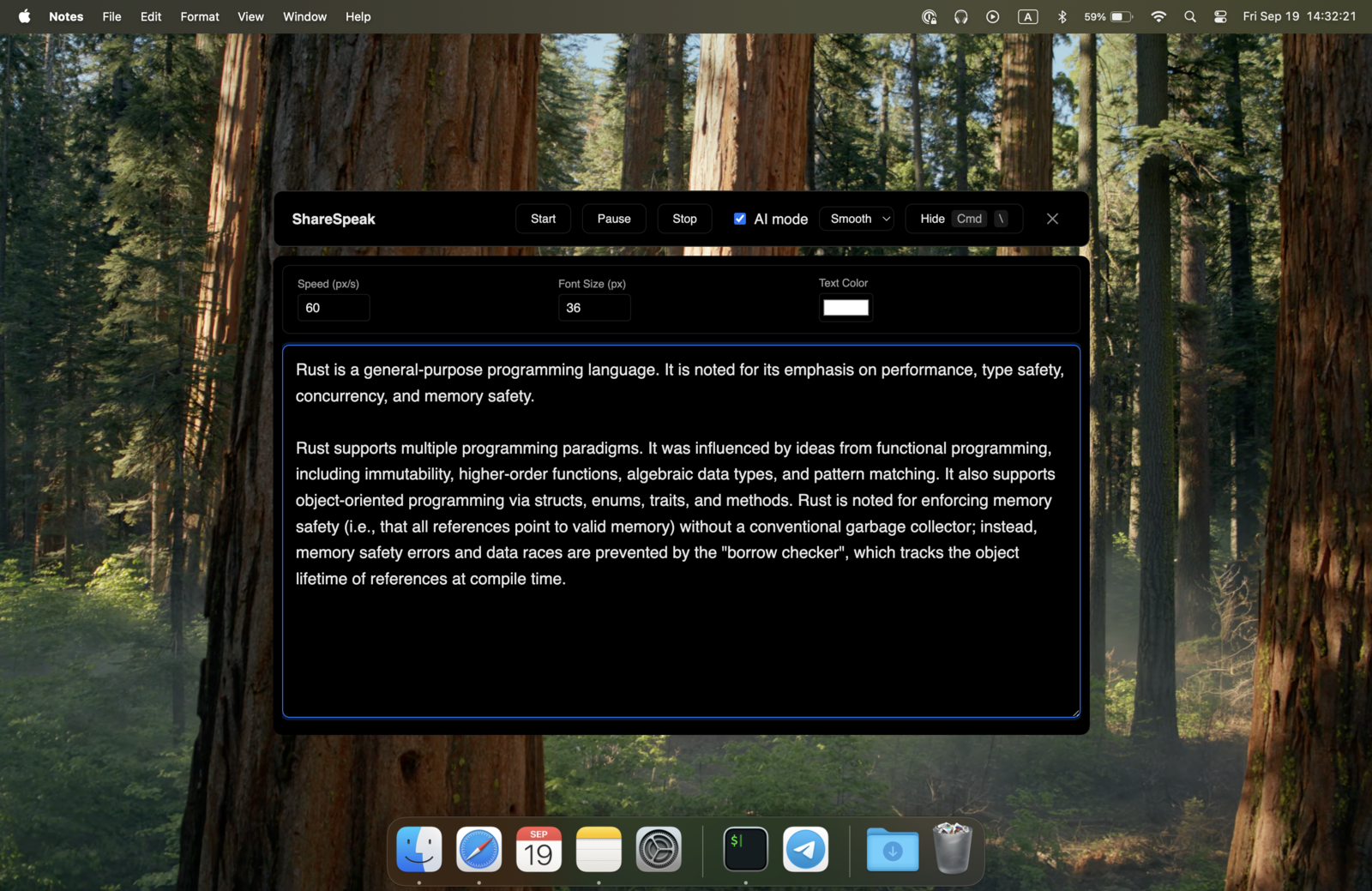
ShareSpeak is built for the opposite end: native desktop overlay on your laptop screen, invisible to every screen capture and video call platform. AI voice tracking at your natural pace. macOS AND Windows. $14.99 once, every feature unlocked from minute one.
Where ShareSpeak Wins That Cue Doesn't Try To
Native Desktop Overlay for Screen-Based Workflows
Cue's design assumption: you're holding an iPhone, your face is on camera, your script overlays on the camera feed. ShareSpeak's design assumption: your laptop is doing real work (sharing a demo, recording a tutorial, hosting a call), and you need the script floating on your screen — invisible to whatever recording, streaming, or video call tool you're using.
That fundamental difference shapes everything:
- Sales reps demoing software — prospect sees the screen-shared product UI, not the rep's face. Cue's selfie camera doesn't apply; ShareSpeak's screen overlay is the entire need.
- Course creators recording in Camtasia/ScreenFlow — recording the desktop screen, not a camera. ShareSpeak overlay invisible to the screen recorder; Cue's camera capture is irrelevant.
- Streamers — OBS captures game + screen + webcam composite. ShareSpeak invisible to the composite; Cue's standalone camera doesn't fit streaming.
- Webinar presenters — sharing slides on Zoom to attendees. Script overlay on the presenting laptop; Cue's camera focus doesn't address screen sharing.
Both Have AI Voice Tracking — But on Different Devices for Different Workflows
Credit where it's due: Cue's AI Voice Sync is a genuine feature, not a marketing claim. The script follows your speech automatically — same category of capability as ShareSpeak's voice tracking. The difference is the device and workflow, not the underlying tech.
Cue's voice sync runs on iPhone, tracking your speech while you point the phone camera at yourself. ShareSpeak's voice tracking runs on your desktop, advancing the script overlay while you do screen-based work. Same tech category, completely different scenarios:
- For a 30-second TikTok selfie, Cue's iPhone voice sync is perfect.
- For a 60-minute Zoom call running a product demo, Cue's iPhone-on-a-tripod-near-your-face is awkward at best.
- For Loom personalized customer videos with screen share, ShareSpeak's desktop overlay fits cleanly.
- For a 4-hour Twitch stream with game capture in OBS, ShareSpeak runs on the streaming machine where it's needed.
Mac AND Windows — Cue is iPhone-First
Cue is built primarily for iPhone. There's a Mac version that requires Apple Silicon (M1 or newer). No Windows version. No Linux version. For Apple ecosystem creators making mobile content, that scope is intentional and reasonable. For everyone else, the scope is a hard wall:
- Windows-issued enterprise laptops — common in sales orgs, customer success teams, B2B presenters, corporate creators
- Intel-era Macs (pre-Apple Silicon) — Cue's Mac version requires M1+, leaving older Mac users out
- Mixed teams — companies with both Mac and Windows laptops needing one consistent teleprompter solution
ShareSpeak runs native on both desktop operating systems. One $14.99 license covers Mac (Apple Silicon AND Intel) and Windows. Same feature set across both platforms.
Transparent $14.99 — Not Freemium with a Paywall
Cue's pricing is freemium with a Pro paywall. The marketing emphasizes "one paywall, no upsell spam" — and credit to them for that approach versus aggressive upsell competitors. But the structure is still: download free, hit a paywall to access Pro features, pay to unlock.
ShareSpeak's structure is different from minute one:
- $14.99 once — you see the price, you pay the price, you get the full app
- Every feature unlocked — AI voice tracking, unlimited script size, multi-platform support, MacBook notch integration, all included from day one
- No paywall screen — there's nothing to unlock because everything is already unlocked
- Free updates forever — Pro tier doesn't change to a new "Pro+" tier next year
- No re-engagement nudges — buy it once, use it forever
For people who prefer "I see the price, I pay the price, I'm done" over "free with paywall surprise" — ShareSpeak's model is the simpler relationship with the tool.
Invisible to Every Recording and Streaming Tool
Cue captures its own video. ShareSpeak overlays on whatever tool you're using and stays invisible to it:
- Zoom, Teams, Meet — invisible during screen share
- Loom — invisible in async recordings
- OBS, Streamlabs, StreamYard, Restream — invisible to streaming capture
- Camtasia, ScreenFlow — invisible to tutorial recording
- QuickTime, Riverside, Squadcast, Ecamm Live — invisible to all
Your existing tools do the recording/streaming. ShareSpeak adds the invisible script layer.
When Cue Is Actually the Right Tool
Honest framing — ShareSpeak doesn't replace Cue for everyone. Choose Cue when:
- Mobile-first short-form creator — TikTok, Instagram Reels, YouTube Shorts, vertical-only content
- All-in-one preference — you want script + camera + recording in one app instead of three tools
- iPhone is your primary creator device — you don't work from a laptop
- Want to try before paying — Cue's free tier lets you test before crossing the paywall
- Short scripts on the go — 30-90 second pieces filmed wherever you are
For everyone else — desktop-based creators, sales reps doing remote demos, course creators, streamers, webinar hosts, anyone using Windows — ShareSpeak's screen-overlay design is the right shape.
Where ShareSpeak's Desktop Design Wins
Remote Sales Reps
Live Zoom demos sharing product UI to prospects. Cue's iPhone camera doesn't apply; ShareSpeak's screen overlay does.
Course Creators in Camtasia/ScreenFlow
Screen recording tutorials need an overlay on the recording laptop, not on a separate iPhone. ShareSpeak fits; Cue doesn't.
Twitch/YouTube Live Streamers
Live streaming pulls from your desktop OBS or Streamlabs setup. Teleprompter has to be on the same machine — Cue's mobile design doesn't fit.
Webinar & Workshop Hosts
Sharing slides on Zoom/Teams to attendees. Script overlay on the presenting laptop, invisible to the audience.
Windows-Based Enterprise Users
Cue doesn't run on Windows. Most enterprise sales orgs, customer success teams, B2B creators use Windows laptops.
Long-Form Content Creators
60-min webinars, 90-min podcast interviews, 2-hour livestreams. Voice tracking matters across the full session — desktop overlay handles it.
The Pricing Model Difference
Cue: Freemium with Paywall
Download free. Hit a paywall to access Pro features. Pay one-time to unlock (Cue claims no subscription spam — credit to them). Total cost depends on the Pro tier at time of purchase.
ShareSpeak: Transparent Flat Price
See $14.99 up-front, pay $14.99 up-front, every feature unlocked from minute one. No paywall screen because there's nothing to unlock.
Different business models, both honest about their structure. ShareSpeak's "see the price, pay the price" is simpler if that's your preference.
Compare to other AI teleprompter options for desktop: PromptSmart Pro at $9.99/month subscription, Teleprompter.com at $20/month, Elgato Prompter at $299 hardware. ShareSpeak hits the lowest one-time cost for desktop AI teleprompter. For the full lineup, browse our teleprompter alternatives hub.
Native on Mac and Windows
Cue is iPhone-primary with limited Mac availability and no Windows or Linux. ShareSpeak runs natively on both desktop platforms with consistent feature set.
$14.99 once per user. One license covers both platforms forever.
The Desktop AI Teleprompter Cue Doesn't Try to Be
Download ShareSpeak. Run it on your laptop. Get AI voice tracking, native screen overlay, cross-platform support, and one transparent price. $14.99 once. Every feature unlocked from minute one.
Use code FIRST100 for 25% off — $11.24 instead of $14.99
Frequently Asked Questions
Is ShareSpeak a full Cue replacement?
Not exactly — they target different creator workflows. Cue is built for iPhone-based short-form selfie video creators. ShareSpeak is built for desktop-based screen workflows. If you make TikTok or Reels content with your iPhone, Cue is genuinely a good fit. If you do Zoom calls, Loom recordings, OBS streams, or Camtasia tutorials from a laptop, ShareSpeak is the fit.
Both have AI voice tracking — what's actually different?
The underlying AI category is similar — both follow your speech to advance the script. The difference is the device and workflow: Cue's voice sync runs on iPhone tracking your speech while filming yourself; ShareSpeak's voice tracking runs on your laptop while you do screen-based work. Same tech category applied to opposite workflows.
Does ShareSpeak work on Windows like Cue doesn't?
Yes. ShareSpeak runs natively on Windows 10/11, plus Mac (Apple Silicon + Intel). Cue is iPhone-primary; Mac availability is limited; no Windows or Linux versions. If your work laptop is Windows, ShareSpeak is the answer Cue can't be.
Why pay $14.99 up-front when Cue is free to start?
Different business models. Cue's freemium structure lets you try before paying — useful if you're not sure you'll use it. ShareSpeak's transparent $14.99 means you see the full price up-front and get every feature from minute one. If you prefer "see the price, pay the price, done" over "free with paywall surprise later," ShareSpeak's structure fits better. ShareSpeak also offers a 21-day refund if it doesn't work for you.
Can I use both — Cue for mobile, ShareSpeak for laptop?
Yes. They serve different scenarios entirely. Many creators use mobile teleprompters like Cue for vertical short-form content shot with their phone, and ShareSpeak for laptop-based work (Zoom calls, screen recordings, streaming, webinars). Different tools for different jobs — no conflict.
Works with screen recording tools like Camtasia, ScreenFlow, OBS?
Yes — this is the core ShareSpeak use case. OS-level invisibility means screen recording tools don't see ShareSpeak in their capture. Your finished video files contain only what you legitimately recorded. Cue's standalone camera design doesn't apply to this workflow at all.
Does ShareSpeak include a built-in video recorder like Cue?
No. ShareSpeak is a teleprompter overlay only, not a recording tool. You pair it with whatever screen recorder or video tool you already use — QuickTime (free Mac), OBS Studio (free, all platforms), Loom, Camtasia, ScreenFlow, Zoom recording. ShareSpeak adds the invisible script layer; your existing tool handles the capture.
Team licensing for creators or sales teams?
Each person buys their own — $14.99 once per user. For a 10-person creator team, $149.90 total forever. Compare to Cue where each user crosses their own paywall at the Pro tier price. ShareSpeak's per-rep one-time desktop license is simpler for team budgeting.
Native Desktop AI Teleprompter Cue Doesn't Cover
Mac and Windows. AI voice tracking. Invisible to every recording tool. Transparent $14.99, no paywall surprise.
Get ShareSpeak — $14.99