
TelePrompt+ Alternative — Cross-Platform AI Teleprompter for Mac and Windows
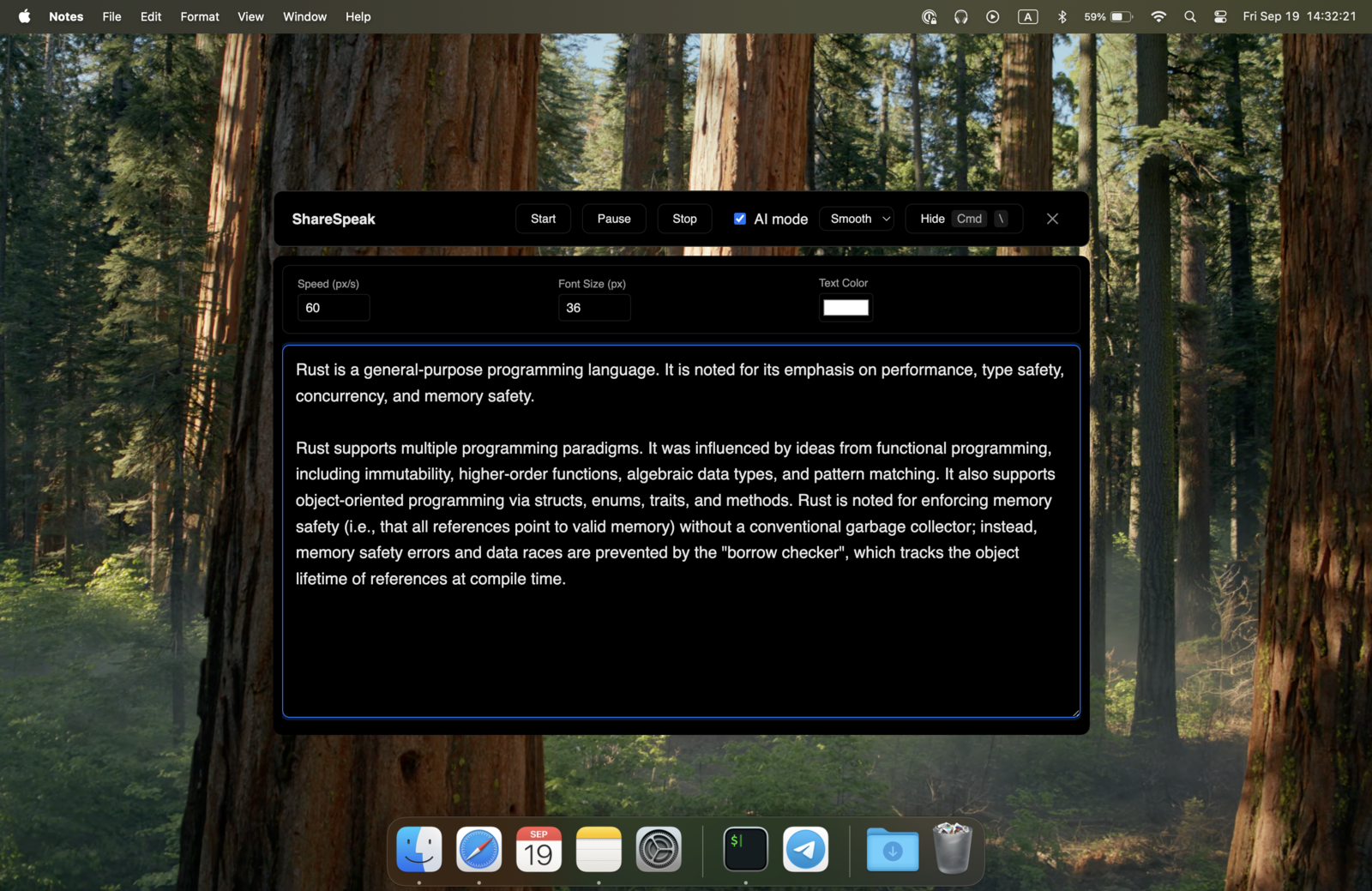
TelePrompt+ has been the iPad teleprompter standard since 2010. Bombing Brain built it for hardware rigs — iPad in a beam-splitter teleprompter behind a camera, foot pedal scroll control, broadcast-studio workflow. If you instead need a teleprompter for modern screen-based work — Zoom calls, Loom recordings, OBS streams, Camtasia tutorials — ShareSpeak runs natively on Mac and Windows with AI voice tracking. $14.99 once vs $29.99 iPad-only. And unlike an iPad rig, it doubles as an invisible teleprompter on your computer — hidden from screen capture during calls and recordings.
| Feature | ShareSpeak | TelePrompt+ |
|---|---|---|
| Pricing | $14.99 Lifetime | $29.99 (App Store) |
| Platforms | macOS and Windows | iPad, iPhone only |
| AI Voice Tracking | ✓ | ✗ |
| Native Desktop Overlay | ✓ | Separate iPad screen |
| Works on Zoom/Teams/Meet | ✓ | Requires separate iPad |
| Hardware Rig Required | No | iPad rig for pro use |
| Invisible to Screen Recording | ✓ | N/A (iPad-based) |
| Apple Watch / Foot Pedal Control | Voice-tracked (hands-free) | ✓ |
| Best For | Screen-based workflows | Hardware rig workflows |
TelePrompt+ Is Excellent for One Specific Workflow — and No Others
TelePrompt+ deserves its reputation. Since 2010, Bombing Brain has refined it for the professional broadcast workflow: iPad mounted behind a beam-splitter teleprompter glass, the iPad screen showing your script, the camera capturing through the glass while you read at near-camera eye level. Foot pedal under your desk to control scroll. Apple Watch app for remote control. A real broadcast-grade tool.
For that workflow, TelePrompt+ is great. For every other modern teleprompter use case, the iOS-only design becomes a hard wall:
- No Mac or Windows version — your teleprompter has to live on a separate iPad. If you don't have an iPad, you can't use TelePrompt+ at all.
- Doesn't help with Zoom, Teams, or Meet calls — those happen on your laptop. The iPad teleprompter is across the room behind a camera rig. Mid-Zoom-call eye-darts to the iPad are visible to every participant.
- No screen recording integration — Camtasia/ScreenFlow/OBS users recording from their computer can't overlay TelePrompt+ on their recording. The teleprompter is on a separate device entirely.
- Fixed-speed scrolling, no AI voice tracking — you set the scroll speed and have to match it, or use a foot pedal/remote to advance. No AI listening to your voice and adapting pace.
- iPad teleprompter hardware kit costs $200-$2,000+ — Glide Gear, Padcaster, Ikan, Datavideo rigs. TelePrompt+ assumes you have one. Without it, the iPad sits awkwardly next to your camera and you're looking sideways the whole time.
- Workflow is unchanged since 2010 — script management, control modes, file sync. Solid, mature, traditional. Doesn't fit the modern remote-work / screen-sharing reality.
ShareSpeak takes the opposite approach. A native overlay that sits on top of your laptop screen — invisible to Zoom, Teams, Meet, Loom, OBS, Camtasia, ScreenFlow, every modern screen-based tool. Voice-tracked AI that follows your natural speech. $14.99 once, no hardware kit required.
The Cross-Platform AI Upgrade
Mac and Windows — Not iOS-Only
TelePrompt+'s biggest limitation is the platform list. iPad and iPhone. That's it. No Mac (the laptop most creators actually work on). No Windows (where most enterprise sales reps live).
ShareSpeak runs native on both desktop platforms:
- macOS — Apple Silicon native (M1/M2/M3/M4), MacBook notch integration, on-device speech recognition
- Windows — works on Windows 10/11, low CPU footprint, native invisibility to all screen capture
One license covers both. If you switch laptops, change companies, or join a mixed-platform team, ShareSpeak follows you. Picking a teleprompter app for Windows? Start with our ranked comparison.
AI Voice Tracking vs Fixed-Speed Scroll + Foot Pedal
TelePrompt+'s control modes are all manual: fixed-speed auto-scroll, manual swipe, foot pedal (USB or Bluetooth), Apple Watch remote, BT remote. Professional broadcast workflows are built around this — a producer or assistant controlling scroll while you read. Solo creators have to multitask: read the script AND tap the pedal AND watch the camera.
ShareSpeak's AI listens to your voice and advances the script at your natural pace. No pedal, no remote, no producer needed:
- Slow down for emphasis? Script slows with you.
- Speed through familiar setup? Script keeps up.
- Pause to take a question or check a demo? Script waits.
- Go off-script for a tangent? Script holds your spot until you return.
Native Desktop Overlay — Not a Separate iPad Across the Room
TelePrompt+ requires the iPad to be on a teleprompter rig in front of (or near) your camera. That works for a static studio setup. For modern remote work, it's awkward:
- Zoom call — your laptop has the camera, the iPad is somewhere else. You're either looking at the iPad (away from your laptop camera) or at the laptop (away from the iPad). Both look obvious to participants.
- Loom or screen recording — your laptop captures the screen, the iPad is irrelevant. You can't overlay TelePrompt+ on your captured demo.
- Couch or laptop-only setup — many creators don't have a permanent teleprompter rig. TelePrompt+ becomes "iPad on a stand awkwardly placed near the camera."
ShareSpeak lives on your laptop screen, where your camera is. Position the script next to your webcam for near-eye-contact reading. No rig, no second device, no setup time.
Invisible to Screen Recording — Works for Screencasters
TelePrompt+ exists on a separate iPad. Your screen recording on your computer can't include the iPad's teleprompter — and shouldn't want to. That means for screencast tutorials, software demos, or screen-recorded sales calls, TelePrompt+ isn't part of the workflow at all.
ShareSpeak is OS-level invisible to all screen capture tools — Camtasia, ScreenFlow, OBS, Loom, QuickTime, Riverside, Zoom recording. Your overlay shows on your screen for you; capture tools never see it. Your finished recording is clean, your script delivery is polished.
$14.99 vs $29.99 — and No $200-$2,000 iPad Rig
TelePrompt+ itself is $29.99 on the App Store — reasonable for a professional iPad app. The hidden cost is the iPad teleprompter hardware kit needed for the workflow it's designed for:
- Entry-level iPad teleprompter rig — $200-$400 (Glide Gear, basic Padcaster)
- Mid-tier rigs with beam splitter — $400-$900 (Ikan PT-Elite, Datavideo)
- Pro studio rigs — $1,000-$2,000+ (Prompter People, broadcast-grade)
- Foot pedal — $50-$150 (PageFlip Firefly, etc.)
- iPad itself — $329-$1,299+ depending on model
Full TelePrompt+ setup: $500-$3,500+ depending on hardware tier.
ShareSpeak setup: $14.99. The laptop you already own. The webcam built into it. Done.
Built for the Modern Screen-Based Workflow
TelePrompt+'s workflow is the traditional broadcast model: rehearsed script, fixed-pace delivery, hardware control, separate teleprompter screen. Built for news anchors, formal corporate videos, and pre-rehearsed monologues.
Modern teleprompter use cases are different:
- Zoom/Teams/Meet calls — invisible overlay on the laptop you're already using
- Loom async recordings — voice-tracked script for personalized customer videos
- OBS/StreamYard/Restream streaming — overlay across all streaming platforms
- Camtasia/ScreenFlow tutorials — invisible during screen recording
- Sales demos — per-account scripts, voice-paced through objections
None of these benefit from an iPad teleprompter rig. All of them benefit from a native desktop overlay with voice tracking.
When TelePrompt+ Is Still the Right Tool
We won't pretend ShareSpeak replaces TelePrompt+ for everyone. Choose TelePrompt+ when:
- You have an iPad teleprompter rig already and are happy with the workflow
- Traditional broadcast-studio production — news anchor desk, corporate video studio with hardware
- Outdoor mobile filming — iPad in a rig with a camera, no laptop in sight
- Foot pedal control matters for your workflow (concert teleprompting, theater performance, live events)
- You prefer rehearsed fixed-pace delivery over voice-tracked natural pace
- Your camera operator runs the prompter while you read — TelePrompt+'s remote control design fits that producer workflow
For everyone else — solo creators on a laptop, remote sales reps, course creators recording in Camtasia, streamers using OBS, podcasters on Riverside, founders pitching investors — ShareSpeak's screen-based, voice-tracked, cross-platform design is the right shape.
Where Cross-Platform AI Beats iOS-Only Hardware
Remote Sales Reps on Laptops
Demos and discovery calls on a MacBook or Windows laptop. No iPad rig setup time, no separate device eye-darts. Per-account scripts ready, voice-tracked.
Course Creators in Camtasia/ScreenFlow
Screen recording tutorials need an overlay on the recording laptop, not on a separate iPad. ShareSpeak is invisible to every screen recorder.
Streamers (Twitch, YouTube, OBS)
Live streaming pulls from your computer. The teleprompter has to be on the same machine. iPad teleprompters can't help streamers.
Webinar & Workshop Presenters
Zoom/Teams webinars where you share your laptop screen with attendees. iPad teleprompter is irrelevant; you need an overlay on your sharing screen.
Founders & Consultants
Investor pitches, sales calls, async customer videos — all from a laptop. No hardware rig in sight. ShareSpeak is the fit; TelePrompt+ isn't.
Non-iPad Households
Many creators don't own an iPad. TelePrompt+ is unusable without one. ShareSpeak works on whatever laptop you already have — no extra hardware needed.
Honest Cost Comparison
Full TelePrompt+ Pro Setup:
- • TelePrompt+ app: $29.99
- • iPad (8th gen or newer): $329–$1,299
- • iPad teleprompter rig with beam splitter: $400–$900
- • Foot pedal (optional): $50–$150
- • Total: $810–$2,380
ShareSpeak Setup:
- • ShareSpeak: $14.99 (lifetime)
- • Your existing laptop: $0
- • Total: $14.99
For screen-based workflows, ShareSpeak delivers 95% of the value for a fraction of the cost.
Compare to other Mac/Windows teleprompter options: PromptSmart Pro at $9.99/month, Teleprompter.com at $20/month, Elgato Prompter at $299 hardware. ShareSpeak hits the lowest total cost among modern cross-platform options. For the full lineup, browse our teleprompter alternatives hub.
The Platforms TelePrompt+ Doesn't Reach
TelePrompt+ is iPad and iPhone only. ShareSpeak is native on the two desktop platforms most creators actually work from.
$14.99 once. One license, both platforms, forever.
The Teleprompter for the Workflow TelePrompt+ Wasn't Built For
Download ShareSpeak. Run it on the laptop you already work from. Get AI voice tracking, cross-platform support, and screen recording invisibility — for $14.99 once. Cheaper than the iPad case for TelePrompt+'s rig.
Use code FIRST100 for 25% off — $11.24 instead of $14.99
Frequently Asked Questions
Is ShareSpeak a full TelePrompt+ replacement?
No — and we won't pretend it is. TelePrompt+ is designed for the iPad-in-a-hardware-teleprompter-rig workflow. ShareSpeak is designed for screen-based workflows on a laptop. If your setup is "iPad mounted behind a beam splitter with a foot pedal," TelePrompt+ is the right tool. If your setup is "laptop with built-in webcam, used for Zoom/Loom/OBS/Camtasia," ShareSpeak is the right tool.
Does ShareSpeak work on iPad like TelePrompt+ does?
No. ShareSpeak is desktop-only — Mac and Windows. We don't have iOS apps. For iPad-based workflows with hardware teleprompter rigs, TelePrompt+ remains the right tool. ShareSpeak is the opposite design: native desktop overlay for the laptop you're already working on.
Does it support foot pedal control like TelePrompt+?
No — and you don't need it. ShareSpeak's AI voice tracking is hands-free by design. The script advances at your speech pace automatically. Foot pedals exist because traditional teleprompters need someone to advance the text manually; voice tracking removes that requirement entirely. If you specifically want pedal-based control for a broadcast workflow, TelePrompt+'s foot pedal support is genuinely useful there.
Does ShareSpeak work with iPad teleprompter rigs?
ShareSpeak runs on a desktop computer, not an iPad. So if your workflow specifically requires an iPad mounted in a beam-splitter teleprompter rig in front of a camera, ShareSpeak isn't the answer — TelePrompt+ is built for exactly that. If you want to skip the rig entirely and use your laptop's built-in camera (which most modern creators do), ShareSpeak is the simpler path.
Why is ShareSpeak cheaper than TelePrompt+?
$14.99 vs $29.99 is the one-time cost. The bigger savings are hardware: TelePrompt+ assumes you have a $200-$900 teleprompter rig plus a $329-$1,299 iPad. ShareSpeak uses the laptop you already own. Lower software price + zero added hardware = dramatic total cost difference.
Can I use both — TelePrompt+ for studio work, ShareSpeak for laptop work?
Yes. They don't conflict at all because they don't overlap. TelePrompt+ runs on your iPad for hardware-rig workflows. ShareSpeak runs on your laptop for screen-based workflows. Many professional creators use both, depending on the project.
Does it have script management like TelePrompt+?
ShareSpeak treats scripts as simple text files you paste in per session. No Dropbox/Google Drive sync, no Apple Watch script-switching, no Bluetooth keyboard shortcuts. If you need TelePrompt+'s extensive script management ecosystem, it's still genuinely better at that. ShareSpeak's approach is "your scripts already live in Notion/Docs; paste the one you need before each session."
Team or studio licensing?
Each person buys their own — $14.99 once. For a 10-person creator team, $149.90 total forever. Compare to TelePrompt+ at $29.99 per device — though for TelePrompt+'s hardware-rig workflow, the per-device cost is the smallest line item anyway (the rigs and iPads dominate).
The Cross-Platform AI Teleprompter for Laptops, Not iPad Rigs
Mac and Windows. Voice-tracked AI. Invisible to screen recording. $14.99 once vs $29.99 + $500-$2,000 iPad rig. Forever.
Get ShareSpeak — $14.99