
Updated: October 2026
PromptSmart Pro Alternative: $14.99 Once, Not $99.99 a Year
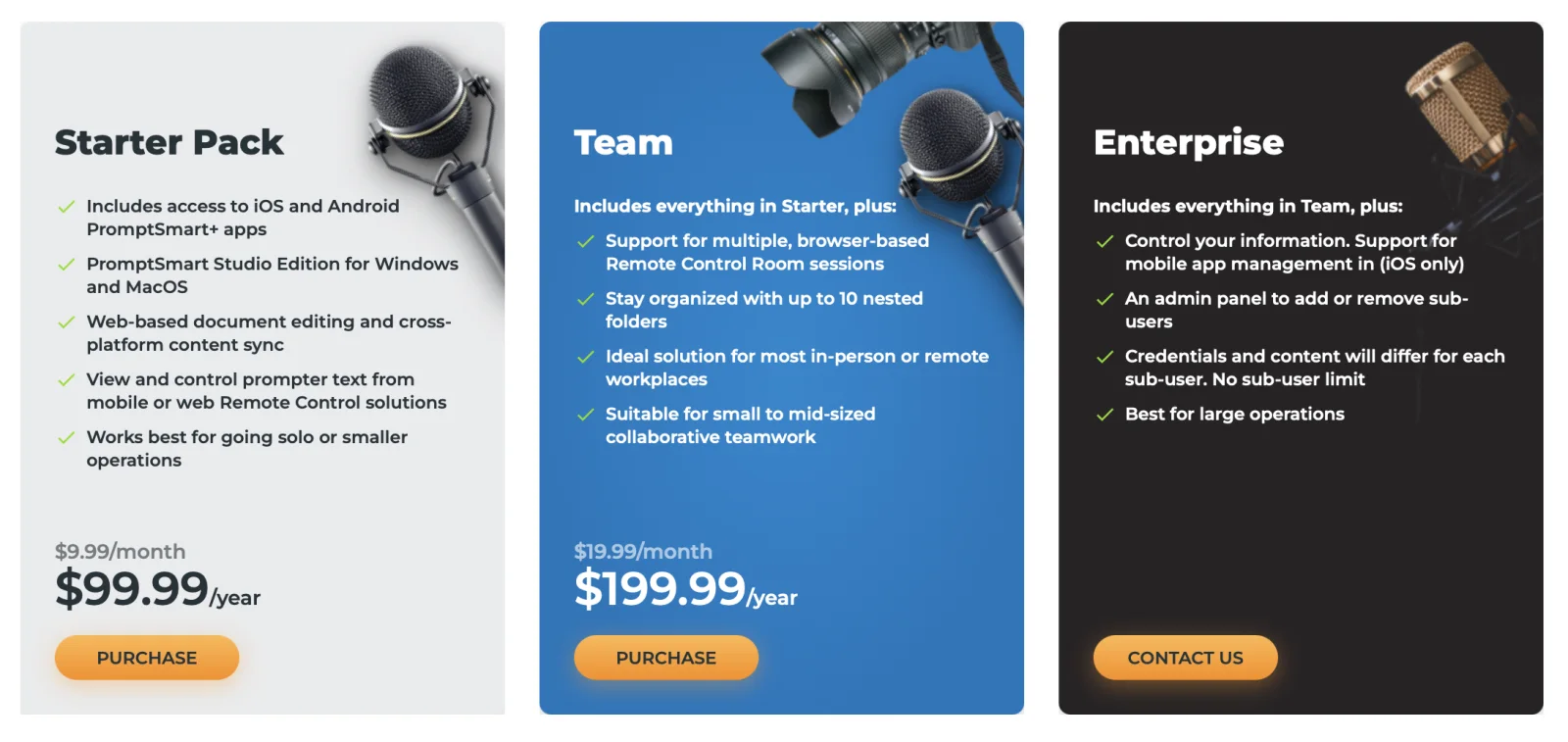
As of October 2026, PromptSmart Pro is subscription-only: the Starter Pack is $9.99/month or $99.99/year and the Team plan is $19.99/month or $199.99/year, after a 7-day trial. ShareSpeak is a one-time $14.99 alternative — the same voice-tracked scrolling, but invisible during screen sharing and yours for life. See the full PromptSmart Pro pricing breakdown.
Our verdict
Switch to ShareSpeak if you record or present from a Mac or Windows desktop and want a one-time price plus an overlay that stays hidden in OBS, Zoom, Loom, and Camtasia. Stay on PromptSmart if your workflow is iPhone/iPad-first, you run a studio rig you control from your phone, or your team needs its Remote Control Rooms, nested folders, and admin panel. One-line why: PromptSmart is a subscription built around mobile and remote control; ShareSpeak is a one-time desktop teleprompter built to disappear on screen share.
| Feature | ShareSpeak | PromptSmart Pro |
|---|---|---|
| Price model | $14.99 one-time | $9.99/mo or $99.99/yr (Starter); $19.99/mo or $199.99/yr (Team) |
| macOS | ✓ | ✓ |
| Windows | ✓ | Studio Edition (paid) |
| Voice-following scroll | ✓ | VoiceTrack |
| Invisible to screen capture | ✓ | Not stated (semi-transparent window) |
| Works offline, no account | ✓ | Account + cloud sync |
| Phone/web remote control, team folders | ✗ | ✓ |
What PromptSmart Pro actually is
PromptSmart is one of the best-known voice-following teleprompters, and it earned that reputation. It started on iOS and iPad, and its patented VoiceTrack — the prompter scrolls as you speak — was genuinely ahead of its time. Today it spans iOS, Android, a web editor, and the PromptSmart Studio Edition for Windows and macOS. Comparing PC options? See our ranking of the best teleprompter software for Windows.
It's strongest for people who use a phone or tablet in a physical rig: you can control the prompter text remotely from another device, and the Team plan adds browser-based Remote Control Room sessions and up to 10 nested folders for organizing scripts across a group. If you run a studio, present from an iPad on a stand, or manage scripts for a whole team, PromptSmart's model fits.
Where it breaks for screen recording
It shows up in your screen capture
PromptSmart's prompter is an ordinary on-screen window. If you're recording a tutorial with OBS, sharing your screen on Zoom, or capturing a demo in Loom, the prompter is in the frame — unless you run it on a separate phone or tablet off to the side. For desktop screencasters that's the whole problem: you either buy a second device or your viewers see your script.
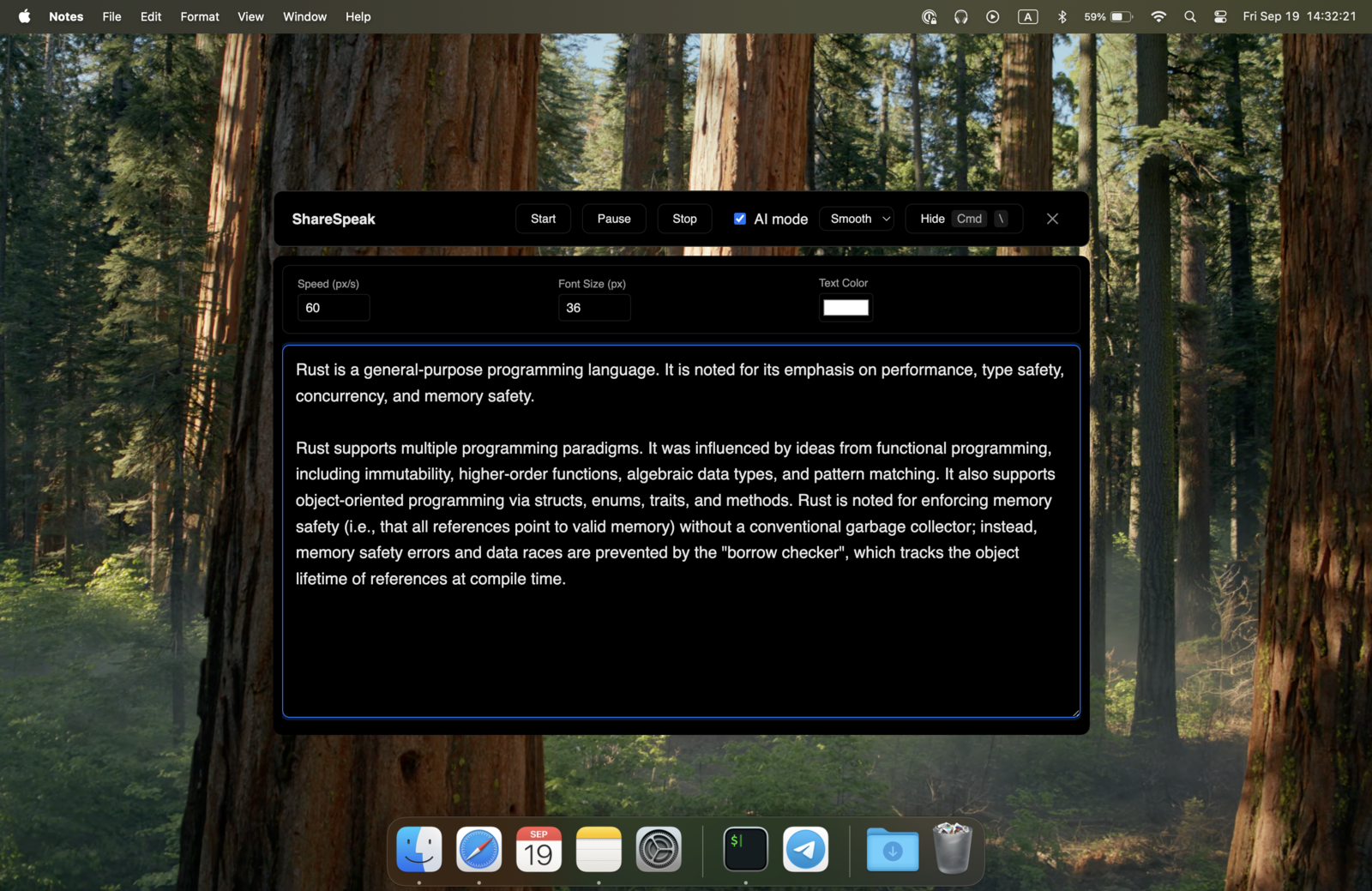
ShareSpeak is built the other way around: it's an overlay that's hidden from capture at the OS level, so a single laptop is all you need. That's the same technique behind our invisible teleprompter for screen sharing.
$99.99/year vs $14.99 once
PromptSmart's cheapest paid tier is $9.99/month, or $99.99/year on annual billing. That's a recurring line item for a tool you use on and off — and if you cancel, you lose access to the app and your synced scripts. ShareSpeak is $14.99 once: roughly six weeks of PromptSmart's monthly plan, then nothing, ever.
Cost over 2 years (per person):
- • PromptSmart Starter, monthly: $239.76 ($9.99 × 24)
- • PromptSmart Starter, annual: $199.98 ($99.99 × 2)
- • PromptSmart Team, annual: $399.98 ($199.99 × 2)
- • ShareSpeak: $14.99 once
See the tier-by-tier PromptSmart Pro pricing breakdown, or how the whole category compares in our teleprompter pricing comparison.
Runs offline, no account
PromptSmart wants an account and syncs your scripts to its cloud — reasonable for a team tool, less ideal if your notes are sensitive sales prep or unreleased content. ShareSpeak needs no account and no cloud sync, and with the local Whisper engine speech recognition stays on your machine too.
Voice-following that keeps your pace
Both apps scroll as you talk. ShareSpeak's speech recognition follows your natural pace — pause to think and it waits, speed up and it keeps up, stumble on a word and it stays in sync — and with the local Whisper engine, nothing leaves your machine.
ShareSpeak vs PromptSmart: which fits you
Choose ShareSpeak if…
you record or present from a Mac or PC, need the script hidden on screen share, and want to pay $14.99 once instead of $99.99 a year.
Choose PromptSmart if…
you film to camera with a phone or tablet, you want to control the prompter from a second device, or you manage scripts across a team with nested folders and an admin panel.
Either works if…
you just want voice-following scroll to read a script on your own screen and you’re not sharing that screen with an audience.
When PromptSmart is still the right choice
Honestly, ShareSpeak isn't the answer for everyone. Keep PromptSmart if:
- You're phone- or iPad-first. If you record to camera with a tablet in a teleprompter rig, PromptSmart's mobile apps and hardware ecosystem are built for exactly that. ShareSpeak's overlay is a desktop app (its free iPhone app is separate).
- You control the prompter from a second device. PromptSmart's phone/web Remote Control (and Team Remote Control Rooms) is a real feature ShareSpeak doesn't have.
- You want a trial before paying. PromptSmart's homepage offers one (“Try before you buy for 7 days!”).
- You manage scripts across a team. Nested folders, per-user credentials, and an admin panel (Team/Enterprise) matter for larger groups; ShareSpeak is a single-user desktop app.
Switching from PromptSmart in 4 steps
- Copy your scripts out of PromptSmart (plain text is fine — no export tool needed).
- Download ShareSpeak for Mac or Windows and install it — no account, no credit card.
- Paste each script into ShareSpeak's Scripts Library (save one per call, account, or video; you'll see a live word count and speaking-time estimate).
- Hit Play, start talking, and let voice tracking follow your pace — the overlay stays invisible to your recorder.
PromptSmart's script handling is its headline feature. ShareSpeak matches the everyday part — a teleprompter with notes: saved, named scripts with a live word count and speaking-time estimate — as a one-time purchase rather than a subscription. Team-scale nested folders and admin stay PromptSmart's territory (above); ShareSpeak is a single-user desktop library.
Built for desktop recording and presenting
Screencasters & YouTubers
Record tutorials with natural delivery. ShareSpeak is invisible during capture — see how it works for YouTube creators.
Sales & demos
Keep talking points on screen, invisible on the share. Built for a teleprompter for sales demos on Mac or Windows.
Course creators
Produce online courses without monthly overhead — a lifetime license means fixed costs, not a yearly renewal.
Camtasia & OBS recording
Works alongside your recorder of choice — for example a teleprompter for Camtasia, hidden from the capture.
Try it for the price of six weeks of PromptSmart
Download ShareSpeak, paste a script, and record — no account, no subscription, no second device. It's one of 33 apps on our teleprompter alternatives hub, and the one built to disappear on screen share.
Use code FIRST100 for 25% off — $11.24 instead of $14.99
Frequently asked questions
How much does PromptSmart Pro cost in 2026?
As of October 2026, PromptSmart is subscription-only. The Starter Pack is $9.99/month or $99.99/year and includes the iOS and Android apps plus PromptSmart Studio Edition for Windows and macOS. The Team plan is $19.99/month or $199.99/year and adds browser-based Remote Control Room sessions and up to 10 nested folders. Enterprise is custom-quoted. Its homepage offers a 7-day trial ("Try before you buy for 7 days"). ShareSpeak, by contrast, is a one-time $14.99 purchase with no renewal.
Is there a PromptSmart for Windows?
Yes. As of October 2026 the Starter Pack includes "PromptSmart Studio Edition for Windows and MacOS," so PromptSmart is no longer Apple-only. It's still a subscription, though ($99.99/year and up). ShareSpeak also runs on Windows and macOS, but for a single one-time $14.99 license instead of a yearly fee.
Is PromptSmart Pro a one-time purchase or a subscription?
It's a subscription. The current plans (Starter, Team, Enterprise) all bill monthly or yearly, and access ends when you stop paying. ShareSpeak is the opposite model: pay $14.99 once, keep it — and its updates — for good.
Can ShareSpeak be invisible during screen recording?
Yes. ShareSpeak sits on top of your screen while you read, but it's hidden from screen-capture at the OS level — OBS, Loom, Zoom, Teams, and Camtasia record a clean screen. PromptSmart describes a semi-transparent window over your meeting rather than one hidden from capture, so plan on it appearing in your capture unless you keep it on a separate device. This is the core reason screencasters pick ShareSpeak.
Is ShareSpeak's voice tracking like PromptSmart's VoiceTrack?
Both follow your voice and scroll as you speak. PromptSmart's VoiceTrack is its patented, well-known implementation. ShareSpeak matches the words you say to your script (Apple Speech on Apple Silicon Macs, a local Whisper model on Windows), so it follows your pace, waits when you pause, and speeds up or slows down with you. If voice-following is the feature you care about, both do it; the difference is price model, invisibility, and platform.
Can I move my scripts over from PromptSmart?
Yes. Copy a script out of PromptSmart and paste it into a new entry in ShareSpeak's Scripts Library, or, since ShareSpeak 0.4.2, save it as a text, Markdown or Word (.docx) file and import it (Word headings become sections). You can save one per call, account, or video, with a live word count and speaking-time estimate. No account needed.
One-time $14.99, not a yearly subscription
Voice-following scroll, Mac and Windows, invisible on screen share — bought once, not rented.
Buy ShareSpeak Now — $14.99