
ScreenFlow Alternative — $14.99 Mac AI Teleprompter, Without the $199 + Upgrade Cycle
ScreenFlow costs $199 upfront — then $50–$60 every time Telestream ships a major version. If you bought ScreenFlow primarily for its teleprompter or you need a dedicated AI prompter alongside your Mac workflow, ShareSpeak is the cheaper, voice-tracked path: $14.99 once, native macOS, Apple Silicon optimized, no annual upgrade fees.
| Feature | ShareSpeak | ScreenFlow |
|---|---|---|
| Pricing | $14.99 Lifetime | $199 + paid major upgrades |
| Major Version Upgrades | Free Forever | $50–$60 each |
| AI Voice Tracking | ✓ | ✗ |
| Dedicated Teleprompter | Core focus | Basic afterthought |
| Native macOS | ✓ | ✓ |
| Apple Silicon Optimized | ✓ | ✓ |
| Cross-Platform (if needed) | Mac + Windows | Mac only |
| Full Video Editor | ✗ | ✓ |
| Screen Recording | Pair with QuickTime/OBS | ✓ |
The ScreenFlow Reality Most Reviews Don't Mention
ScreenFlow is excellent at what it's marketed for: Mac-native screen recording and video editing for tutorial creators and screencasters. Around since 2008, polished, fast on Apple Silicon. For a full-suite video tool, it's a reasonable buy.
What Telestream doesn't advertise loudly: the teleprompter situation.
- No real teleprompter in ScreenFlow's marketing — not on the pricing page, not in the feature highlights, not in the comparison sheets. If they had a strong teleprompter, it would be a marketing point.
- Whatever scripting overlay exists is basic — fixed-speed scroll at best, manual control at worst. No AI voice tracking, no smart script management.
- $199 entry price + $50–$60 per major version — a recurring criticism in user reviews. Pay once, then pay again every 18-24 months when ScreenFlow 11 → 12 → 13 ships.
- Mac-only lock-in — fine if you'll never touch Windows, painful if your next gig is at a Windows-first company.
- Overbuilt if all you need is teleprompter — you're paying for a full video editor when you only use the script-overlay feature.
ShareSpeak is the dedicated AI teleprompter — at 6% of ScreenFlow's price, with voice tracking ScreenFlow doesn't have. Pair it with QuickTime (free, native Mac) or OBS (free, all platforms) for screen recording if that's all you need. Keep ScreenFlow if you need its full video editor — and add ShareSpeak for the teleprompter feature Telestream never built properly.
Why Mac Creators Switch (or Supplement) with ShareSpeak
$14.99 Once vs $199 + Recurring Upgrade Fees
ScreenFlow's pricing model is "buy a version, then buy upgrades to stay current." Each major version costs $50–$60. Telestream ships roughly every 18-24 months. Five years of staying current with ScreenFlow:
- Year 1: $199 (initial license)
- Year 2-3: +$50–$60 (major version upgrade)
- Year 4-5: +$50–$60 (next major version upgrade)
- 5-year total: ~$300–$320 per user
ShareSpeak: $14.99 once. Free major version updates forever. No upgrade pressure, no version-locked features, no "Telestream Maintenance Plan" upsells.
5-Year Cost Comparison (10-person Mac team):
- • ScreenFlow: $3,000+ over 5 years
- • ShareSpeak: $149.90 forever
- • Savings: $2,850+
Dedicated AI Teleprompter — Not a Feature Buried in a Video Editor
ScreenFlow is a video editing suite. Whatever scripting overlay it offers exists alongside hundreds of other features — color correction, animation, transitions, audio effects, exporting presets. The teleprompter portion gets minimal product attention because the team's bandwidth is split across the full suite.
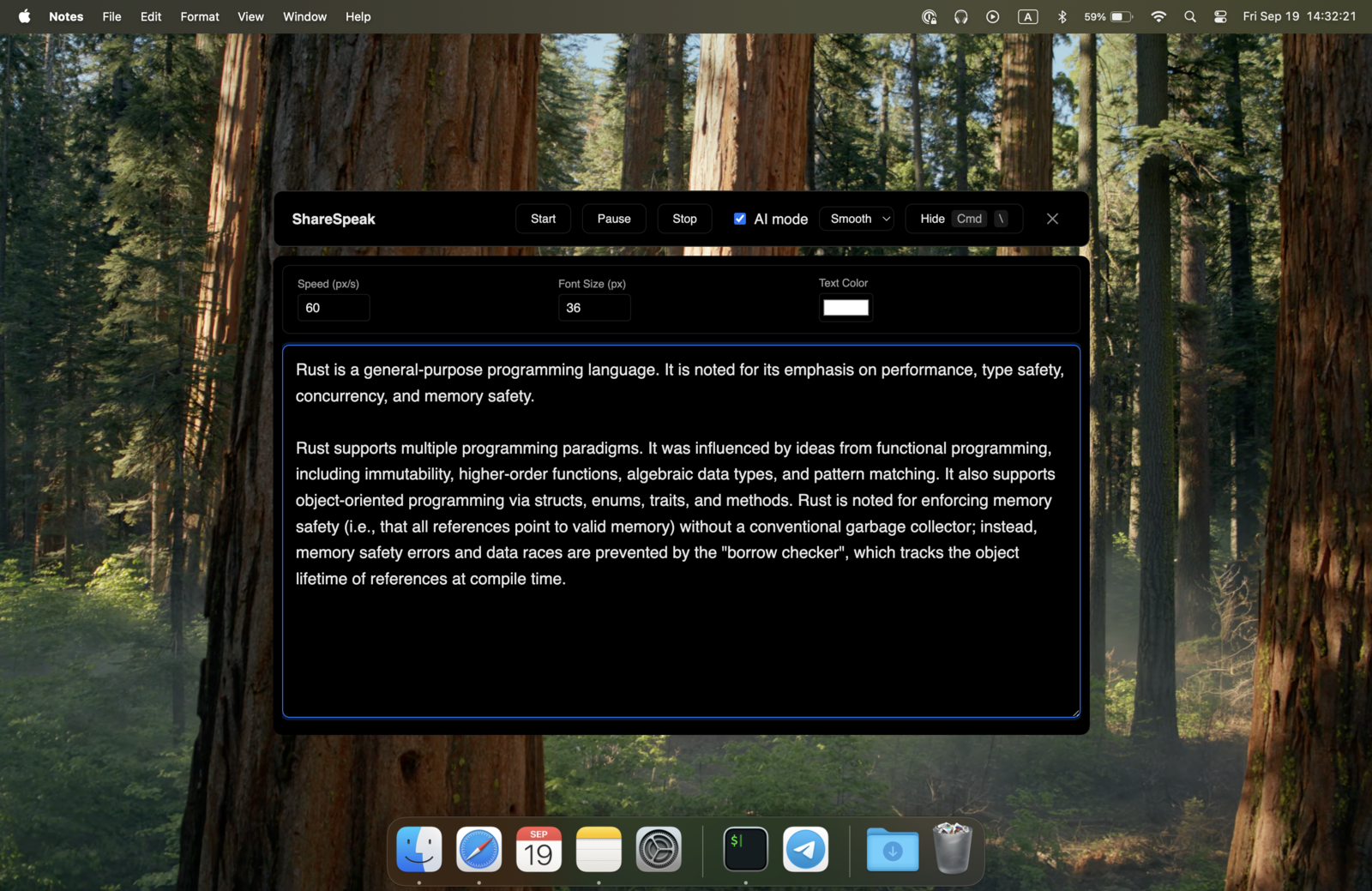
ShareSpeak does one thing: dedicated AI teleprompter. That means:
- AI voice tracking — the script follows your speech, no fixed-speed scrolling
- OS-level invisibility — a genuinely invisible teleprompter that never appears in screen recordings from any tool (ScreenFlow, QuickTime, OBS, Loom, etc.)
- Script library — per-project, per-cohort, per-customer scripts ready to load
- Notch mode — MacBook notch integration for face-to-camera content
- Long-form support — 60-90 min courses recorded without script fatigue
Native macOS, Apple Silicon — Same Tier as ScreenFlow on Mac
One thing ScreenFlow does well: native Mac performance. ShareSpeak matches it.
- Native macOS app — not Electron, not a port, not a browser wrapper. Built for Mac.
- Apple Silicon native — runs efficiently on M1, M2, M3, M4 — no Rosetta translation hit
- On-device speech recognition — uses Apple's neural engine. No cloud, no latency, no internet required
- MacBook notch integration — script sits in the notch area for natural camera eye contact
- Low CPU/memory footprint — runs alongside ScreenFlow or QuickTime without performance impact during long recordings
Mac creators who care about native performance don't have to compromise. Use ShareSpeak as you'd use any well-built Mac app.
Cross-Platform — Mac Now, Windows Later If You Switch
ScreenFlow is Mac-only by design. If you switch to Windows for a new job, change roles into a Windows-shop company, or join a team with mixed laptops — your $199 ScreenFlow license is dead. You're learning Camtasia or something else from scratch.
ShareSpeak runs on macOS and Windows. Same license follows you wherever your work goes. Your scripts, your library, your voice tracking — same app, both platforms. Moving to a PC? Our roundup ranks the best teleprompter software for Windows.
Pair With QuickTime, OBS, or Loom — All Free
If you bought ScreenFlow primarily for screen recording (most of its users), the irony is that macOS already includes a perfectly capable screen recorder: QuickTime. Free, native, sufficient for most tutorial creators. OBS adds professional features (multi-source compositing, streaming) for free.
ShareSpeak pairs with all of them:
- QuickTime (free Mac) + ShareSpeak = teleprompted Mac screencasts for $14.99
- OBS (free, all platforms) + ShareSpeak = professional streaming + teleprompter for $14.99
- Loom Free + ShareSpeak = async video with teleprompter for $14.99
- Screenium, Capto, Snagit — all work the same way; ShareSpeak invisible to any screen capture
Total cost for a polished Mac tutorial setup: $14.99. ScreenFlow's $199 was for the video editor — which you might not actually need.
When to Keep ScreenFlow (and Just Add ShareSpeak)
We won't pretend ShareSpeak replaces ScreenFlow for everyone. Keep ScreenFlow if:
- You use the full video editor — color correction, transitions, animations, advanced export presets
- You produce complex multi-track edits where Final Cut or Premiere feel like overkill
- You depend on ScreenFlow-specific features like cursor highlighting effects or callout templates
- Your workflow is built around ScreenFlow project files and your editor team uses them
For all of those: add ShareSpeak alongside ScreenFlow for $14.99. You'll get the teleprompter Telestream never built properly, without abandoning the editor you already paid for.
Built for the Mac Creators ScreenFlow Was Built For
Mac Course Creators
Recording courses for Thinkific, Teachable, Kajabi. Polished module delivery, fewer re-takes, faster course shipping.
Mac Tutorial YouTubers
Software walkthrough channels — Figma tutorials, Final Cut tips, Mac productivity content. Voice-tracked scripts mean polished delivery without rehearsal.
Mac Podcasters
Video podcasters on Mac using ScreenFlow for editing, ShareSpeak for live recording prep. Sponsor reads, interview prep, segment structure on screen.
SaaS Marketing Teams on Mac
Product launch videos, feature walkthroughs, demo content recorded in-house. Brand voice consistent, key messaging hit every time.
Mac-First Educators
ESL teachers, Italki tutors, bootcamp instructors recording on MacBooks. Lesson plans on screen, voice-paced delivery, consistent across cohorts.
The Honest Cost Math
Three real scenarios for Mac creators:
Scenario A: You bought ScreenFlow just for teleprompter
→ Switch entirely to ShareSpeak + QuickTime. Save $184.01 immediately, plus all future upgrade fees.
Scenario B: You use ScreenFlow's editor but want better teleprompter
→ Keep ScreenFlow, add ShareSpeak for $14.99. Best of both — full editor + voice-tracked AI prompter.
Scenario C: You're a new Mac creator deciding between tools
→ Try QuickTime (free) + ShareSpeak ($14.99). Total $14.99 for a working setup. Upgrade to ScreenFlow only if you hit a real editing limitation.
Compare to other Mac-focused options: Elgato Prompter at $299 hardware, Moody at $59, or Notchie for Mac. ShareSpeak hits the lowest price point with AI voice tracking and broadest platform support.
Native on Mac (Like ScreenFlow) — Plus Windows
ScreenFlow's biggest limitation is its Mac-only design. ShareSpeak runs native on macOS the same way — but also on Windows if your workflow ever needs it.
$14.99 once per user. One license covers both platforms forever.
Stop Paying for ScreenFlow Upgrades You Didn't Want
Download ShareSpeak. Pair with QuickTime (free) for a working Mac screencast setup at $14.99 total. Or keep ScreenFlow and add ShareSpeak for the AI teleprompter Telestream never built. Either way: one-time, lifetime, no upgrade pressure. Still weighing tools? Browse our full teleprompter alternatives hub.
Use code FIRST100 for 25% off — $11.24 instead of $14.99
Frequently Asked Questions
Is ShareSpeak a full ScreenFlow replacement?
No — and we won't pretend it is. ScreenFlow is a video editor with screen recording; ShareSpeak is a dedicated AI teleprompter. If you use ScreenFlow primarily for screen recording + teleprompter, pair ShareSpeak with free QuickTime (or OBS) for a complete $14.99 setup. If you use ScreenFlow's editing features heavily, keep it and add ShareSpeak for the teleprompter Telestream doesn't build properly.
Does ScreenFlow have a real teleprompter?
ScreenFlow includes a basic scrolling text overlay function that's been called a "teleprompter" in some versions. It's not a marketed feature on Telestream's pricing or feature pages — likely because it's a fixed-speed manual scroller without AI voice tracking, far below what dedicated teleprompter tools offer. If teleprompter is what you actually need, you're using ScreenFlow for the wrong reason.
What's the real cost of ScreenFlow over 5 years?
ScreenFlow is $199 to buy, then roughly $50–$60 per major version upgrade. Telestream ships major versions every 18-24 months. Over 5 years, expect $300–$320 per user just to stay current. ShareSpeak: $14.99 once, free upgrades forever. The 5-year delta per user is $290+.
Does ShareSpeak appear in ScreenFlow recordings?
No. ShareSpeak is invisible at the OS level — ScreenFlow's screen capture doesn't see it. Your ScreenFlow project files, editing timeline, and exported videos contain only what was actually captured. Same applies to all ScreenFlow recording modes.
Is ShareSpeak native macOS like ScreenFlow?
Yes. ShareSpeak is a native macOS app, not Electron, not a port. Apple Silicon optimized (M1/M2/M3/M4 native). Uses Apple's on-device speech recognition. Integrates with MacBook notch for face-to-camera content. Same performance tier as well-built Mac apps including ScreenFlow itself.
What screen recorder should I use with ShareSpeak instead of ScreenFlow?
Depends on need. QuickTime (free, native Mac) handles simple screencasts well. OBS (free, all platforms) adds multi-source compositing and streaming. Loom (free tier) handles async video sharing. iShowU and Capto are paid alternatives in the $30-50 range. For most Mac tutorial creators, QuickTime + ShareSpeak ($14.99 total) covers everything ScreenFlow was bought for.
Can I use ShareSpeak alongside ScreenFlow if I keep both?
Yes. They don't conflict. ShareSpeak runs as a separate app, invisible to ScreenFlow's screen capture. Record screens in ScreenFlow as you always have, with your voice-tracked script overlaid for you only. Edit afterwards in ScreenFlow normally. Two tools, $14.99 added cost, complete workflow.
Team licensing for course creators or sales teams?
Each person buys their own — $14.99 per user, one-time. For a 10-person Mac-based content team, $149.90 total forever. Compare to ScreenFlow at ~$199 × 10 + recurring upgrades = $2,000+ in year one alone. Most teams expense ShareSpeak as a one-time productivity tool and never think about it again.
The Dedicated Mac Teleprompter ScreenFlow Never Built
Voice-tracked AI. Apple Silicon native. Works with QuickTime, OBS, Loom, or ScreenFlow. $14.99 once, free upgrades forever.
Get ShareSpeak — $14.99