
Software vs Hardware Teleprompter: Cost and When to Use Each
A hardware teleprompter — a beam-splitter rig or the $299.99 Elgato Prompter — puts your script over the camera lens for near-perfect eye contact, but costs $50 to $300+, needs a camera, and lives on a desk. A software teleprompter puts the script on your own screen for $0–$14.99 and travels with your laptop. For screen recordings and video calls, software wins on cost and convenience; for studio reads into an external camera, hardware still wins on eye contact. Here's the honest breakdown. New to prompters? Start with what a teleprompter is and how it works.
Updated: October 2026 · Elgato Prompter price verified on elgato.com (July 2026)
New in ShareSpeak 0.4.2: you don’t have to pick a side. The app can now drive a glass rig: it mirrors the text, fills the rig’s monitor in full screen and still follows your voice, a clicker or a foot pedal. How to run a beam-splitter teleprompter from your computer.
Disclosure: ShareSpeak is our own software teleprompter, so we have a horse in this race. We've tried to keep the comparison fair — including an honest section on where hardware genuinely beats software. Every hardware price below is verified against the vendor's live page (July 2026).
The three ways to run a teleprompter
Beam-splitter rig
~$50–$300+ (rig only)A pane of glass at 45° over your camera lens reflects a script from a tablet or monitor below it, so you read while looking straight down the lens.
Where it shines: The best possible eye contact — you're literally reading through the lens.
The catch: You still supply the camera and the tablet/monitor; it's bulky, takes setup time, and lives on a tripod. Consumer kits start around $50; broadcast rigs run past $2,000.
Elgato Prompter
$299.99 (+ your camera)A small monitor that mounts on the front of your camera and shows your script over the lens via Elgato's free Camera Hub app.
Where it shines: Cleaner and sturdier than a DIY rig; good eye contact for an external-camera setup.
The catch: It's a $299.99 one-time buy and you still need a compatible camera, a mount, and desk space; it's tethered to a computer over USB-C. Verified on elgato.com, July 2026.
Software teleprompter
$0–$14.99 (app)An app shows your script on your own screen while you record or present — no rig, no glass, no camera mount.
Where it shines: Cheapest by far, nothing to carry, and it travels with your laptop. For webcam, screen-share and screencast work your eyes are already near the screen.
The catch: On an external-camera studio read, the script sits on a screen slightly off the lens rather than through it — a small eye-offset a beam-splitter avoids.
What each really costs
Hardware prices are for the prompter alone — a camera is extra, and most people already own one. Verified July 2026.
| Option | Cost | Notes |
|---|---|---|
| Beam-splitter rig + camera + tablet | ~$50–$300 rig, plus a camera you own | Studio-bound, setup each time |
| Elgato Prompter + camera | $299.99 + a compatible camera | Desk setup, USB-C to computer |
| Free teleprompter app | $0 | Basic; no voice-follow, visible on screen share |
| ShareSpeak (our app) | $14.99 once | Voice-following, invisible on screen share, Mac + Windows |
| Glass rig + ShareSpeak | ~$50–$300 rig + $14.99 once | Mirrored full-screen text on the rig's monitor; follows your voice, a clicker or a pedal |
When hardware genuinely wins
We make software, but hardware is the right call in real situations:
- External-camera studio shoots (DSLR / mirrorless) where you read long scripts straight down the lens — a beam-splitter gives eye contact a screen beside the lens can't fully match.
- Long-form to-camera reads — news-style segments, courses or ads shot on a real camera, where you're reading continuously for minutes at a time.
- Fixed studio setups where the rig lives on a stand and setup time doesn't matter.
If you shoot to an external camera and eye contact through the lens is the priority, a beam-splitter rig is worth the cost and the setup.
When software wins
- Screen recordings and screencasts — OBS, Loom, Camtasia, ScreenFlow — where you're already looking at your screen.
- Video calls and demos — Zoom, Google Meet, Microsoft Teams — where you present from a laptop.
- Talking-head video to a webcam, where your eyes are close to the screen anyway.
- Anyone mobile, on a budget, or who wants the script to follow their voice and stay invisible on a screen share.
For all of the above, ShareSpeak is a $14.99 one-time app that follows your voice, stays invisible when you share your screen, and runs on Mac and Windows — no rig, no camera mount. Own a glass rig as well? ShareSpeak can drive it too (below). If your hesitation was a specific product, see our Elgato Prompter alternative and Parrot Teleprompter alternative.
Run a Beam-Splitter Teleprompter From Your Mac or PC
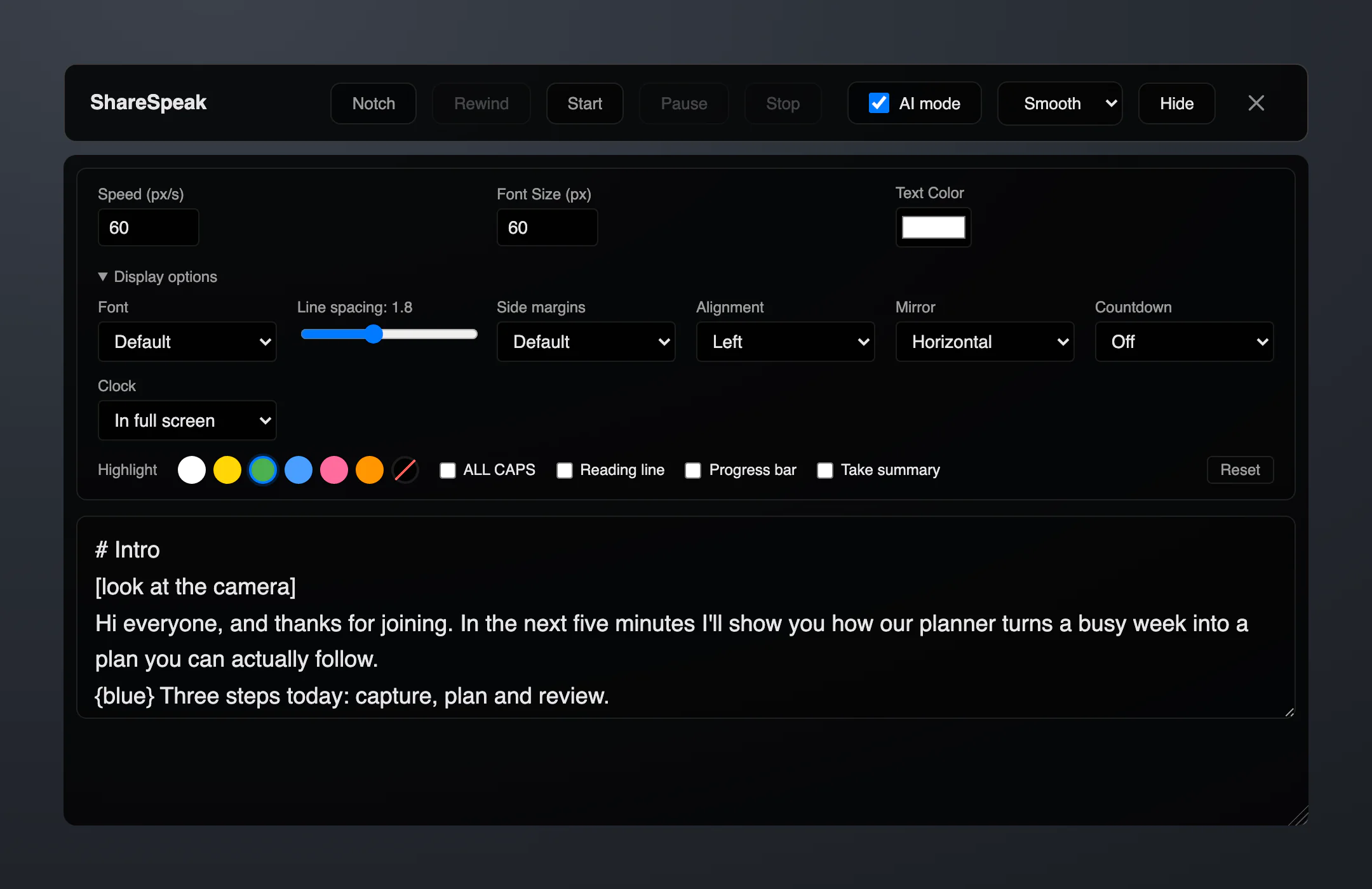
A glass rig only needs a screen under the glass showing mirrored text. From version 0.4.2, ShareSpeak can be that screen’s software, with the same voice-following it uses on your desktop. Connect the rig’s monitor to your Mac or Windows PC as a second display, then:
- Drag the ShareSpeak window onto the rig’s monitor, pick your script and press Play.
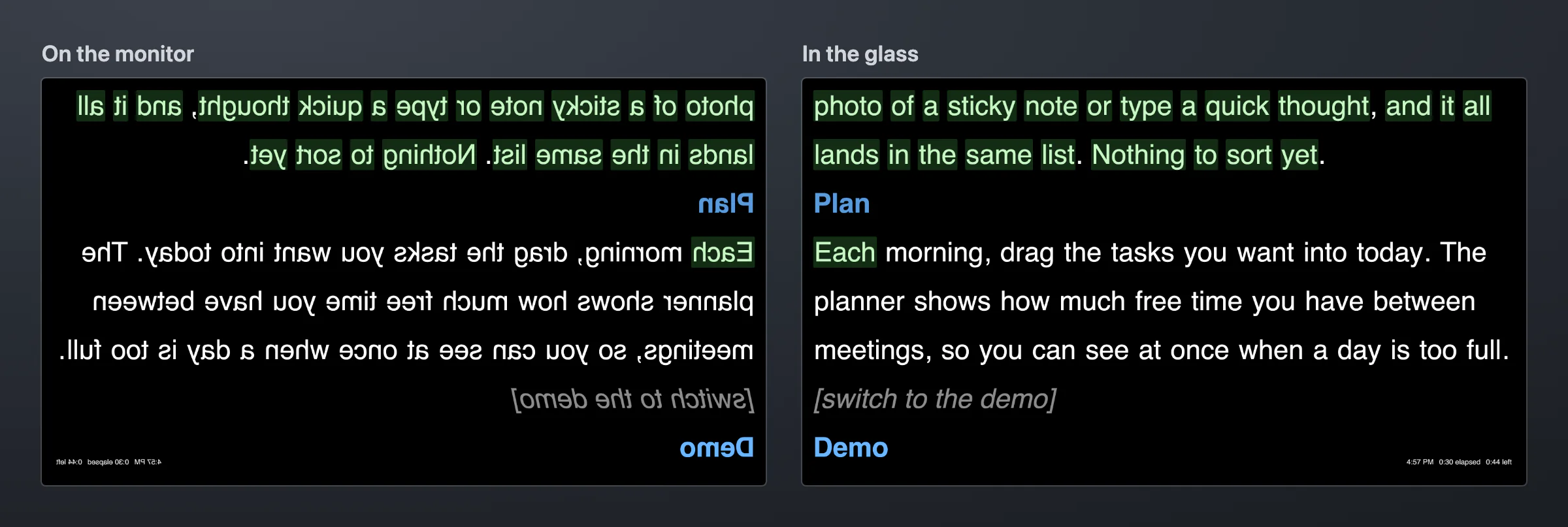
- Open Display options on the prompter screen and set Mirror: Horizontal suits most rigs; Vertical and Both are for monitors mounted the other way round. Only the text flips, so the controls stay readable.
- Press Start, then the full-screen button in the prompter’s top-right corner (or Ctrl+Cmd+F on a Mac, F11 on Windows, after a click on the prompter). The text fills that monitor on black, without the window’s header. Esc brings the window back at its old size.
- Read. In Apple Speech, Local or Gemini mode the text follows your voice; in Classic it scrolls at your speed, and Shift+Up / Shift+Down change it by 5 px/s. In full screen a small clock shows the time, the time since Start and the time left, in the corner the glass shows bottom-right.
Own an Elgato Prompter? Switch it to Display Mode in Camera Hub so it works as a second monitor, then follow the same steps; look through the glass before you set Mirror, and leave it off if the text already reads the right way round.
Nothing needs hiding on a rig: if the text doesn’t show on a monitor connected through AirPlay, Sidecar or a DisplayLink adapter, switch Customize → Stealth Profile to Visible (it takes a restart).
Clicker or Foot Pedal Control
Presentation clickers and USB foot pedals act as a keyboard, so ShareSpeak 0.4.2 can take their keys. Turn them on in Customize → Clicker / Pedal (off by default):
- Next (Page Down, → or ↓) and Previous (Page Up, ← or ↑): in the voice modes the reading position moves 5 words; in Classic and Manual the prompter scrolls a third of its height.
- Play / Pause: B, the period key or F5, the keys many clickers send for “blank screen” and “start slideshow”.
- A pedal or button that sends another key: click Add key next to the action and press it.
The keys work while the ShareSpeak window is focused (after using another app, click the prompter once) and do nothing in the notch overlay. No clicker? In the voice modes Cmd+Shift+Down / Up (Ctrl+Shift on Windows) move the reading position 5 words, as they do in the notch, and Cmd+= / Cmd+- (Ctrl on Windows) change the text size mid-take.
Where it stops: the prompter shows on one monitor at a time, with no separate operator screen, no multi-display sync and no phone remote. For a studio where an operator drives several screens, an app built for that is the better fit: see our Power Prompter comparison or the EasyPrompter alternative.
Skip the rig for screen work
If you record or present from a computer, a $14.99 app does the job of a $300 rig — voice-following, invisible on screen share, on Mac and Windows.
Frequently Asked Questions
Software or hardware teleprompter — which is better?
Neither is better across the board; they suit different shoots. Hardware (a beam-splitter rig or the Elgato Prompter) wins when you read long scripts straight into an external camera and want perfect eye contact through the lens. Software wins for screen recordings, video calls, and talking-head webcam video — it's far cheaper, needs no rig, travels with your laptop, and can follow your voice. Most people recording on a computer are better served by software; studio shooters on a real camera often want hardware.
How much does a hardware teleprompter cost?
Consumer beam-splitter rigs start around $50 and run to roughly $300, with broadcast rigs going past $2,000 — and you still supply your own camera and a tablet or monitor to display the script. The Elgato Prompter is $299.99 (verified on elgato.com, July 2026) and also requires a compatible camera and a mount. A software teleprompter, by comparison, is $0 to about $14.99.
Does the Elgato Prompter need a camera?
Yes. The Elgato Prompter is a monitor that mounts on the front of your camera — it doesn't record anything itself. You supply a compatible camera (DSLR, mirrorless, or a webcam), a mount or stand, and desk space, and it connects to your Mac or Windows computer over USB-C. That's the difference from a software teleprompter, which just uses the screen you already have.
Can a teleprompter app give the same eye contact as a beam-splitter?
Honestly, not quite for an external-camera studio read — a beam-splitter puts the script directly over the lens, while an app puts it on a screen slightly to the side. But for webcam and laptop recording, your eyes are already at the screen, so the offset is small; positioning the script near the top of the screen (or in the MacBook notch) keeps you looking close to the camera. If you want both, put the app's screen under the glass: ShareSpeak 0.4.2 mirrors its text for a rig.
Can I use a teleprompter app with a beam-splitter rig?
Yes, if the app can mirror its text. Connect the rig's monitor to your computer as a second display, move the app onto it and flip the text. ShareSpeak 0.4.2 does this with Mirror (horizontal, vertical or both) in its Display options and a full screen without the window's header on the monitor its window is on, and the text still follows your voice. Our free online teleprompter mirrors too, at a fixed speed.
Can I control a teleprompter app with a foot pedal or clicker?
With ShareSpeak 0.4.2, yes: turn on Customize → Clicker / Pedal. Next and Previous (Page Down, Page Up and the arrow keys by default) move the reading position 5 words, or scroll a third of the prompter in Classic and Manual mode; B, the period key or F5 start and pause. A pedal that sends another key can be learned with Add key. The keys work while the ShareSpeak window is focused.
Is a teleprompter app enough for professional video?
For screencasts, online courses, video calls, sales demos, and talking-head video shot on a webcam, yes — a good app is all most creators need, and it's invisible on a screen share. For studio productions shot on an external camera with long continuous reads, a beam-splitter rig still has the eye-contact edge. Many people own both: an app for everyday screen work, a rig for the occasional studio shoot.