
Teleprompter for Online Teachers — Polished Lessons Every Cohort, Even at 4pm on a Friday
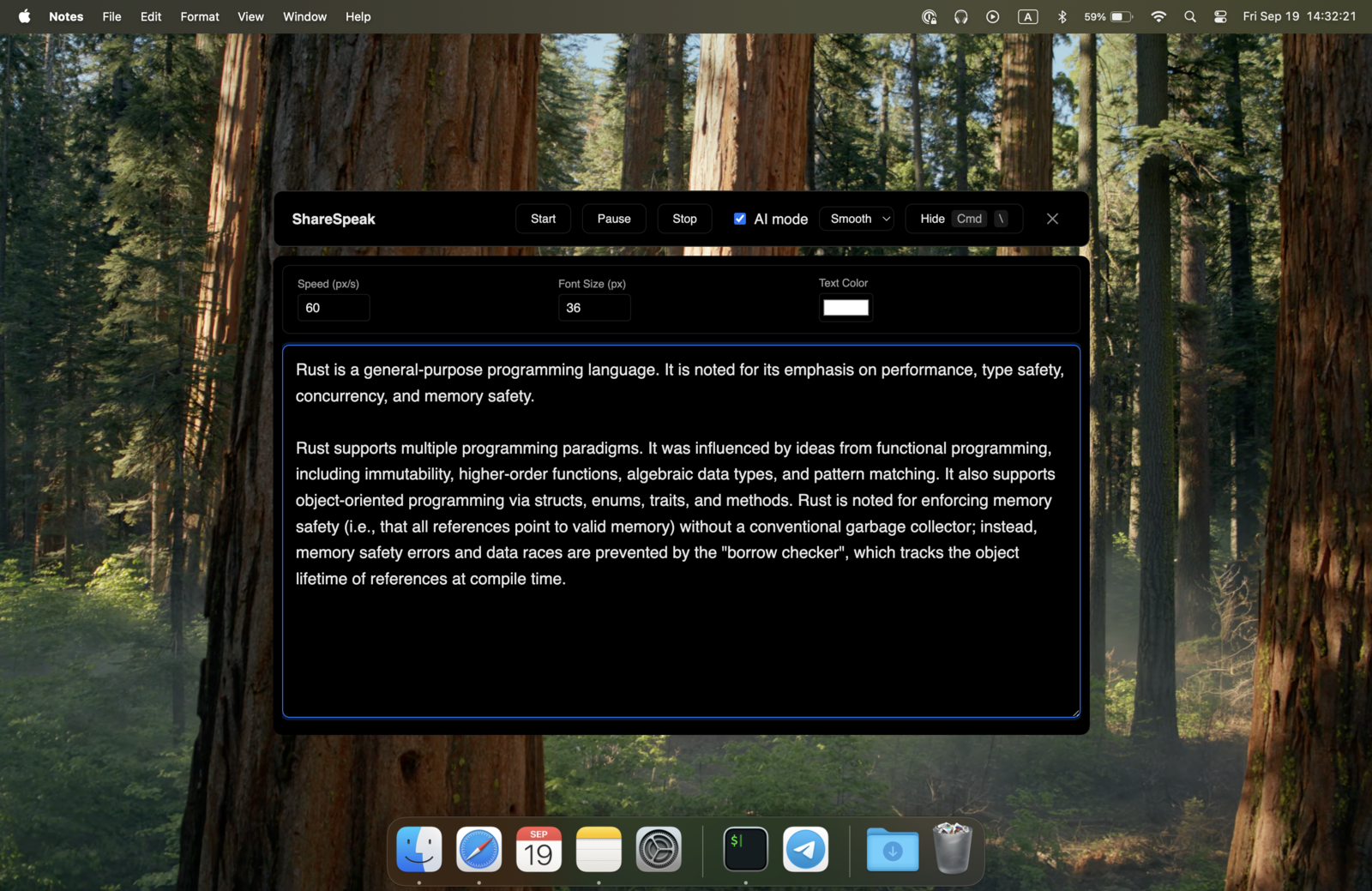
You teach the same lesson five times this semester. By delivery three, you forget which cohort heard which example. By delivery five, you're skipping a learning objective without noticing. ShareSpeak puts your lesson plan, key concepts, and Q&A library on screen — invisible to students, voice-tracked to your natural pace. Same quality every cohort, even on the fifth class of the day. $14.99 once.
The Online Teaching Reality Nobody Talks About
You're not bad at teaching. You're tired. You taught the same intro module 47 times this year. The first 20 deliveries were polished — every learning objective covered, every analogy delivered with energy. By delivery 30, you're on autopilot. By delivery 47, you've started skipping concepts you don't realize you skipped, and your post-class survey scores are slowly drifting down.
The cope without ShareSpeak:
- Printed lesson plan — paper on your desk, eyes constantly down, students see a teacher reading from notes.
- Lesson plan in a second tab — you alt-tab away to check, the screen share breaks, students get confused.
- Sticky notes on the monitor — works for 5 bullet points, falls apart for a 60-minute lesson.
- Memorize everything — the original plan, but the human brain doesn't keep 47 deliveries of the same script crisp.
- Wing it — what most experienced teachers actually do. Result: inconsistent coverage, slow drift in student outcomes, eventual burnout.
ShareSpeak fixes this. Your full lesson plan — learning objectives, key concepts in order, anticipated student questions, recurring transitions — sits on top of your slides or whiteboard, invisible to students. Cohort 47 gets the same polish as cohort 1.
Built for the Realities of Teaching Online at Scale
Invisible Live and in Recordings — Across Every Teaching Platform
Whatever your school or platform uses, ShareSpeak is invisible to it. Zoom for live classes. Google Meet for office hours. Microsoft Teams for K-12 districts. Loom or Vimeo for async lesson recording. Course platform recording (Thinkific, Teachable, Kajabi, Podia, Mighty Networks). LMS recording (Canvas, Moodle, Blackboard). Same OS-level invisibility on every single one.
Live or recorded, the student sees a confident lesson — never the prompter behind it. Recordings stored on your platform never contain your lesson plan overlay.
AI Voice Tracking — Survives 90-Minute Lessons and Off-Topic Q&A
Online lessons aren't lectures from a script. Students raise hands, chat-bomb questions, ask for an example you didn't plan on, request a re-explanation of slide 14. You're not pressing scroll buttons between thoughts — your hands are on the keyboard for code demos, on the whiteboard for math, on slides for transitions.
ShareSpeak follows your voice. The lesson plan moves at your pace, no input needed:
- Student asks a clarification mid-concept? Pause to answer — the plan waits.
- Detour to a deeper example a student requested? Improvise — pick up your next concept when you're back.
- Running short on time? Speed through the remaining objectives — text keeps up.
- Recording a 60-minute async lesson? Voice tracking works the whole way through, no fatigue.
Per-Lesson Scripts — Different Classes, Different Cohorts, Different Levels
A real teaching week: Monday morning Algebra II for high schoolers, Tuesday evening SAT prep for a different cohort, Wednesday afternoon a custom corporate training, Thursday office hours, Friday recording a new module for your Thinkific course. Every class needs different prep.
ShareSpeak makes per-class prep usable in the moment:
- Different lesson plans per class — load before each session, no script confusion
- Cohort-specific notes — student names you want to call on, previous-class context, learning gaps you noticed
- Level-adjusted explanations — same topic explained differently for beginners vs advanced
- Recurring lesson reuse — paste the same script for cohort 8 that you used for cohort 7
- Curriculum revision notes — "this is the part where last cohort got confused — go slow here"
Most teachers already keep lesson plans in Notion, Google Docs, or curriculum docs. ShareSpeak just puts the right one on screen during the right class.
Coverage Guarantee — Never Skip a Learning Objective Again
Every certified curriculum has explicit learning objectives. Board-mandated standards. Course outcome statements. The list of things a student must walk away knowing for the lesson to "count." Long-form lessons make it easy to drift past one without noticing — until the assessment reveals the gap.
ShareSpeak holds your objectives on screen:
- Required vocabulary terms — the words students must encounter and define this lesson
- Key concepts in order — sequenced from foundational to advanced, no skipping forward
- Practice examples — the exact problems or scenarios that lock in understanding
- Misconception flags — the wrong-answer patterns to call out and correct
- Check-for-understanding cues — when to pause and ask the cohort the diagnostic question
Cohort 47 gets the same comprehensive coverage as cohort 1. The standards review passes. The end-of-unit scores stay solid.
Student Q&A Library — Best Answers Refined Across 47 Cohorts
After teaching a lesson five times, you've heard most of the questions. After fifty, you've heard them all — and you've refined your best answer to each. That accumulated wisdom usually lives in your head and disappears the year you change jobs.
ShareSpeak holds your refined answers ready:
- "Why does this matter?" — your best motivational answer, cued up
- "What if X is negative?" — the edge case you've explained 200 times, ready in one place
- "How is this different from Y?" — the comparison answer that finally clicked for cohort 23
- "When would I use this in real life?" — your best applied example, refined over years
- The question every cohort asks but you forget to anticipate — until they ask it again and you scramble
Even the new teacher on year one can deliver answers refined from a veteran's playbook — if you build the library together, ShareSpeak makes it usable.
Especially Valuable for ESL Teachers and Technical Subjects
Two segments where ShareSpeak goes from useful to essential:
Non-native English instructors: If English isn't your first language, teaching English (or any subject in English) carries an extra cognitive load — searching for the right word while explaining a concept. Your script supports your delivery without making you sound like you're reading. Italki, Preply, Cambly, Outschool, Lingoda teachers — this is exactly your tool.
Technical subjects: Math, code, physics, statistics. The precision required ("the slope is rise over run" — not "the slope is rise per run") demands script-level accuracy. ShareSpeak keeps your exact phrasing on screen so the right wording reaches every student.
For Every Online Teaching Role
K-12 Online Teachers
Remote and hybrid classroom teachers. Standard-aligned lesson plans, vocabulary lists, check-for-understanding cues. Consistent delivery across all sections.
University Professors & TAs
Online lectures, recorded courses, virtual office hours. 50-minute syllabus-driven sessions where every learning outcome must be hit.
Course Creators (Udemy, Thinkific, Teachable, Kajabi)
Recording polished course modules without 30 takes. Same script, professional delivery, fewer reshoots. Course launch faster.
Coding Bootcamp & Technical Instructors
Live coding sessions, technical lectures, code demos. Keep your exact terminology and step-by-step explanations on screen while your hands stay on the keyboard.
Language Teachers (ESL, Italki, Preply)
Lesson templates per student level. Vocabulary lists, grammar examples, conversation prompts. Especially valuable for non-native English instructors.
Tutors & Test Prep (SAT, GRE, MCAT)
One-on-one tutoring sessions with structured curricula. Standard problem types, common mistakes, refined explanations — all ready per session.
The Math of Teaching at Scale
Online teachers don't deliver one lesson and walk away. The math is volume:
Average online teacher class load: 4–8 hours of live instruction per day
Cohort-based courses: same lesson taught 5–30+ times per cohort cycle
Course creators: 30–80 modules recorded per course launch
One forgotten learning objective per lesson × 47 cohorts = decades of accumulated gaps in student knowledge
One re-take in course recording: 30 minutes of extra editing time
ShareSpeak: $14.99, one-time, forever
For a course creator recording 50 modules, ShareSpeak pays for itself if it saves one re-take per module.
Compare to alternatives teachers consider: hiring an instructional designer to script every lesson ($50–$200/hour), buying course-recording software bundles ($30–$80/month), or paying for VODIUM at $15/month. ShareSpeak is $14.99 once. The smallest line item on your edtech stack.
Works on Whatever Laptop You Teach From
Mac for K-12 districts, Windows for university IT. ShareSpeak runs natively on both. Teaching from a PC? See our pick for the best teleprompter for Windows 11.
$14.99 per teacher, one-time. For a school cohort of 10 instructors, that's $149.90 — forever. No per-student fees, no annual edu license, no purchase order needed.
Your Next Class — Polished, Comprehensive, Consistent
Download ShareSpeak before your next class or recording session. Paste your lesson plan, your Q&A library, your sequenced learning objectives. Teach with the prep of a veteran on cohort 1 and the energy of cohort 1 on cohort 47. $14.99 — cheaper than one edtech tool you don't actually use.
Use code FIRST100 for 25% off — $11.24 instead of $14.99
Frequently Asked Questions from Teachers
Will my students see the teleprompter on their end?
No. ShareSpeak is invisible at the OS level. Students see your camera, your slides, your screen share — they don't see your lesson plan overlay. Whether you're on Zoom, Google Meet, Teams, or recording in Loom, the student-facing video never contains the prompter.
Does it appear in lesson recordings for async students?
No. Recordings capture the same shared output students see — and ShareSpeak isn't in that output. Whether your LMS auto-records, you use Loom for async, or you save Zoom cloud recordings for absent students, the prompter is never in the file.
Can I use different scripts for different classes or cohorts?
Yes. Each lesson plan is just a text script you paste in before class. Most teachers already have lesson plans in Google Docs, Notion, or curriculum software — ShareSpeak just puts the right one on screen for the right class. Switch between scripts as fast as switching between Google Doc tabs.
I'm a non-native English instructor — does this help?
Yes — this is one of ShareSpeak's strongest use cases. Teaching in English carries an extra cognitive load when it's not your first language. Your script supports your delivery — vocabulary you want to use, exact grammar of complex explanations, transition phrases. Combined with voice tracking (no robotic read-along rhythm), you sound naturally fluent. Especially valuable for Italki, Preply, Cambly, Outschool, and Lingoda tutors.
Does it work for technical subjects (math, coding, physics)?
Yes — and especially well. Technical subjects demand precision: exact mathematical phrasing, correct variable names in code, the right unit-of-measure callout. ShareSpeak keeps your scripted explanations on screen while your hands stay on the keyboard for coding or the whiteboard for math. The terminology stays consistent across all your sections.
Does it conflict with auto-captioning or transcription tools?
No. Zoom's live captioning, Google Meet's captions, Otter.ai, and accessibility transcription tools all read your microphone audio. ShareSpeak's voice tracking also reads from your microphone, but neither system affects the other — both can run simultaneously. Your script text isn't picked up by captioning because you don't speak it aloud verbatim.
I'm a course creator. Will this reduce my re-recording time?
Yes. Course creators commonly do 5-20 takes per module to get a polished result. With ShareSpeak, the script is on screen the whole time — you hit the right phrasing on take 1 or take 2 instead of take 7. For a course with 50 modules at $30/module of editing time saved, that's $1,500 of editing cost reduced for $14.99 spent.
Can my whole school or training team use ShareSpeak?
Each teacher buys their own — $14.99 per person, one-time. For a school cohort of 10 teachers, $149.90 total — forever. For a bootcamp with 5 instructors, $74.95. No per-student fees, no annual education licensing, no purchase orders. Most schools expense it as a per-teacher one-time productivity tool.
Teach Like It's Cohort 1 — Every Single Cohort
Your lesson plan on screen. Your learning objectives sequenced. Your refined answers ready. Voice tracks your pace. Students see polished teaching, every time. $14.99. Forever.
Get ShareSpeak — $14.99