
By Vlad, who builds ShareSpeak · Updated October 25, 2026
Teleprompter for Laptop: Read Your Script Next to the Webcam
To use your laptop as a teleprompter, put the script just under the webcam so your eyes stay near the lens. There are three ways to do it: a free browser prompter, an overlay app that screen sharing can’t capture, or a clip-on glass rig. For video calls and screen recordings, the overlay is the easiest: ShareSpeak follows your voice on Mac and Windows laptops for $14.99 once. Disclosure: ShareSpeak is our app.
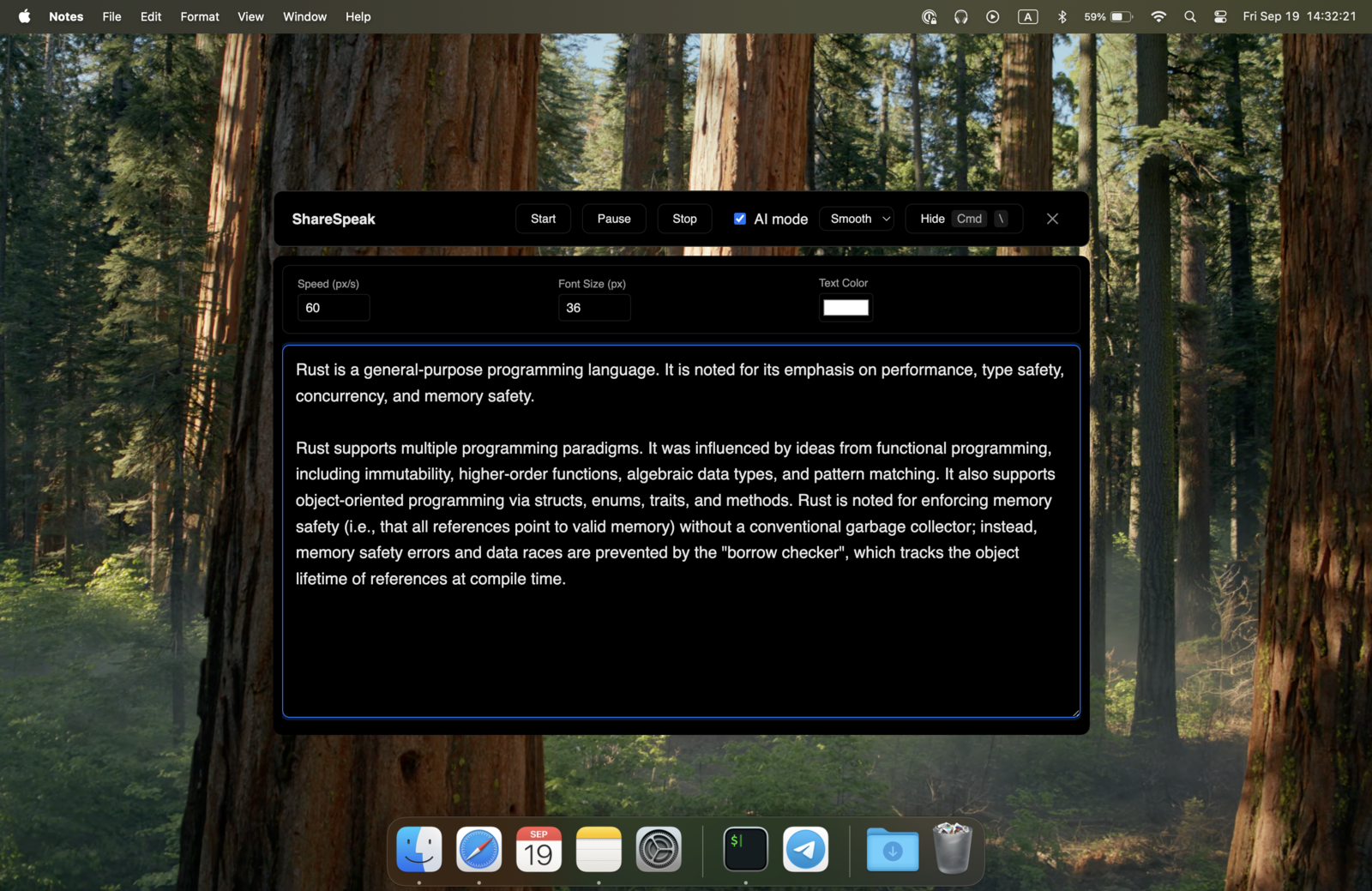
Where to Put the Script on a Laptop Screen
- Top center, right under the webcam. The closer the words are to the lens, the more your glance reads as eye contact.
- Narrow, not wide. A column of a few words per line keeps your eyes from sweeping left and right.
- Big enough to read at arm’s length. Laptop screens are small; bump the font size up rather than leaning in.
- On a notched MacBook, use the notch. On a MacBook with a notch (Apple Silicon, macOS 14 or later), ShareSpeak’s Notch Bar mode puts the script right next to the camera. On other MacBooks, drag the overlay to the top center, under the webcam.
3 Ways to Use a Teleprompter on a Laptop
| Way | Example | Price, Oct 2026 | How it scrolls | Seen in a screen share |
|---|---|---|---|---|
| Browser prompter | CuePrompter | Free | Speed you set | Yes, it's a normal browser window |
| Overlay app | ShareSpeak (more in our Mac and Windows lists) | $14.99 once | Follows your voice | No, excluded from screen capture |
| Clip-on glass rig | Glide Gear TMP 75 | $179 + a phone | A mirrored prompter app on your phone | No, the text is on your phone |
Sources, checked October 25, 2026: cueprompter.com, Glide Gear TMP 75. More apps in the best teleprompter for Mac and best teleprompter for Windows lists, and hardware in software vs hardware teleprompters.
A glass rig makes sense if you record to a separate camera and already use a phone prompter app; a free browser prompter is enough when nothing on your screen is shared. For calls and screen recordings from the laptop itself, an overlay keeps the script on your screen and out of the share.
Set Up ShareSpeak on a MacBook or Windows Laptop
On a MacBook
Buy a license, download ShareSpeak for Mac and paste your key. On Apple Silicon, Apple Speech follows your voice out of the box, and on a MacBook with a notch (macOS 14 or later), Notch Bar mode puts the script right next to the camera. More in the AI teleprompter for Mac guide.
On a Windows laptop
Buy a license, download ShareSpeak for Windows (x64 Windows 10 version 2004 or newer, or Windows 11) and paste your key. A local Whisper model follows your voice offline after a one-time model download. Drag the overlay to the top of the screen under the webcam and make it narrow.
Then: paste, place, talk
Paste your script into the Scripts Library (word count and speaking-time estimate included), start your call or recording, and talk. ShareSpeak stays out of the share, so you can keep it on the same screen you present from. Step-by-step for calls: teleprompter for Zoom; how the hiding works: invisible teleprompter for screen sharing.
Laptop Limits Worth Knowing
- Small screen. The prompter shares space with your slides or demo. A narrow column under the webcam takes the least room.
- External monitor. If you look at a second monitor but the camera is on the laptop, your eyes leave the lens. Keep the script on the screen with the camera you use; ShareSpeak’s window can be dragged to any display.
- Webcam position. If your webcam is off-center or below the screen, put the script as close to it as you can. (ShareSpeak’s Windows build is x64; there’s no ARM64 build yet.)
Turn your laptop into a teleprompter
Voice-following, under the webcam, hidden from screen share, on Mac and Windows laptops. $14.99 once, 2 devices per license, 21-day refund window (see our terms).
Use code FIRST100 for 25% off — $11.24 instead of $14.99
Laptop teleprompter FAQ
Can I use a teleprompter on my laptop?
Yes. A teleprompter app shows your script on the laptop screen; put it in a narrow column right under the webcam so your eyes stay near the lens. Browser prompters are free but show up if you share your screen; a desktop overlay like ShareSpeak ($14.99 once) follows your voice and stays out of Zoom, Teams and Meet screen shares.
How do I make my laptop a teleprompter?
Install a teleprompter app, paste your script, and drag the text window to the top of the screen under the webcam. Make it narrow (a few words per line) and large enough to read at arm's length. If the app follows your voice, you don't have to set a scroll speed; if not, rehearse once to pick one.
Is there a teleprompter app for laptop?
Yes, for both Mac and Windows laptops. Free browser options like CuePrompter work in any browser; desktop apps such as ShareSpeak ($14.99 once, Mac and Windows) sit on top of your other apps, follow your voice and hide from screen sharing. See our Mac and Windows lists for more.
How do I read a script while looking at the camera on a laptop?
Keep the text as close to the webcam as you can: at the top center of the screen, a few words wide. On a MacBook with a notch (Apple Silicon, macOS 14 or later), ShareSpeak's Notch Bar mode puts the script right next to the camera. Read in short glances and let a voice-following prompter keep your place, so you never hunt for the line.